10
RADIO
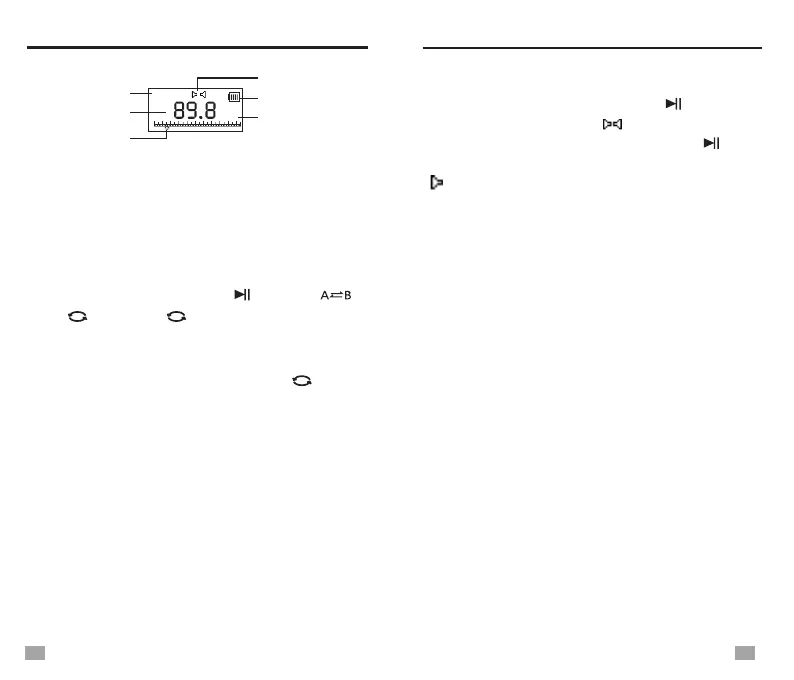
RADIO mode
Band symbol
Frequency point
MHz
FM
Battery symbol
Stereo symbol
Unit
NOTE:
Due to electrical interference, it is not recommended
that you use FM radio when the radio is connected
to an external adapter or a computer.
CHOOSEING BANDS
In Radio Mode, press <FM/ >, <MW/ >,
<SW/ > or to select your desired
band. The display will show the band symbol
that you are listening to.
When listening to WB, press < WB/ > to
WB ALERT MODE, display ALERT.
<WB/ >
SELECTING FM FREQUENCY RANGE
When listening to FM, press <MENU> to enter
the below sub-menu:
- Save: Store the station into memory manually
- Delete: Delete single memory
- Delete all: Delete all stored memories
- Auto Search: Auto tuning storage
- Ordinary band: 87-108MHz
- Campus radio: 64-108MHz
- Japanese FM: 76-90MHz
- ESC
When listening to FM, press < > to select
stereo/mono listening. If [ ] shows in the display,
stereo listening is selected, press < > again
to change to mono listening and the mono symbol
[ ] will show. You cannot listen in stereo when
the radio signal you are receiving is mono.
FM STEREO/MONO SELECTION
Suggestions:
1. Stereo listening is for strong signal broadcasts
and music programs.
2. For weak signal broadcasts or voice programs,
please choose mono. (Because stereo decoding
may be noisy.)
FM/
FM/
FM STEREO/MONO SELECTION
9k/10k A M TUNING STEPS
the below sub-menu:
- Save: Store the station into memory manually
- Delete: Delete single memory
- Delete all: Delete all stored memories
- Auto Search: Auto tuning storage
- Stepping switch: When “522” appears in the
display, it indicates 9k steps are selected; When it
shows “520”, it indicates 10k steps are selected.
Repeatedly pressing <MENU> to change
between 9k and 10k
- ESC
When listening to MW, press <MENU> to enter
9
Frequency d isplay


 To Next Page