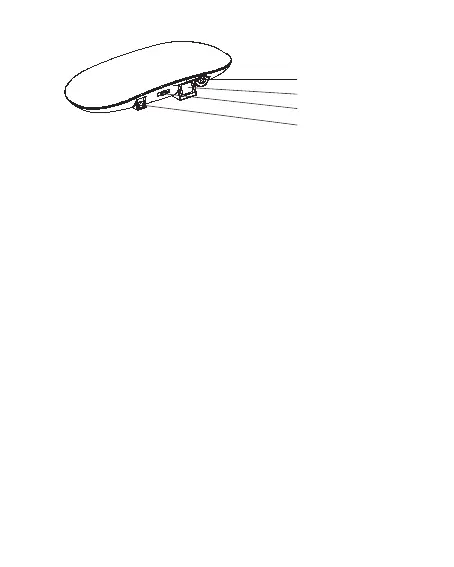
AUX 3.5MM
Optical Input
Off/A/B
DC 5V
Operating Instruction
Step 1:
Plug the included 5V AC/DC power supply into the DC jack at the rear
of the transmitter, then plug the other end of the power supply into a
wall outlet.
Step 2:
Turn on your audio source(e.g. TV set, HI-FI system, MP3 or iPod),
please set the television, audio amplifier or DVD/ CD player
headphone volume level at approximately half way (50%).
Step 3:
Connect the transmitter with TV/Phone/Computer through the Optical
Input or Aux Input by provided optical cable or 3.5mm audio/RCA
cables. Switch on the transmitter to channel A or B position, RED led
on. When audio device connected and there is with music, the
transmitter BLUE led on. If audio device was unconnected or without
music, 3-6 minutes later, the transmitter will auto turn off.
Like, you could connect the transmitter to a TV in three different
methods.
Method 1: for Connection Through TV Earphone Jack
The TV headphone jack corresponds to the 3.5mm IN socket on the
backside of the transmitter. Connect one end of the 1.5m audio cable
(3.5mm) to the transmitter socket and the other end to the headphone
jack on TV.
02


 To Next Page