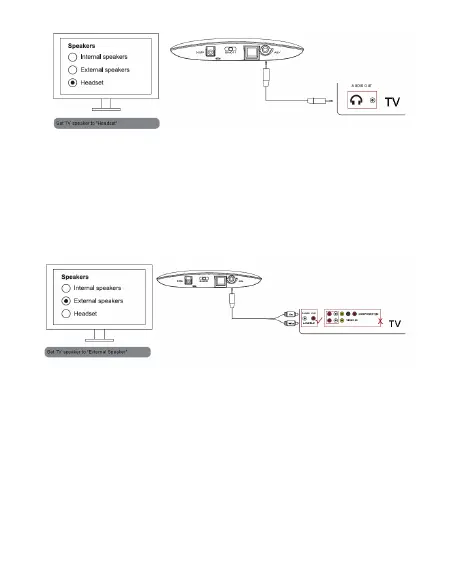
Now, you can hear sound through headphones, and if not, please
make sure to set your TV speaker to “Headset”.
Method 2: for Connection Through TV RCA sockets
Please connect the included RCA 3.5mm adapter cable to the RCA
Audio Out jack on TV. And connect the included 3.5mm cable to the
RCA adapter cable and the other end of the 3.5mm cable into the
Audio In jack on the backside of the transmitter.
Now, you can hear through headphones, and if not,
A.Make sure the connected sockets are the white/red sockets labeled
“AuDIo ouT”, and other white/red sockets are incorrect.
B.Make sure to set your TV speaker to “External Speaker”.
Methods 3: for Connection Through TV Optical Output
Please connect one end of the included optical digital cable to the
optical output socket on TV and the other end to the optical input
socket on the backside of the transmitter.
03


 To Next Page