TF card/USB flash drive play:
The speaker will automatically play the music file after insert TF card/USB flash drive. Support MP3 / WAV / WMA / FLAC / APE music
format.
Play/Pause: When play music, short press “ ” button to Play & Pause music.
Previous/Next: When play music, short press “ " / “ ”button to choose play previous song and next song.
REC Function:
1.Connected the wireless or wired microphone, then insert the storage (USB flash drive or TF card). Press “●” key and hold on to enter into
REC mode, the time display on LED screen will flash. Press “●” key again to stop recording, save the audio files and play the recordings.
2.In music mode, press “●" key to play back recordings with inserting storages (which have recordings). It will play the last recording by
default and press “ ”or “ ”to select the previous and next recordings.
Bluetooth Function:
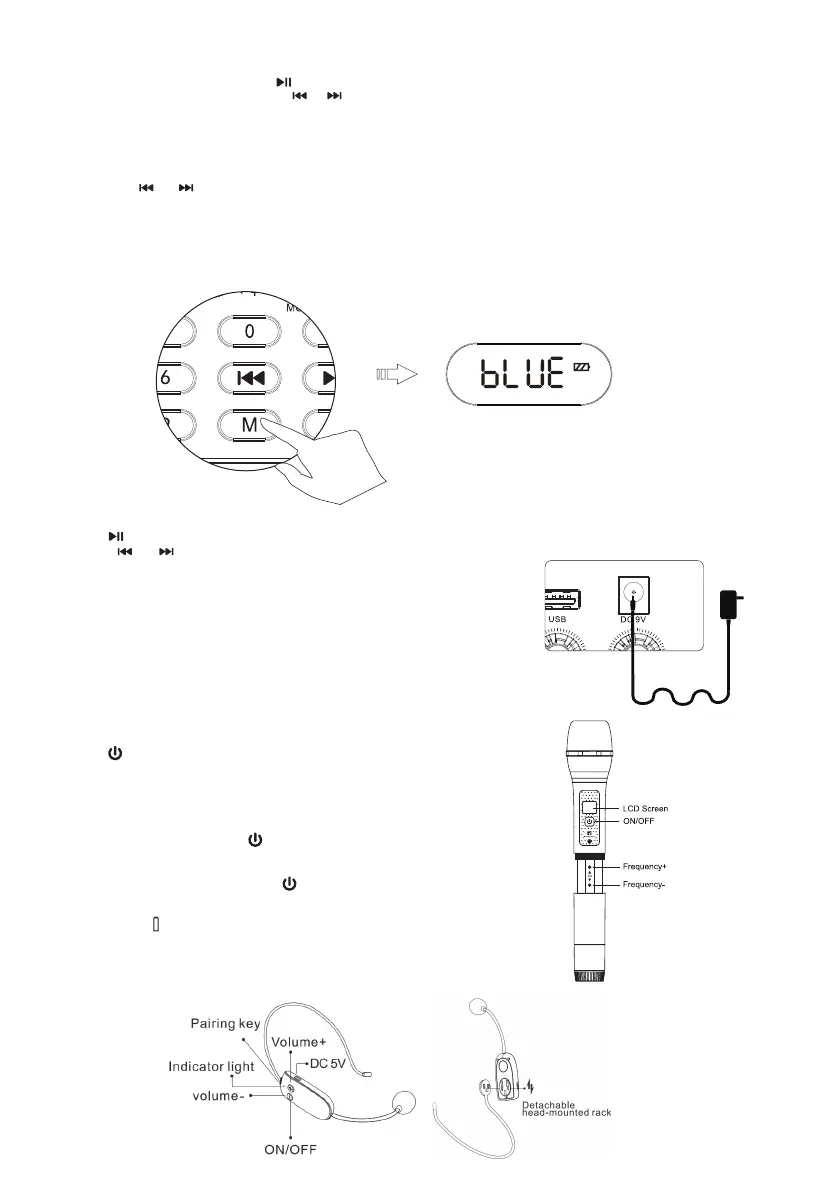
1.Turn on the speaker and press “M" to enter into Bluetooth mode with “bLUE” icon on the screen.
2.Turn on the Bluetooth function of your mobile phone, then search for “Retekess TC102" and connect, Bluetooth pairing is successfully
with a voice prompt “Bluetooth is connected".
3.When playing music, please keep the amplifier close to the Bluetooth-enable device to maintain a stable connection.
FM Function:
Switch on the speaker, short press “M" to choose the FM mode with the screen showing radio frequency;
Long press “ ”to enter into automatic channels searching, after searched successfully, the device will save the channel automatically.
Please press “ ” or “ ” to choose the saved channels.
About Charging:
Power off the speaker when charging. The indicator will light on when charging and will be
off after fully charged.
Remarks:
a.The battery indicator will blink when the battery is low. Please charge it timely.
(The charging time is normally 3~4 hours.)
b.We recommend that you fully charged the battery before first use.
Wireless Microphone Operation:
1.Switch ON I OFF:
Long press “ ” switch on/off the wireless microphone.
2.Pair the UHF Wireless MIC Manually (This pairing is used when the MIC is no sound)
Step1: Switch on the speaker, short press “M” key to choose UHF mode.
Step2: In UHF mode, long press “M” key three seconds to enter into UHF wireless pairing
status with voice prompt “UHF is waiting for connection".
Step3: Switch on the wireless MIC and twist-off the MIC; choose a frequency point by
Press “▲” or “▼”. Quickly short press “ ” 3 times until “MHZ" stop flashing. Paring is
successful with voice prompt "UHF is connected". Then it's possible to amplify voice with
wireless MIC.
Notes: Under the pairing status, short press “ ” 3 times on the hand-held microphone
to disconnect. Repeat Step1, step2 & step3 for pairing the UHF wireless MIC manually.
3.Battery Indication of UHF Wireless MIC:
It's low battery with “ ” indication showed on screen and please change the battery timely.
Note: Please twist off the battery cover properly and put the batteries. (Please mind the
positive & negative anode.)
Wireless Microphone Sketch:
02


 To Next Page
 Loading...