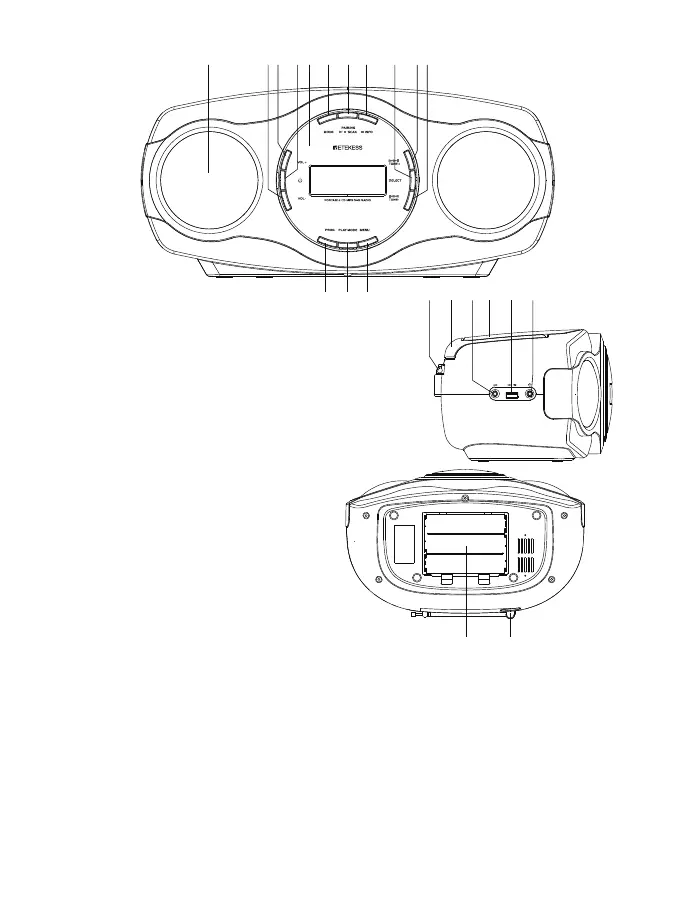
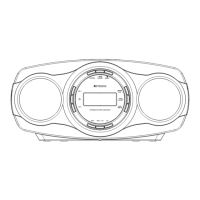
LOCATION OF CONTROLS
1.Speaker
2.Volume - Control Button
3.Volume + Control Button
4.Power Button
5.LCD Display
6.Source Button/switch FM CD player USB AUX BT function
7.Play/Pause/AUTO-M Button
8.Stop/mono stereo Button
9.Memory/clock set Button
10.Next Song Button
11.Previous Song Button
12.Repeat Button
13.Previous Song (+10) /Station Storage Button
14.EQ Button
15.FM Antenna
16.Carry Handle
17.Aux Socket
18.CD Door OPEN/CLOSE Area
19.USB Socket
20.Headphone Jack
21.Battery Compartment
22.AC~Socket
OPERATION
CD PLAYER OPERATION
1. In standby mode, press Power button to starting up.
2. Press the OPEN/CLOSE Area on the CD Door to open it then place a CD disc on the center spindle, with the
printed side face up
3. Close the CD door by pressing the OPEN/CLOSE area. Wait a few seconds; the number of the total tracks will
appear on the LCD Display
4. Press the Play/Pause Button to start playing the first track on the disc.
5. During playback:
● Turn the VOLUME Control button to adjust volume level as desire.
● Press the Play/Pause Button to pause; press it again to resume normal playback
● Press the Previous Song(+10) Buttons to skip the tracks.
● Press the Repeat Button once to single song repeat mode, “REPEAT 1” shows on display;
Press the Repeat Button twice to folder repeat mode, “REPEAT FOLDER” shows on display; Press the Repeat
Button three time to repeat all mode, “REPEAT ALL” shows on display; Press the Repeat Button four time to re-
peat rand mode, “RAND” shows on display, Press the Repeat Button five time to cancel the Repeat mode;
02
21 22
15 16 17 18 19 20
1 2 3 4 5 6 7 8 9 10
12 13 14
11


 To Next Page