At this time, rotate【 】to choose time zone in GTM:-12.0,-11.0,
-10.0,-9.0,-8.0,-7.0,-6.0,-5.0,-4.0,-3.0,-2.0,-1.0 ,+0,+1.0,+2.0,+3.0,+4.0,+5.0,+6.0,+7.0,+8.0,+9.0,+10.0,
+11.0,+12.0. after choosing time zone, slightly press【ENTER】to confirm.
※: The date displayed is automatically updated with the network connection.
4.1.2 Network Radio Reception
Choose the icon of “ ”, and slightly press【ENTER】to enter.
If the machine is not connected to the network, first prompt to connect to the network.
There is the following list, rotate the【 】button to select and press the [ENTER] key to confirm entry.
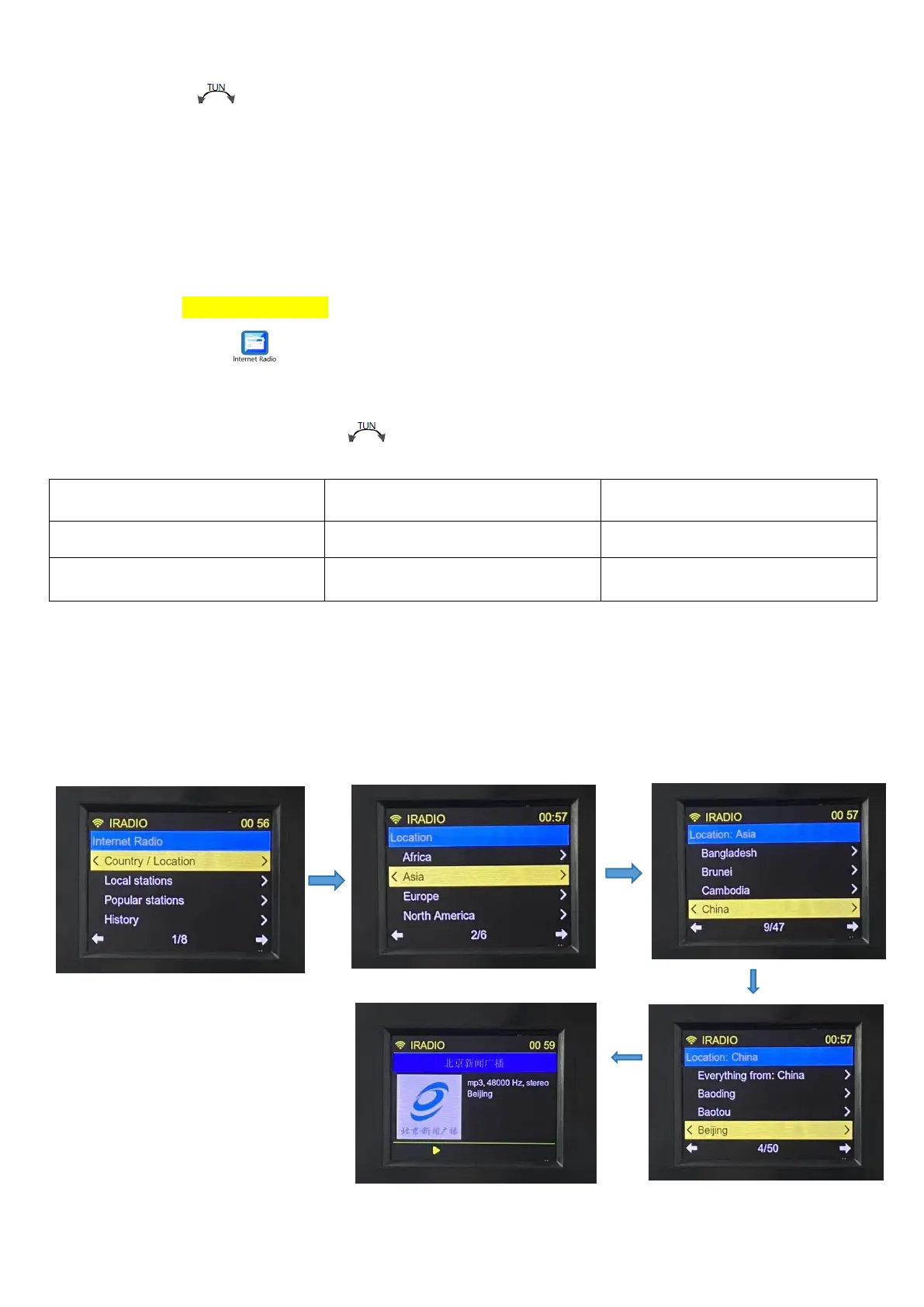
For example: to play the ‘Beijing News Broadcast’ radio station, the procedure is as follows:
Choose Country/Location, press【ENTER】to enter continent list,and find Asia, and then press【ENTER】to enter
country list,and find China to press【ENTER】to enter city list,find Beijing, and then press【ENTER】to enter station
list,and find ‘Beijing News Broadcast’ station, and press【ENTER】to play, specific operations are shown as follows:


 To Next Page