04
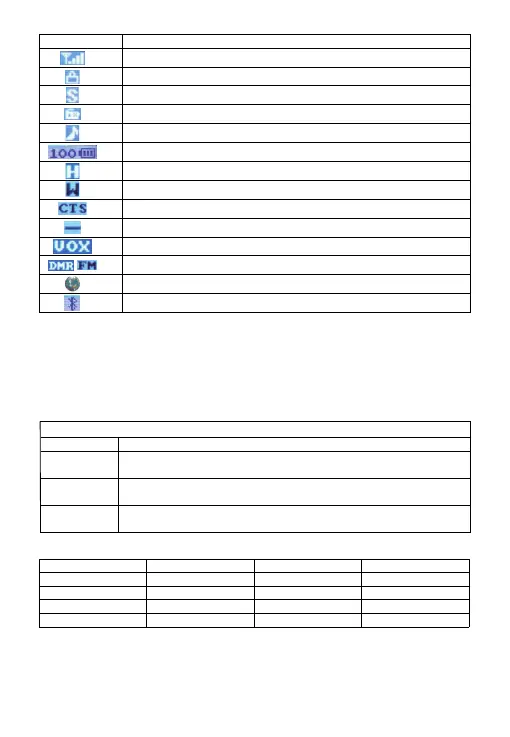
LCD Display Icon
LCD Display meaning
Indicates received signal strength;
Keyboard Lock.
Batte Save.
FM Radio is on.
Voice announcement and Key tone on.
Displays remaining batte percentage level
Display power level.
Means current channel is wide bandwidth.
Means current channel set with CTCSS tone.
Shift Up Plus or Minus.
VOX function is on.
FM means the channel is analog mode, DMR means the channel is DMR mode.
GPS function is on.
Bluetooth function is on.
Basic Operations
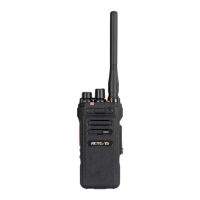
Turn the radio volume knob clockwise to turn on the HD2, there will be a "click" sound, a
message sound, and the screen will show up
welcome, while the LED indicator lights up.
Turn the volume knob clockwise to increase the volume or anticlockwise to lower.
Note: If the voice announcement and the key beep function are turned o, there is no sound
when power on the radio.
Number key quick function
KEYPAD FUNCTIONS
MENU
EXIT
*SCAN
#LOCK
Conrm button.
Sho press to switch VFO and channel mode.
Long press to switch analog and digital under VFO mode.
Sho press to switch Band A and Band B.
Long press to begin or stop the scan function.
Sho press to switch single band or dual band.
Long press to lock or unlock the keyboard.
MENU+1
MENU+3
MENU+5
MENU+7
MENU+9
Backlight
Step
Power
VOX
Roger beep
MENU+2
MENU+4
MENU+6
MENU+8
MENU+0
Save
W/N
Shift Up
Squelch
Key Beep



 To Next Page