5
Function Description
Menu Settings
You can enter "Menu Settings" through the menu key of the terminal to set some common functions. The specific
instructions and operation methods are as follows:
Side Key 2 The same side key SK1 has a short press and long press function to choose
V/M key Frequency mode or channel mode switching.
•Frequency mode: Manually enter the frequency.
Channel mode: Press [ ▲ / ▼ ]to select a channel.
A/B key A/B upper and lower frequency band switch selection.
Press the PTT button to transmit in the frequency band pointed to by the pointer.
Keyboard lock Manual lock: Long press # key to lock the intercom.
and unlock Automatic lock: After the automatic keyboard lock is turned on, when there is no operation
on the buttons and knobs,the automatic lock will be delayed for 10 seconds.
Unlock: Long press the # key to unlock the keyboard.
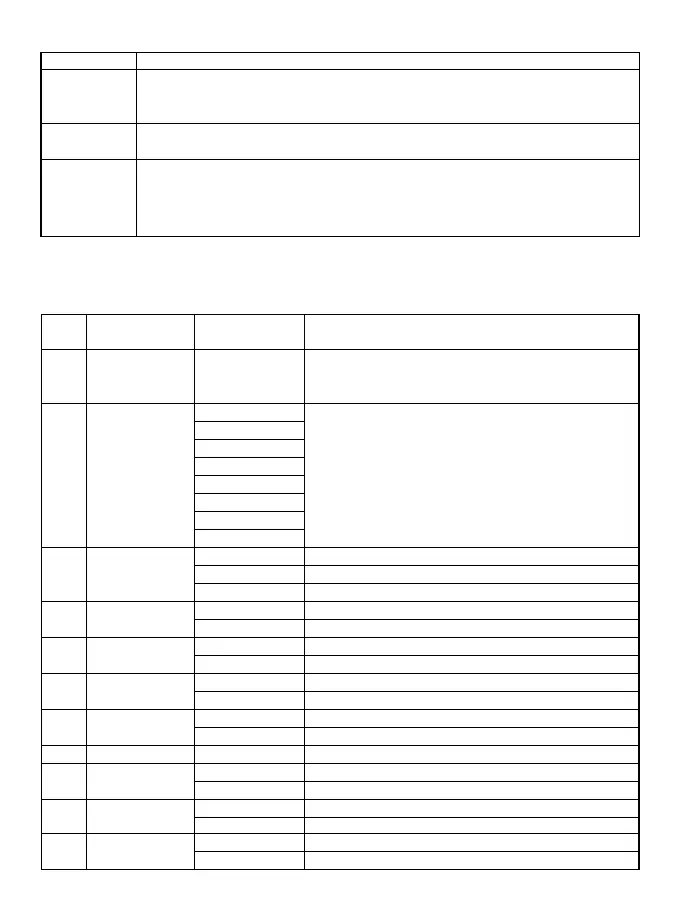
Menu First-level menu Secondary menu Description of secondary menu setting
number display characters display characters
0 Squelch 0,…,9 Squelch level, the lower the level, the easier it is to interfere,
the higher the level the worse the sensitivity, the default value
is 3.
1 Step 2.5KHz In frequency mode, press ▲ / ▼ key to change the step value
5.0KHz of frequency, the value range is 2.5~50KHz
6.25KHz
10.00KHz
12.50KHz
20.0KHz
25.0KHz
50.0KHz
2 Tx Power High High power
Middle Middle Power
Low Low Power
3 Power save OFF Turn off power saving mode
ON Turn on power saving mode
4 Vox Level OFF Turn off voice control
1,2,… 10 Start the sound control level intensity, value range
5 Bandwidth Wide Wide band working
Narrow Narrow band working
6 Backlight Bright Backlight is always on
5Sec,10Sec,… 60Sec Automatic backlight delay time, the value range is 5~60 seconds
7 Menu Exit Time 5Sec,10Sec,… 60Sec Menu exit time, the value range is 5~60 seconds
8 Dual Standby OFF OFF
ON ON
9 Beep Prompt OFF OFF
ON ON
10 VOICE OFF OFF
ON ON


 To Next Page
 Loading...











