EasyManua.ls Logo

Retevis RB29 - User Manual

Retevis RB29
9 pages
Print Icon
To Next Page IconTo Next Page
Loading...
RB29
5RRP)&=KRQJKDL[LQ6FLHQFH7HFKQRORJ\3DUN
1R*DQOLWK5RDG-LKXD6WUHHW/RQJJDQJ'LVWULFW
6KHQ]KHQ&KLQD

Questions and Answers

  • C
    chrishornJul 29, 2025
    Why is there always noise heard on my Retevis RB29?
    • A
      Alexandra GomezJul 29, 2025
      If you're experiencing constant noise with your Retevis Two-Way Radio, it could be due to being out of range. Try moving closer to the other radio. Alternatively, switch on the radio in a nearer range and try again.
  • T
    Tony RhodesAug 4, 2025
    How to fix communication issues with the same group on Retevis RB29 Two-Way Radio?
    • J
      Jaime AlexanderAug 4, 2025
      If your Retevis Two-Way Radio isn't communicating with transceivers in the same group, ensure that the QT/DQT settings are identical across all devices. Also, confirm that the distance between the radios is within the operational range.
  • K
    kathryn69Aug 9, 2025
    What to do if I hear another group's voice on my Retevis RB29 Two-Way Radio?
    • J
      Jacob ButlerAug 9, 2025
      If you are hearing voices from another group on your Retevis Two-Way Radio, the solution is to change the QT/DQT settings for all radios within your group.
  • D
    daniel24Aug 16, 2025
    Why Retevis RB29 has no electrical source?
    • M
      manningericaAug 16, 2025
      If your Retevis Two-Way Radio has no electrical source, it may be due to an exhausted battery. Try replacing or recharging the battery. Another possible cause is incorrect battery installation. Remove the battery and reinstall it.
  • A
    Arthur MonroeAug 21, 2025
    Why does my Retevis Two-Way Radio's operating time become short quickly?
    • M
      Maria WilliamsAug 21, 2025
      If the operating time of your Retevis Two-Way Radio becomes short even after a full charge, the battery likely needs replacement.

Summary

Warning

Using tips

Unpacking and Checking the Equipment

Carefully unpack the radio and confirm items before discarding packing material. Contact seller if missing or damaged.

Installing; Removing the Battery

To install, align with the hole and press. To remove, turn off the radio and push the button.

Installing the belt clip

Attach the belt clip to the back of the battery with screws for convenient carrying.

Getting Acquainted

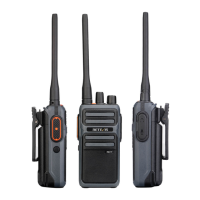
Familiarize yourself with the radio's components and their functions for proper operation.

Basic Operations

LED Indicator

Indicates status: red for transmitting, green for receiving.

Channel-selecting Knob

Rotate to select channels 1-16. Clockwise increases, counter-clockwise decreases.

Power;Volume Knob

Rotate clockwise to power on, counter-clockwise to power off. Rotate for volume control.

PTT Switch

Press to transmit, release to receive. Indicator light turns red when transmitting.

Troubleshooting Guide

Specifications

Channel and Frequencies

RF Energy Exposure and Product Safety Guide

Local Government Regulations

Users must be aware of and control exposure to meet occupational requirements.

Radio License

Business radios operate on regulated frequencies requiring a license from local authorities.

FCC Requirements

CE Requirements

Restriction Information

Lists EU countries where the product can be used, including any applicable restrictions.

Disposal

Dispose of electrical/electronic products, batteries according to local laws.

IC Requirements

RF Exposure Information

Portable Device

Limits exposure for body-worn configurations, maintaining a 2.5 cm separation distance.

Occupational;Controlled Radio

Designed for use by trained individuals aware of hazards and minimization techniques.

RF Exposure Compliance and Control Guidelines

Guidelines

User awareness instructions should accompany the device when transferred to other users.

Operating Instructions

Transmit no more than 50% duty factor. Keep antenna away from face and eyes.

Hand-held Mode

Hold radio vertically, keeping microphone and antenna at least 2.5 cm from face.

Phone Mode

Hold radio like a wireless telephone and speak directly into the microphone.

Safety Operation

Forbid

Do not use charger outdoors, disassemble it, or operate if broken. Keep radio away from airbags.

To reduce risk

Pull by plug, not cord. Unplug before maintenance. Install adapter near equipment.

Approved Accessories

Use only Retevis approved accessories for RF exposure compliance and regulations.

Guarantee

Retevis RB29 Specifications

General IconGeneral
Battery Capacity1500mAh
Waterproof RatingIP54
Antenna Impedance50Ω
Modulation ModeFM
Maximum Deviation≤5kHz
Current≤1.5A
SquelchCTCSS/DCS
Frequency Range400-470MHz
Battery TypeLi-ion battery
Operating Voltage3.7V
Channel Capacity16 channels

Related product manuals