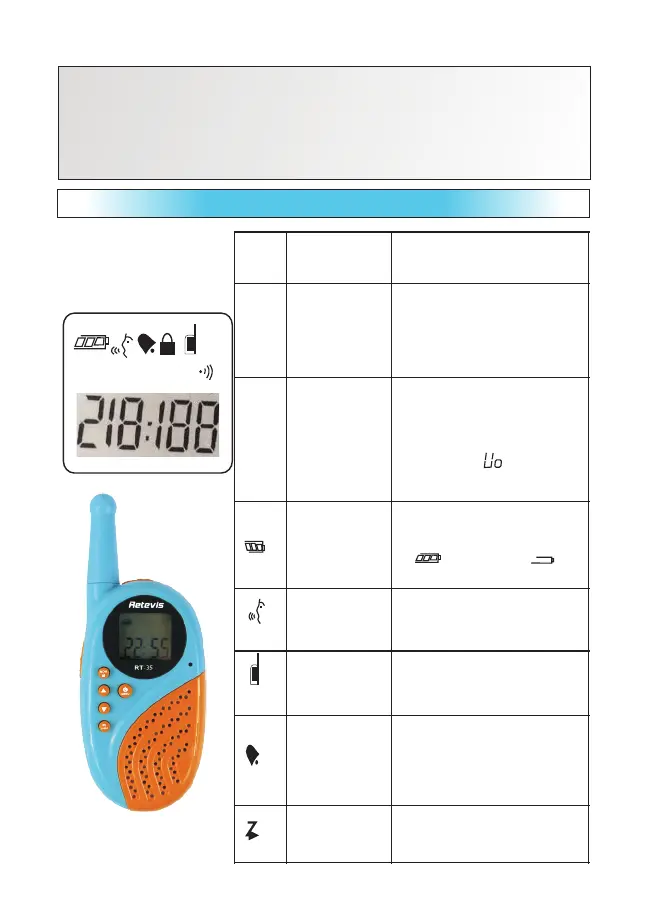
Men u mod e LCD inst ruct ions
Channel
programming
c l o c k /
volume
level
Channel programming / clock /
volume level. When the volume
level is displayed in the number
of standby Press up or down key
CTCSS / DCS
pro g ram m ing
/ M i n u t e / v o l u
m e U O
instructions
When the minutes standby, press
PPT key to display after the
current CTCSS / DCS
programming number.
Sta n dby displ a y t he volume
indication“ ” press up
key or down key.
Show the number of cells, the
more power the more foot: High
power,
“ " low battery“ ”
Display when the unit is in the
alarm mode of operation.
Display when the unit is in the
alarm mode of operation.
O p e n t h e
i n t e r c o m
f u n c t i o n
indication
Display when the unit is in the
open mode. When close will
not show this icon.
S c a n n i n g
instructions
Di s pl ay w he n th e w al kie -
talkie under scan function…
Radio Unit Two
Headset Two
Switching power supply double One
Strap Two
User's Manual : One
z


 To Next Page