Step
1
2
P
.save
3
VOX
4
TXP
5
SQL
6
RPT
7
N/W
MEN
U
Lock
MENU
Lock
MEN
U
Lock
M
E
N
U
Lock
M
E
N
U
Lock
M
E
N
U
Lock
M
E
N
U
Lock
STEP
5.00K
DS
01
RX.SAV
ON
DS
02
VOX
OFF
DS
03
POWER
HIGH
DS
04
SQL
4
DS
05
RELAY
OFF
DS
06
N/W
WIDE
DS
07
MEN
U
Lock
MENU
Lock
MEN
U
Lock
M
E
N
U
Lock
M
E
N
U
Lock
M
E
N
U
Lock
M
E
N
U
Lock
MEN
U
Lock
MENU
Lock
MEN
U
Lock
M
E
N
U
Lock
M
E
N
U
Lock
M
E
N
U
Lock
M
E
N
U
Lock
V
FO
C
a
l
l
M
R
V
FO
C
a
ll
M R
VFO
Ca
l
l
M
R
VF
O
Cal
l
M R
VF
O
Cal
l
M
R
VFO
Cal
l
M
R
VF
O
Call
M R
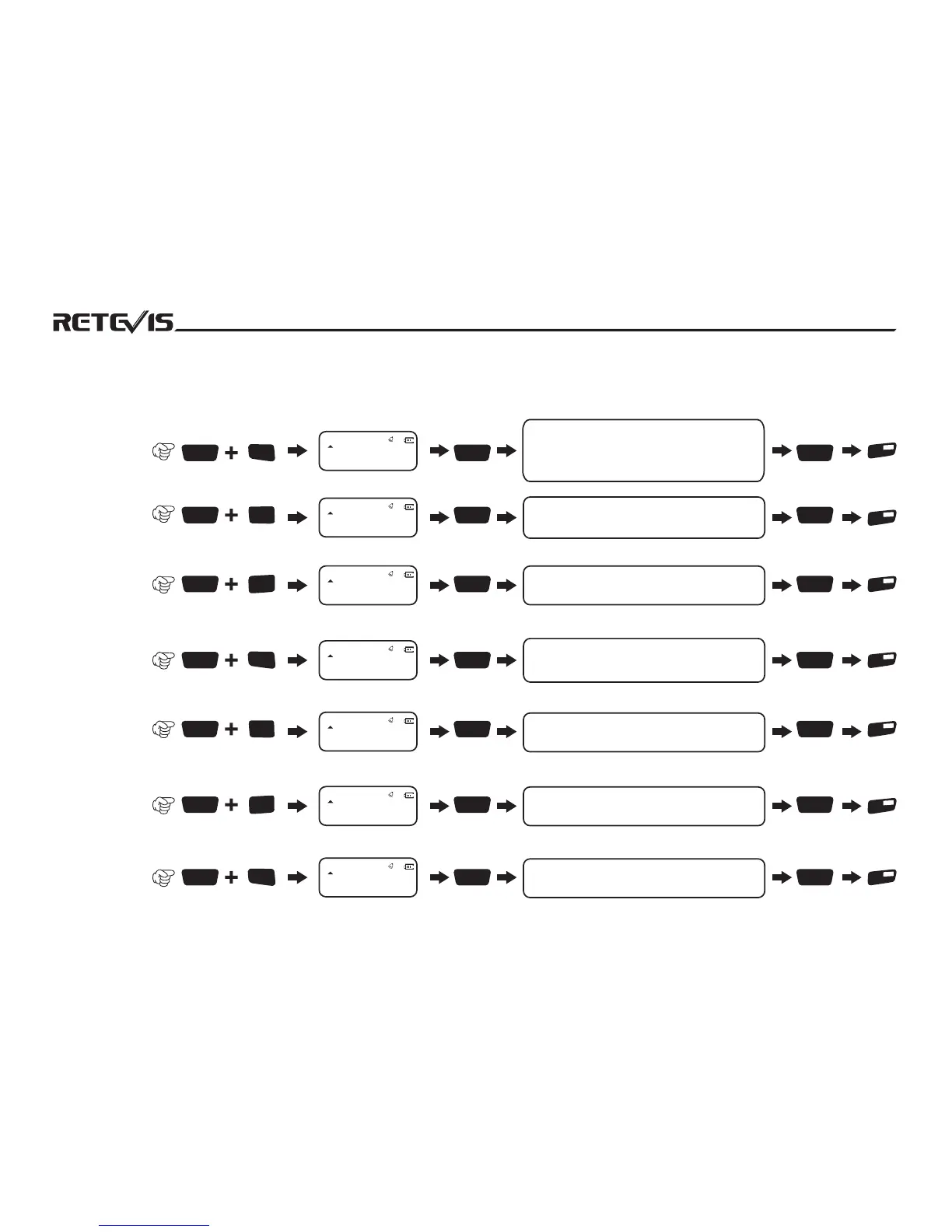
1 Step Frequency
Can select 5K/6.25K/10K/12.5K/20K/25K/50K
step frequency, input frequency range is
related to channel step frequency.If the
entered frequency range does not match
the step frequency range, the input
frequency is invalid
NO.Menu Name
Enter Menu
Setting
Screen Display
Rotate Channel Knob to
select parameter(notes)
Confirm
Return
State
Shortcut Operations
2 Battery
Save Mode
Select ON means transceiver is in battery
save mode,Off means close battery save
mode.
VOX level setting have 0-5 levels to selection,
the level more high, VOX sound is low.
3 VOX Switch
4 Output Power
Select
HIGH means High power, LOW means low
power.When select low power, the lcd screen
will display “L
5 Squelch Level
Adjust squelch level, higher level means
deeper squelch。
6 Repeater Switch
Select ON is into repeater mode, OFF is exit
repeater mode.
7 Band Setting
Wide band is WIDE, narrow band is Narrow.
19
STEP
5.00K
DS
01
NO.Menu Name
Enter Menu
Setting
Screen Display
Rotate Channel Knob to
select parameter(notes)
Confirm
Return
State
1010101010101010101010


 To Next Page