9
8.Monitor
You can use the monitor feature to check for weaker signals in the current
channel.
·Press the MON-button to activate channel monitoring.
·Press the MON-button to stop channel monitoring.
Note: During channel monitoring the receiver circuit in the Radios will not
not listen to CTCSS codes.
9. VOX Selection
The radios is capable of voice activated (VOX) transmission. In VOX mode,
the radio will transmit a signal when it pick up your voice or other sound
around you. VOX operation is not recommended if you plan to use your radio
in a noisy or windy environment.
Note: VOX mode will be overrided when you press the PTT-button (15).
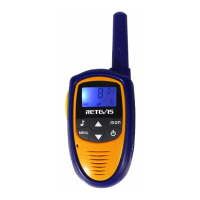
·Press the MENU(11) three times, the current VOX setting flashes on the
display and the VOX icon is displayed.
·Press ▲-button (4) to set the VOX sensitivity level between 1 and 3
(level 3 is the most sensitive level).
·Press ▼-button (7) until OF appears on the display, to turn VOX off.
·Press the PTT -button (15) to confirm and return to stand-by mode.


 To Next Page