EasyManua.ls Logo

Retevis Rt35 - User Manual

Retevis Rt35
14 pages
Print Icon
To Next Page IconTo Next Page
Loading...
User's manual
Rt35
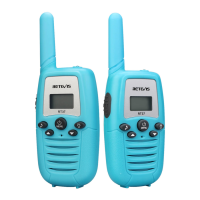
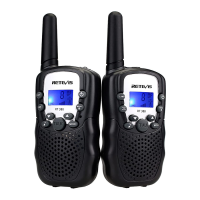
Kids walkie talkies

Questions and Answers

  • T
    Tyler ColemanAug 1, 2025
    How to change the channel on Retevis Rt35 Two-Way Radio?
    • J
      joseph82Aug 1, 2025
      If you're having trouble changing the channel on your Retevis Two-Way Radio, it might be due to a low battery. When in channel mode, press the power/menu button until the channel number flashes on the screen. Then, press the up or down key to change the channel.
  • M
    Melanie BurnsAug 5, 2025
    Why is the Retevis Rt35 Two-Way Radio reception range limited with sound distortion?
    • L
      Lisa MaysAug 6, 2025
      Limited reception range and sound distortion in your Retevis Two-Way Radio can occur due to several reasons. First, a low battery can cause these issues, so recharge the battery if it indicates low power. Also, terrain and environmental factors affect the effective reception range. To improve this, check the antenna and ensure it is positioned upwards for optimal call quality. Note that shade trees and buildings can also affect the reception range.
  • B
    Brandon HayesAug 10, 2025
    What to do if Retevis Rt35 received signal is poor?
    • J
      Joseph PerkinsAug 10, 2025
      If you are experiencing a poor signal with your Retevis Two-Way Radio, it could be due to a weak signal or being out of range. Check the antenna and make sure it is positioned upwards to get the best call quality.
  • N
    nduncanAug 14, 2025
    Why Retevis Two-Way Radio has no power supply?
    • C
      Christie SerranoAug 14, 2025
      If your Retevis Two-Way Radio has no power, it could be due to a low or damaged battery. If the battery is low, use the special charger to charge it. If the battery is damaged, consider replacing it with a new lithium-ion battery.
  • K
    karenjordanAug 18, 2025
    Why does my Retevis Two-Way Radio reception have limited range and sound distortion?
    • K
      Kathryn Blackwell MDAug 18, 2025
      Limited reception range and sound distortion in your Retevis Two-Way Radio can occur due to several reasons: * The battery may be low. Recharge the battery if the low battery indicator is on. * Terrain and environmental factors affect the effective reception range. * Check the antenna. For getting the best call quality, make the antenna up. * Shade trees, the plant building affect the reception range of the car.
  • H
    Heather HoustonAug 22, 2025
    What to do if Retevis Rt35 reception range is limited and has sound distortion?
    • K
      kayla97Aug 22, 2025
      To improve the communication quality of your Retevis Two-Way Radio, consider these points: * When transmitting, maintain a 5 cm distance between your mouth and the microphone and speak in a normal voice. * Adjust the volume level when receiving a signal. * Maintain a minimum distance of 3 meters between the caller and respondent. * Obstacles can affect signal transmission if the caller and respondent are far apart. Without obstacles, the communication range can reach up to 3km.
  • J
    Jason BurnsAug 27, 2025
    How to fix Retevis Rt35 Two-Way Radio with no power supply?
    • P
      Phillip TravisAug 27, 2025
      If your Retevis Two-Way Radio has no power, the following steps may help: * Ensure the battery is not low. If it is, this could be the reason for the issue. * Charge the battery using the special charger. * If charging doesn't resolve the issue, the lithium-ion battery may be damaged and require replacement.

Summary

Precautions

Interference and Signal Acceptance

Users must not cause harmful interference and must accept any received signal.

Prohibited Operations

Unauthorized operations, such as changing frequency or antenna, are illegal.

Hazardous Environment Usage

Do not use in hazardous environments like gas stations or airports due to explosion risk.

Battery Usage

Charging Method

Connect USB charger to socket and then to device. Battery indicator cycles during charging.

Item Description

Power;Menu Button

Long press to power on/off; short press to enter function settings.

PTT Key

Press and hold to transmit; double press for calling sound.

USB Interface

Walkie-talkie charging interface.

Notice: Charger and Battery

Use dedicated charger only. Do not transmit while charging. Charge new battery for 12 hours.

Using the Walkie-Talkies

Low Battery Tips

Low battery is indicated by flashing power icon in talk/standby modes.

Powering On and Mode Selection

Press and hold Power/Menu for 3s to power on. Shows intercom icon.

Navigating Function Settings

Press Power/Menu to access settings. Use up/down keys to select options.

Saving Settings

Press PTT to save settings and return to standby.

Select Channel

Changing Channels

Press Power/Menu to flash channel, use up/down keys to change. Save with Power/Menu or PTT.

CTCSS;DCS

Selecting Privacy Codes

Press Power/Menu twice to flash code. Use up/down keys to select CTCSS/DCS privacy codes.

Saving CTCSS;DCS Settings

Press PTT/CALL to save or Power/Menu to next option.

Channel Scan

Activating Channel Scan

Press Scan button to start scanning. Stays 4-5s on active channels.

Hands-free Function

Enabling Hands-free Mode

Press Power/Menu until hands-free label appears. Use up/down to select mode (0-3).

High;Low Power Selection

Selecting Power Output

Press Power/Menu to show LO/HI. Click PTT to save selection (0.5W/1W).

Malfunction and Troubleshooting

No Power Supply Troubleshooting

Check battery level, use special charger, or check for battery damage.

Poor Received Signal Troubleshooting

Increase volume, check signal strength, or adjust antenna.

Limited Range;Distortion Troubleshooting

Check battery, terrain, environment, antenna, and maintain optimal distance.

Retevis Rt35 Specifications

General IconGeneral
BrandRetevis
ModelRt35
CategoryTwo-Way Radio
LanguageEnglish

Related product manuals