EasyManua.ls Logo

Retevis RT76P - Side View Features; Side Controls and Ports

Retevis RT76P
36 pages
Print Icon
To Next Page IconTo Next Page
To Previous Page IconTo Previous Page
Loading...
09
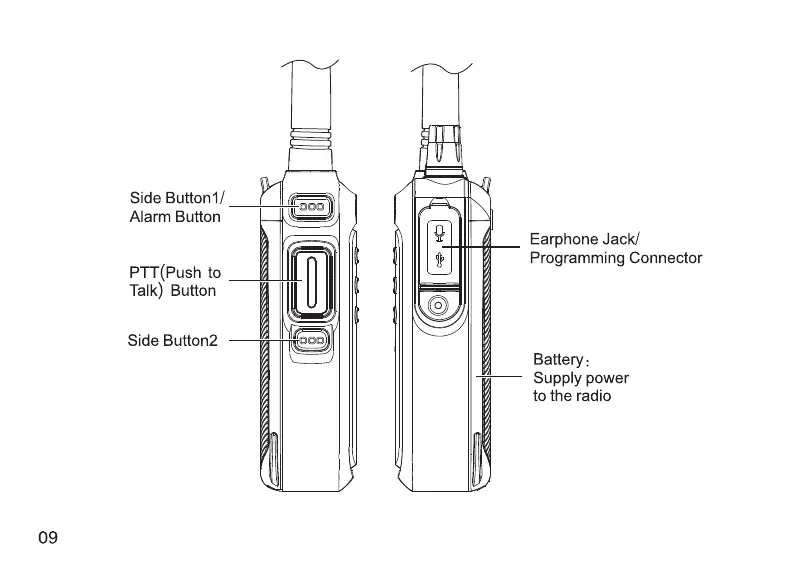
Side
Button1/
Alarm
Button
PTT(Push
to
Talk)
Button
Side
Button2
a
|
Hs
|
Ne)
SSS
SSS
SSS
Earphone
Jack/
Programming
Connector
Battery:
—y4-
Supply
power
to
the
radio
1.
PTT
button
Transmit
and
receive
the
switch
button.
When
transmitting,
press
this
button
and
speak
to
the
microphone.
Release
this
button
for
receiving.
2.
Side
Button
1(Alarm
button)
Short press
to
turn
on
ID
list.
Long
press
to
turn
on the
alarm
function.
There
are
3
modes
of
alarm,
which
can
be
edited
through
menu
operation
and
programming
software.
3.
Side
Button
2
The
multi-function
button.
The
multi-function
button
has
two
modes:
long
press
and
short
press.
The
button
functions
can
be
edited
by
the
programming
software.
There
are
6
types
of
functions:
FM
radio,
power
switch,
monitor,
scan,NOAA
and
talk
around.
4.
LCD
Display
Display
all
working
status
of
the
two
way
radio.
5.
360
degree
Channel
Switch
Replace
[
ZZ)
/
(IK)
buttons,
for
changing
channels,
frequency,
and
menu
and
so
on.
6.
A/B
Band
Switch
under
the
standby
status,
short
press
[
ES)
to
select
A
band
or
B
band.
When
selected,
the
transmission
will
be
transmitted
with
priority
on the
current
channel.
7.
Switch
frequency
mode
/
channel
mode
under
the
standby
status,
long
press
[@W]
to
select
frequency
model
and
channel
mode.
10

Related product manuals