EasyManua.ls Logo

Retevis RT76P - Quick Operation Instructions; Basic Menu Settings

Retevis RT76P
36 pages
Print Icon
To Next Page IconTo Next Page
To Previous Page IconTo Previous Page
Loading...
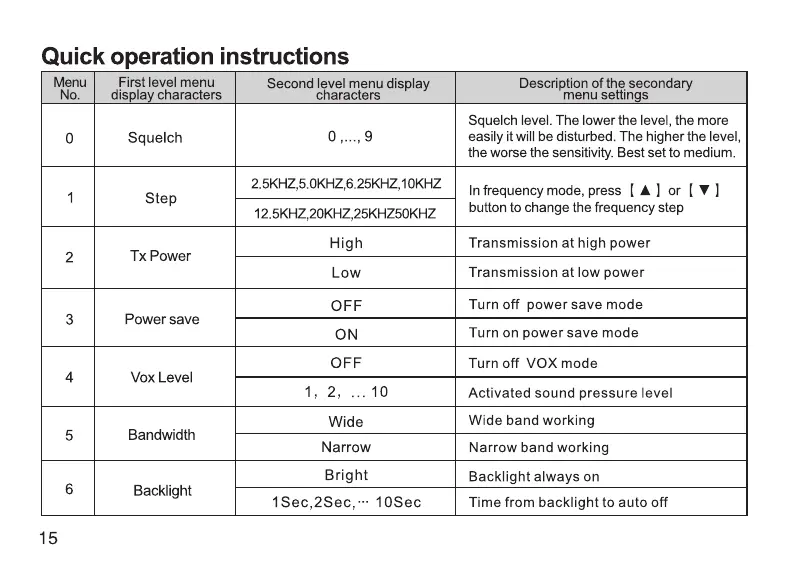
Quick
operation
instructions
Menu
First
level
menu
Second
level
menu
display
Description
of
the
secondary
No.
display
characters characters
menu
settings
Squelch
level.
The
lower
the
level,
the
more
0
Squelch
0,...,9
easily
it
will
be
disturbed.
The
higher
the
level,
the
worse
the
sensitivity.
Best
set
to
medium.
4
Ste
2.5KHZ,5.0KHZ,6.25KHZ,10KHZ
In
frequency
mode,
press
[
&]
or
[
V]
P
12.5KHZ.20KHZ.25KHZ50KHZ
button
to
change
the
frequency
step
High
Transmission
at
high
power
2
Tx
Power
Low
Transmission
at
low
power
OFF
Turn
off
power
save
mode
3
Power
save
ON
Turn
on
power
save
mode
OFF
Turn
off
VOX
mode
4
Vox
Level
1,
2,
10
Activated
sound
pressure
level
Wide
Wide
band
working
5
Bandwidth
Narrow
Narrow
band
working
Bright
Backlight
always
on
6
Backlight
:
:
1Sec,2Sec,:
10Sec
Time
from
backlight
to
auto
off
Menu
First
level
menu
Second
level
menu
display
Description
of
the
secondary
No.
display
characters characters
menu
settings
OFF
Turn
off
Dual
Standby
7
Dual
Standby
ON
Turn
on
Dual
Standby
OFF
Turn
off
Beep
prompt
8
Beep
Prompt
ON
Turn
on
Beep
Prompt
OFF
Turn
off
VOICE
9
VOICE
ON
Turn
on
VOICE
OFF
Press
and
hold
PTT
Button
to
transmit
10
Tx
over
time
Numbers
from
15
to
600,
in
15-step
15,30,---600
increments,
indicating
the
maximum
time
to
transmit
when
the
PTT
button
is
pressed
OFF
No
CTCSS/DCS
11
Rx
DCS
DO23N,::,D7541
DCS
sequence
OFF
No
CTCSS/DCS
12
Rx
CTCSS CTCSS
sequence,
Simultaneous
typing
67.0HZ,~-,254.1HZ
of
standard
or
CTCSS
non-standard
by
buttonboard
15
16

Related product manuals