EasyManua.ls Logo

Retevis RT76P - Advanced Operation Settings: Codes, Scanning, and Identification; Code Sending and Scanning Configurations

Retevis RT76P
36 pages
Print Icon
To Next Page IconTo Next Page
To Previous Page IconTo Previous Page
Loading...
Menu
First
level
menu
Second
level
menu
display
Description
of
the
secondary
No.
display
characters
characters
menu
settings
OFF
No
CTCSS/DCS
13
Tx
DCS
DO23N,-::,D7541
DCS
sequence
OFF
No
CTCSS/DCS
14
Tx
CTCSS
CTCSS
sequence,
Simultaneous
typing
67.0HZ,-:,254.1HZ
of
standard
or
CTCSS
non-standard
by
buttonboard
Voice
OFF
Turn
off
voice
compandor
15
Compand
ON
Turn
on
voice
compandor
OFF
DT-ST
Can
monitor
the
DT
-
ST
16
DTMFST
ANI-ST
Only
monitor
to
the
ANI
-
ST
DT+ANI
Both
monitor
1000Hz/1450Hz/
. . :
17
R-TONE
Repeat
signaling
code
selection
1750Hz/2100Hz
17
Meni
First
level
menu
Second
level
menu
display
Description
of
the
secondary
No.
display
characters
characters
menu
settings
When
needed,
send
the
group
of
information
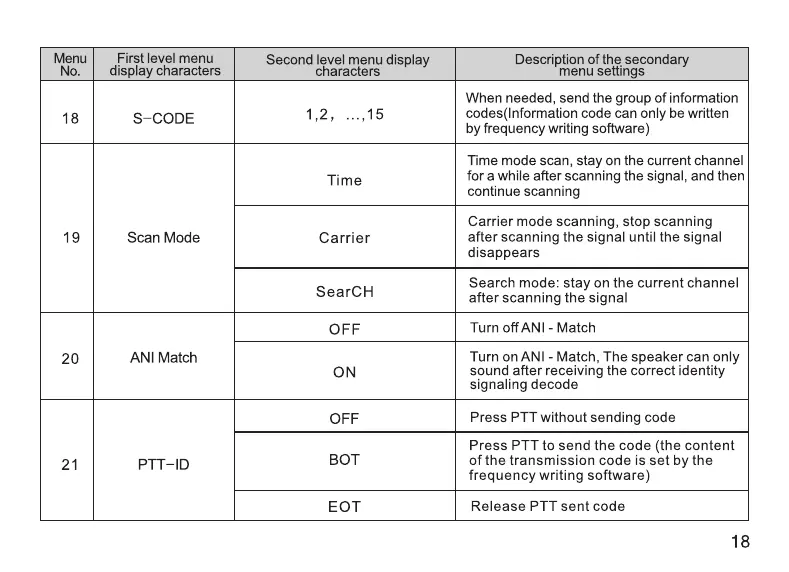
18
S-CODE
1,2,
...,15
codes(Information
code
can
only
be
written
by
frequency
writing
software)
Time
mode
scan,
stay
on
the
current
channel
Time
for
a
while
after
scanning
the
signal,
and
then
continue
scanning
Carrier
mode
scanning,
stop
scanning
19
Scan
Mode
Carrier
after
scanning
the
signal until
the
signal
disappears
s
CH
Search
mode:
stay
on
the
current
channel
ear
after
scanning
the
signal
OFF
Turn
off
ANI
-
Match
20
ANI
Match
Turn
on
ANI
-
Match,
The
speaker
can
only
ON
sound
after
receiving
the
correct
identity
signaling
decode
OFF
Press
PTT
without
sending
code
Press
PTT
to
send
the
code
(the
content
21
PTT-ID
BOT
of
the
transmission
code
is
set by
the
frequency
writing
software)
EOT
Release
PTT
sent
code
18

Related product manuals