EasyManua.ls Logo

Retevis RT76P - Call Management (Part 1); Individual and Group Call Procedures

Retevis RT76P
36 pages
Print Icon
To Next Page IconTo Next Page
To Previous Page IconTo Previous Page
Loading...
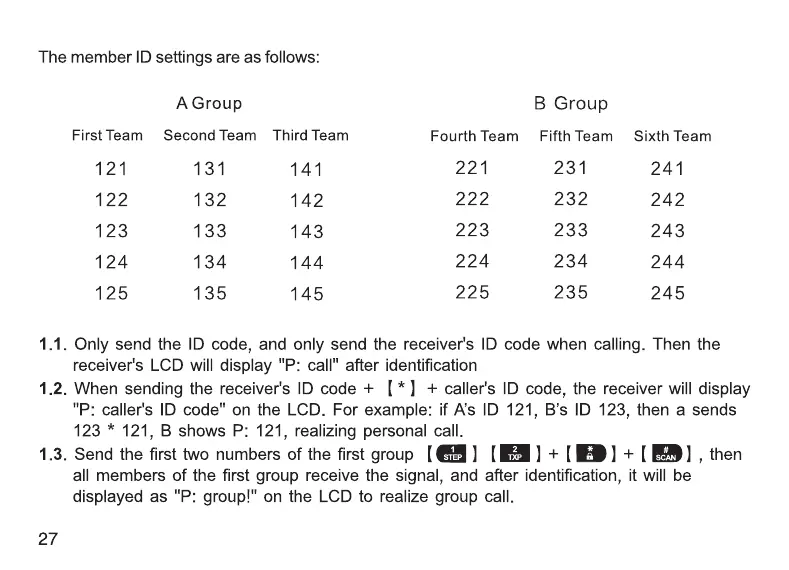
The
member
ID
settings
are
as
follows:
A
Group
B
Group
FirstTeam
SecondTeam
Third
Team
Fourth
Team
FifthTeam
Sixth
Team
121
131 141
221 231
241
122
132
142
222
232 242
123 133
143
223
233
243
124
134
144
224
234
244
125
135
145
225
235
245
1.1.
Only
send
the
ID
code,
and
only
send
the
receiver's
ID
code
when
calling.
Then
the
receiver's
LCD
will
display
"P: call"
after
identification
1.2.
When
sending
the
receiver's
ID
code
+
[*]
+
caller's
ID
code,
the
receiver
will
display
"P:
caller's
ID
code"
on
the
LCD.
For
example:
if
A’s
ID
121,
B’s
ID
123,
then
a
sends
123
*
121,
B
shows
P:
121,
realizing
personal
call.
1.3.
Send
the
first
two
numbers
of
the
first
group
[G3] (HM)
+
|
HD)
+
|
BB),
then
all
members
of
the
first
group
receive
the
signal,
and
after
identification,
it
will
be
displayed
as
"P:
group!"
on
the
LCD
to
realize
group
call.
27
1.4.
Send
group
A's
first
ID
number
[@j)
+
[
HD)
+
[
EB),
only
all
members
of
group
A's
three
groups
receive
the
signal,
and
the
group
call
will
be
realized
if
it
is
displayed
as
"P:
group!"
on
the
LCD
after
identification.
1.5.
Send
any
digit
+
[
JHB)
+
(IB)
to
call
all
members.
After
identification,
the
LCD
displays
"P:
ALL"
to
realize
all
call.
Tips:
1.
Only
when
turn
onANI
Match
function,
All
Call
/
Group
Call
/
Groups
Call/
Single
Call
will
be
activated.
2.
After
ANI
Match
function
is
turned
on,
the
speaker
can
only
be
turned
on
within
5
seconds
after
receiving
the
correct
signaling
code
or
active
call.
®DTMF
Editor
This
radio
can
realize
fast
code
sending
by
editing
the
stored
ID
code
in
advance.
The
editing
method
is
as
follows:
28

Related product manuals