EasyManua.ls Logo

Retevis RT76P - Maintenance and Cleaning

Retevis RT76P
36 pages
Print Icon
To Next Page IconTo Next Page
To Previous Page IconTo Previous Page
Loading...
How
to
charge
the
Battery
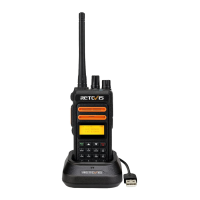
1.
Plug
the
charger
into
the
AC
power
outlet.
2.
Connect
the
battery
or
walkie-talkie
with
the
battery
to
the
Charging
dock
3.
Please
make
sure
the
battery
is
well
connected
to
the
charging
contacts.
Meanwhile
the
indicator
light
turns
red,
charging
starts.
4.
Charging
time
is
about
4
hours
.
After
4
hours,
the
indication
light
will
turn
green,
charging
finishes.
CAUTION:
Power-off
the
radio
when
charging.
Maintenance
And
Cleaning
Do
not
directly
hold
the
antenna
or
external
microphone.
Use
the
cloth
without
wool
to
wipe
the
dust
on
intercom,
dirty
quality,
prevent
contact
bad.
please
cover
the
headphone
jack
when
not
using
the
intercom.
after
long-term
use
of
the
intercom,
the
keys,
control
buttons
and
the
case
is
easy
to
get
dirty,
you can use
a
neutral
detergent
(do
not
use
highly
corrosive
chemicals)
and
warm
cloth
cleaning.
05
Accessory
Installing
Installing/Removing
the
Battery
Pack
Install
the
battery
pack,
insert
the
top
two
ends of
the
battery
pack
into
the
two
grooves
on
the
top
of
the
intercom,
and
then
buckle
the
bottom.
(1)
When
the
battery
is
removed,
please
first
confirm
that
the
intercom
is
off,
then
break
the
bottom
of
the
buckle,
the
battery can
be
removed
from
the
ejection
side.
(2)
i
4
T
(1)
(2)
06

Related product manuals