18
GB
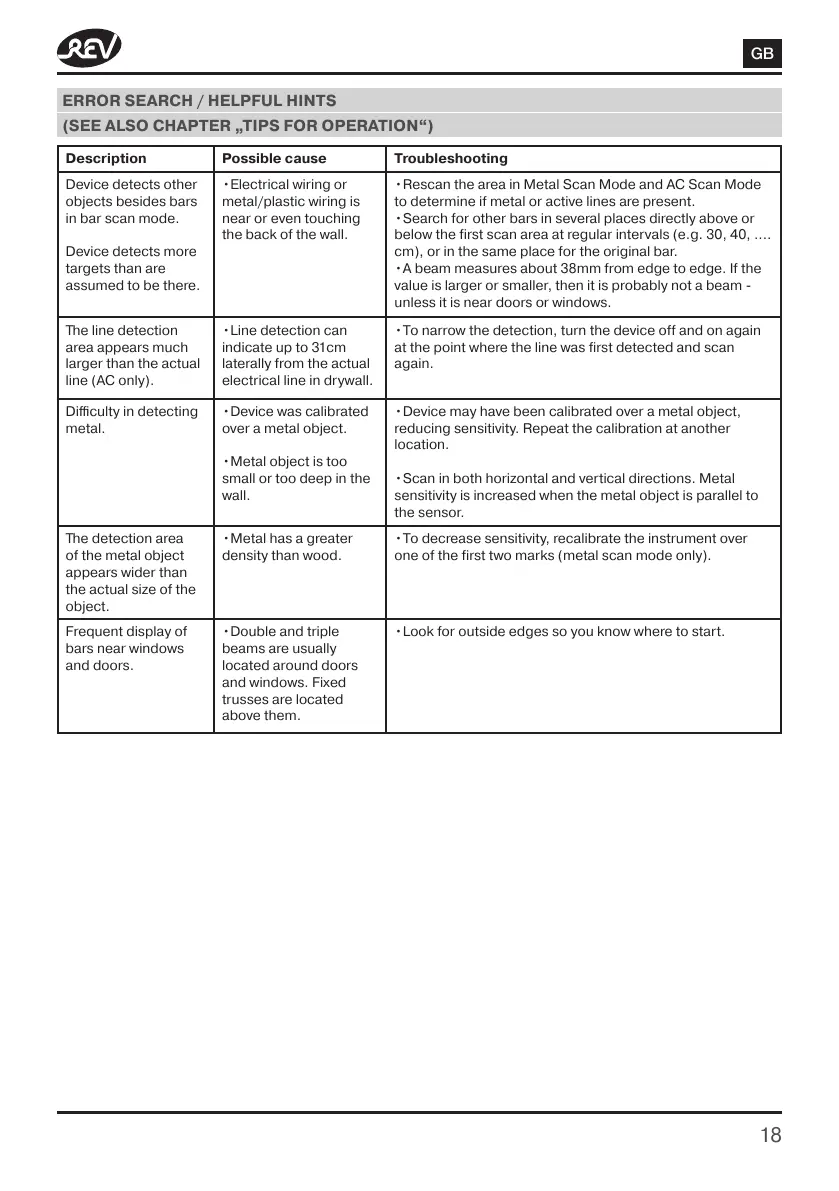
ERROR SEARCH / HELPFUL HINTS
(SEE ALSO CHAPTER „TIPS FOR OPERATION“)
Description Possible cause Troubleshooting
Device detects other
objects besides bars
in bar scan mode.
Device detects more
targets than are
assumed to be there.
•Electrical wiring or
metal/plastic wiring is
near or even touching
the back of the wall.
•Rescan the area in Metal Scan Mode and AC Scan Mode
to determine if metal or active lines are present.
•Search for other bars in several places directly above or
below the first scan area at regular intervals (e.g. 30, 40, ....
cm), or in the same place for the original bar.
•A beam measures about 38mm from edge to edge. If the
value is larger or smaller, then it is probably not a beam -
unless it is near doors or windows.
The line detection
area appears much
larger than the actual
line (AC only).
•Line detection can
indicate up to 31cm
laterally from the actual
electrical line in drywall.
•To narrow the detection, turn the device off and on again
at the point where the line was first detected and scan
again.
Difficulty in detecting
metal.
•Device was calibrated
over a metal object.
•Metal object is too
small or too deep in the
wall.
•Device may have been calibrated over a metal object,
reducing sensitivity. Repeat the calibration at another
location.
•Scan in both horizontal and vertical directions. Metal
sensitivity is increased when the metal object is parallel to
the sensor.
The detection area
of the metal object
appears wider than
the actual size of the
object.
•Metal has a greater
density than wood.
•To decrease sensitivity, recalibrate the instrument over
one of the first two marks (metal scan mode only).
Frequent display of
bars near windows
and doors.
•Double and triple
beams are usually
located around doors
and windows. Fixed
trusses are located
above them.
•Look for outside edges so you know where to start.


 To Next Page
 Loading...