EasyManua.ls Logo

Rexing AUX2 - User Manual

Rexing AUX2
8 pages
Print Icon
To Next Page IconTo Next Page
Loading...
User Manual
Bluetooth Receiver
AUX2
The information in this manual is subject to change without notice.
Rexing All Rights Reserved
www.rexingusa.com
Question and Answer IconNeed help?

Do you have a question about the Rexing AUX2 and is the answer not in the manual?

Summary

Overview

Introduction

Whats in the Box?

Lists the included items in the product package.

Product Overview

Specifications

Details technical specifications such as Bluetooth version, input/output, dimensions, and weight.

Installation Instruction

Features

Highlights key functionalities and benefits of the Bluetooth receiver.

Basic Operations

Device Controls and Functions

Explains how to use buttons for music playback, calls, and voice assistants.

Warranty & Support

Warranty Details

Outlines the 12-month warranty and how to extend it.

Customer Support Information

Provides contact methods and expected response times for assistance.

User Feedback

Encourages constructive feedback for product and service improvement.

Overview

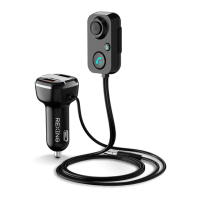
The Rexing AUX2 Bluetooth Receiver is a versatile in-car audio solution designed to bring wireless connectivity to vehicles equipped with a 3.5mm AUX input. This device allows users to stream audio, including music and phone calls, from their Bluetooth-enabled devices directly to their car's stereo system. It integrates seamlessly into the car's interior, featuring a compact receiver that sticks to the dashboard and a car charger that plugs into the cigarette lighter hole.

Function Description:

The primary function of the AUX2 Bluetooth Receiver is to enable wireless audio streaming in cars that lack built-in Bluetooth capabilities. It acts as a bridge between a user's smartphone, tablet, or MP3 player and the car's audio system. When a phone call is received, the device automatically switches from music streaming to hands-free mode, ensuring a smooth transition and safe communication while driving. The built-in microphone, featuring an isolated rubber cavity for noise suppression, is designed to guarantee clear conversations even in a noisy car environment. For enhanced audio experience, the receiver includes a "BASS" button that allows for one-button activation of a bass boost feature, enriching the music playback. Beyond its audio streaming capabilities, the AUX2 also serves as a charging hub, incorporating dual USB ports (QC3.0 and 5V/2.4A) within its car charger component, enabling simultaneous charging of external devices. This dual functionality makes it a practical accessory for modern drivers, combining entertainment, communication, and power delivery in one compact unit.

Important Technical Specifications:

  • Bluetooth Version: 5.1, ensuring stable and efficient wireless connectivity.
  • Bluetooth Protocol: Supports AVRCP, HFP, and A2DP, covering audio/video remote control, hands-free profile, and advanced audio distribution profile, respectively.
  • Receiver Input: 5V.
  • Charger Input: 12-24V, compatible with most car electrical systems.
  • Charger Output: QC3.0 & 5V/2.4A, providing fast charging for compatible devices and standard charging for others.
  • Receiver Size: 2" X 1.2" X 0.6", indicating a very compact design.
  • Car Charger Size: 1.3" X 1.3" X 2.8", also compact for discreet placement.
  • Length of Cable: 3.25 FT (approximately 1 meter), offering flexibility in placement.
  • Product Weight: 2oz, making it lightweight.
  • Material: ABS, suggesting durability and a standard finish.
  • FCC ID: 2AJ5B-BT61Q, indicating compliance with FCC regulations.

Usage Features:

The AUX2 Bluetooth Receiver is designed for ease of use with intuitive controls and simple installation.

  • Installation: The receiver attaches to the dashboard using a hook and loop fastener, ensuring it's within easy reach. The AUX cable plugs into the car's 3.5mm AUX jack, and the car charger plugs into the cigarette lighter. Once powered, users can search for "AUX2" on their cellphone's Bluetooth settings to connect.
  • Music Mode Operations:
    • Previous Song: Quick press the "UP" button.
    • Next Song: Quick press the "DOWN" button.
    • Volume Up: Press and hold the "UP" button.
    • Volume Down: Press and hold the "DOWN" button.
    • Pause/Play: Quick press the "Music/Phone" button.
    • Active Bass Sound: Quick press the "BASS" button to enhance bass.
  • Hands-Free Mode Operations:
    • Answer/Hang Off Call: Quick press the "Music/Phone" button.
    • Dial Last Number Automatically: Double press the "Music/Phone" button.
    • Reject Call: Press and hold the "Music/Phone" button.
    • Switch to Private Calling (during a call): Press and hold the "Music/Phone" button.
    • Activate Voice Assistant (Siri/Google Assistant): Press and hold the "Music/Phone" button for 2 seconds.
  • Connectivity: Bluetooth V5.1 ensures crystal clear sound quality and a reliable connection.
  • Charging: Dual USB ports (QC3.0 & 5V/2.4A) on the car charger allow for convenient charging of multiple devices simultaneously.
  • Convenience: The 1-meter built-in audio and USB power cord provides ample length for installation and operation. The stick-on design for the receiver allows for flexible placement on the car dashboard.

Maintenance Features:

The manual does not explicitly detail specific maintenance features for the device itself, but general care for electronic devices applies. Keeping the device clean and free from dust and moisture would prolong its lifespan. The robust ABS material suggests a degree of durability for in-car use. The product comes with a 12-month warranty, which can be extended to 18 months upon product registration on the official Rexing website, indicating manufacturer support and confidence in the product's reliability. For any issues or questions, Rexing provides customer support via email and phone, with typical response times within 12-24 hours. This support system acts as a maintenance feature by ensuring users can get assistance with troubleshooting or warranty claims.
Rexing AUX2 Specifications

General IconGeneral
BrandRexing
ModelAUX2
CategoryReceiver
LanguageEnglish

Related product manuals