EasyManua.ls Logo

Rexing Intelligent Hardwire Kit - User Manual

Rexing Intelligent Hardwire Kit
14 pages
Print Icon
To Next Page IconTo Next Page
Loading...
User Manual
Intelligent
Hardwire Kit
The information in this manual is subject to change without notice.
Rexing All Rights Reserved
www.rexingusa.com
Question and Answer IconNeed help?

Do you have a question about the Rexing Intelligent Hardwire Kit and is the answer not in the manual?

Summary

Overview

Whats in the Box?

Initial Setup Steps

Motion Sensor Placement

Place the motion sensor on the windshield, a few inches away from the dash cam, ensuring it is not blocked.

Connect Motion Sensor

Connect the motion sensor to the dash cam using the included USB cable.

Route Wiring

Run the wiring towards the fuse box using the included smart hardwire kit.

Smart Hardwire Kit Connection

Connect Switched Fuse

Connect the RED cable to the switched fuse, which has power only when the car is on.

Connect Hot Fuse

Connect the YELLOW cable to the hot fuse, which has power at all times.

Ground Connection

Attach the black fuse cable and connect the GROUND cable to a bolt near the fuse box.

Final Dash Cam Connection

Connect the power cable to the dash cam and ensure motion sensing is configured correctly.

Warranty & Support

Product Warranty Information

The Rexing Intelligent Hardwire Kit includes a 12-month warranty, extendable to 18 months upon product registration.

Customer Support

Contact support via email at care@rexingusa.com or call (877) 740-8004 for assistance.

Overview

This document describes the Rexing Intelligent Hardwire Kit, a device designed to provide continuous power to a dash cam, enabling parking monitor features without draining the vehicle's battery.

Function Description

The Rexing Intelligent Hardwire Kit is an accessory for dash cams that allows for continuous power supply, even when the vehicle's ignition is off. It integrates a motion sensor to activate dash cam recording when motion is detected around the parked vehicle. This kit overrides the dash cam's internal parking monitor function, taking over the responsibility of initiating recordings based on motion detection. The system ensures that the dash cam only records when necessary, conserving power and preventing battery drain.

Important Technical Specifications

The kit includes:

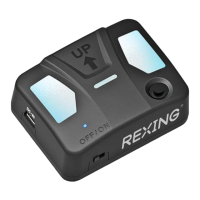
  • Motion Sensor: Detects movement to trigger dash cam recording. It has a "Motion Sensor Indicator" and a "Motion Sensor On/Off Button."
  • Smart Hardwire Kit: This is the core power management unit.
  • Mini-USB to Mini-USB Cable: Connects the motion sensor to the dash cam.
  • User Manual: Provides instructions for installation and usage.

The hardwire kit features specific cables for connection to the vehicle's fuse box:

  • Power Cable: The main power input.
  • Ground Cable: Connects to a bolt near the fuse box for grounding.
  • Hot Fuse Cable (Yellow): Connects to a fuse that has power at all times (constant power).
  • Switched Fuse Cable (Red): Connects to a fuse that only has power when the car's ignition is on (switched power).

The motion sensor unit has:

  • Power Switch: To turn the motion sensor on or off.
  • Power Indicator: Shows the operational status of the device.
  • Mini-USB Port for dash cam connection: Output to the dash cam.
  • Mini-USB Port for fuse box connection: Input from the hardwire kit.

The device is certified with FC, ROHS, and CE markings, indicating compliance with relevant safety and environmental standards.

Usage Features

The Intelligent Hardwire Kit enables the following usage features:

  • Continuous Power Supply: Provides constant power to the dash cam, allowing it to operate even when the vehicle is off.
  • Motion-Activated Recording: The integrated motion sensor automatically triggers dash cam recording when movement is detected around the parked vehicle. This is indicated by a blue light on the motion sensor.
  • Battery Protection: By connecting to both switched and constant power sources, the kit is designed to prevent the vehicle's battery from being drained. The dash cam will power up and record only when motion is detected, and stop once the motion clears.
  • Override of Dash Cam Parking Monitor: Users are explicitly instructed not to enable the parking monitor function in their dash cam's settings once this hardwire kit is connected, as the kit's motion sensor will manage this feature.
  • Easy Installation: The manual provides a step-by-step guide for installation, including placing the motion sensor, connecting cables, and wiring to the fuse box.

Maintenance Features

While the manual does not explicitly detail maintenance features, the following can be inferred:

  • Troubleshooting Support: Rexing offers customer support via email (care@rexingusa.com) and phone ((877) 740-8004) for any questions or issues, with typical response times within 12-24 hours.
  • Warranty: The product comes with a standard 12-month warranty, which can be extended to 18 months upon product registration on the Rexing website (https://www.rexingusa.com/support/registration).
  • Fuse Compatibility Information: The manual directs users to the Rexing support page (https://www.rexingusa.com/support/for) for details on different fuse types, suggesting resources are available for users with varying vehicle fuse configurations.
  • Feedback Mechanism: Rexing encourages users to provide constructive feedback and suggestions to improve products, services, and user experience, indicating a commitment to ongoing product refinement.

The device is designed for a "set it and forget it" operation once properly installed, with the primary "maintenance" being ensuring correct initial setup and seeking support if issues arise.

Rexing Intelligent Hardwire Kit Specifications

General IconGeneral
BrandRexing
ModelIntelligent Hardwire Kit
CategoryAutomobile Accessories
LanguageEnglish

Related product manuals