
 Need help?
Do you have a question about the Rexing W1 and is the answer not in the manual?
Important usage notes for the car media receiver functionality.
Notes and procedures for disconnecting the Apple CarPlay feature.
Notes and procedures for disconnecting the Android Auto feature.
How to activate and use the backup camera display.
Details on the product's 12-month warranty and extension options.
Contact information and expected response times for customer assistance.
Invitation for constructive feedback and suggestions for product improvement.
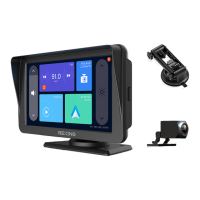
The Rexing W1 is a 7-inch digital media receiver designed to enhance your in-car entertainment and navigation experience, offering seamless integration with both Apple CarPlay and Android Auto. This device serves as a central hub for various functions, including smartphone mirroring, media playback, and a backup camera display, all presented on a clear, responsive touchscreen.
At its core, the Rexing W1 functions as a versatile media receiver that brings the familiar interfaces of Apple CarPlay and Android Auto directly to your vehicle's dashboard. This allows you to access essential smartphone features safely and conveniently while driving. Through CarPlay and Android Auto, you can make and receive phone calls, send and read messages, utilize navigation apps like Apple Maps, Google Maps, or Waze, and stream music, podcasts, and audiobooks from your preferred services. The device supports voice commands, enabling hands-free operation for tasks such as initiating calls, dictating messages, or getting directions, thereby minimizing distractions and promoting safer driving.
Beyond smartphone integration, the W1 includes a dedicated backup camera function. When connected, the device can automatically display the rear camera's feed when the vehicle is put into reverse, providing a clear view of the area behind your car. This feature is particularly useful for parking and maneuvering in tight spaces, significantly enhancing safety by helping to prevent collisions with obstacles or pedestrians. The backup camera view often includes guidelines to assist with parking accuracy.
The device also incorporates an FM receiver, allowing you to tune into local radio stations. This provides an alternative audio source when you prefer traditional radio broadcasts over streaming services or stored media. The FM receiver can be easily toggled on and off, and its frequency can be adjusted to find clear signals. When CarPlay or Android Auto are active, the audio output from these platforms can be routed through your vehicle's radio, ensuring a unified sound experience.
The Rexing W1 is designed for intuitive and user-friendly operation. Its 7-inch touchscreen display serves as the primary interface, offering a clear and vibrant visual experience. The main menu provides quick access to key functions such as FM Receiver, Backup Camera, CarPlay, and Android Auto, each represented by a distinct icon. Physical buttons or touch controls are available for volume adjustment (up and down), brightness control (increase and decrease), and an auto-brightness toggle for optimal viewing in various lighting conditions.
Connecting to Apple CarPlay or Android Auto is a straightforward process, primarily relying on Bluetooth for initial pairing and Wi-Fi for the data connection. For Apple CarPlay, users first connect their iPhone to the W1 via Bluetooth, after which the device automatically establishes a Wi-Fi connection to enable CarPlay functionality. The system remembers the last connected phone, facilitating automatic reconnection in subsequent uses. Similarly, for Android Auto, users download the Android Auto app on their phone, enable wireless projection in the app's settings, and then pair via Bluetooth. Once paired, the W1 automatically connects via Wi-Fi to display the Android Auto interface. The device is designed to mute its own touch or camera tones when CarPlay or Android Auto are active, ensuring that audio from your smartphone takes precedence.
The backup camera feature can be activated manually by pressing its dedicated icon on the interface. Alternatively, if the camera's red wire is connected to the vehicle's reverse lights, the display will automatically switch to the rear camera view when the car is shifted into reverse. This automatic activation is particularly beneficial for parking assistance, providing immediate visual feedback without requiring manual input.
The FM receiver allows users to easily adjust the frequency band using on-screen arrows. To avoid interference, it is recommended to tune the vehicle's radio to the same frequency as the W1's FM receiver, ideally selecting a frequency without an active radio station.
While the Rexing W1 is primarily a plug-and-play device, certain aspects contribute to its ongoing performance and user experience. Disconnecting from CarPlay or Android Auto can be achieved by turning off the Wi-Fi function on your smartphone or switching to a different Wi-Fi network. Users can also choose to "ignore" the Bluetooth device in their phone settings, though this might require going through the connection steps again for future use. The system is designed to automatically manage Wi-Fi connections once Bluetooth pairing is established, simplifying the process for the user.
For optimal performance of CarPlay and Android Auto, it's crucial to ensure that both Bluetooth and Wi-Fi are enabled on the connected smartphone. In cases where CarPlay or Android Auto do not display correctly on the W1 despite a successful connection, users are advised to check their phone's settings, specifically related to screen time, content and privacy access restrictions, and allowed apps, to ensure that vehicle access is permitted. If issues persist, restarting the phone and the W1 can often resolve connectivity problems.
The device's software is designed to save the last used iPhone or Android phone as the default, ensuring that it attempts to connect automatically the next time, which streamlines daily use. This intelligent memory function reduces the need for repeated manual setup.
The Rexing W1 is built to operate within a wide range of temperatures, from -13°F to 149°F (-25°C to 65°C) during operation and -31°F to 185°F (-35°C to 85°C) for storage, indicating its robustness in various environmental conditions. This broad temperature tolerance minimizes concerns about the device's reliability in extreme hot or cold climates, reducing the need for special environmental maintenance. Regular cleaning of the touchscreen with a soft, dry cloth is recommended to maintain optimal visibility and responsiveness.
 General
| Wi-Fi | No |
|---|---|
| GPS | No |
| Frame Rate | 30 fps |
| Video Resolution | 1920x1080 (Full HD) |
| Field of View / Lens | 170° |
| Display | 2.4" LCD |
| Storage | MicroSD card up to 128GB |
| Loop Recording | Yes |
| G-Sensor | Yes |
| Parking Monitor | Yes |
| Power Source | 12V |

 To Next Page