EN
32
F1
F2
P1 P2
P3
P4
1
2
3
4
5
6
7
mode
disp
Prg
F1
F2
P1 P2
P3
P4
1
2
3
4
5
6
7
mode
disp
Prg
F1
F2
P1 P2
P3
P4
1
2
3
4
5
6
7
mode
disp
Prg
F1
F2
P1 P2
P3
P4
1
2
3
4
5
6
7
mode
disp
Prg
F1
F2
P1 P2
P3
P4
1
2
3
4
5
6
7
mode
disp
Prg
F1
F2
P1 P2
P3
P4
1
2
3
4
5
6
7
mode
disp
Prg
F1
F2
P1 P2
P3
P4
1
2
3
4
5
6
7
mode
disp
Prg
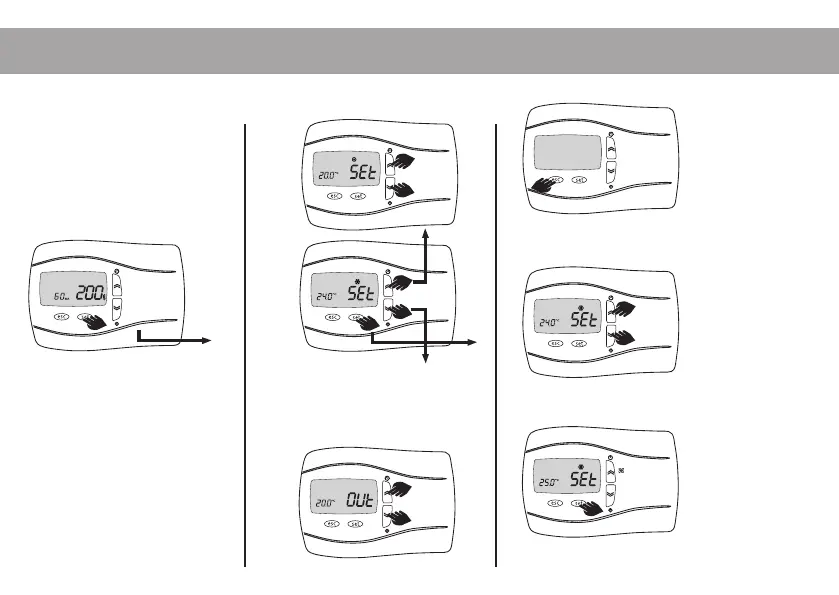
How to access and modify the Set menu parameters:
Press the set key on the main
display to access the list of
“Set” menu parameters.
Press the set key to have the value
of the parameter flash. Press
the up or down keys to scroll the
various parameters on the display.
Press the up or down keys to modify the value, if it
is intermittent.
Press the esc key to confirm the modification.
Press the esc key to go back one level.


 To Next Page