| 18 | | 19 |
ENEN
Installation
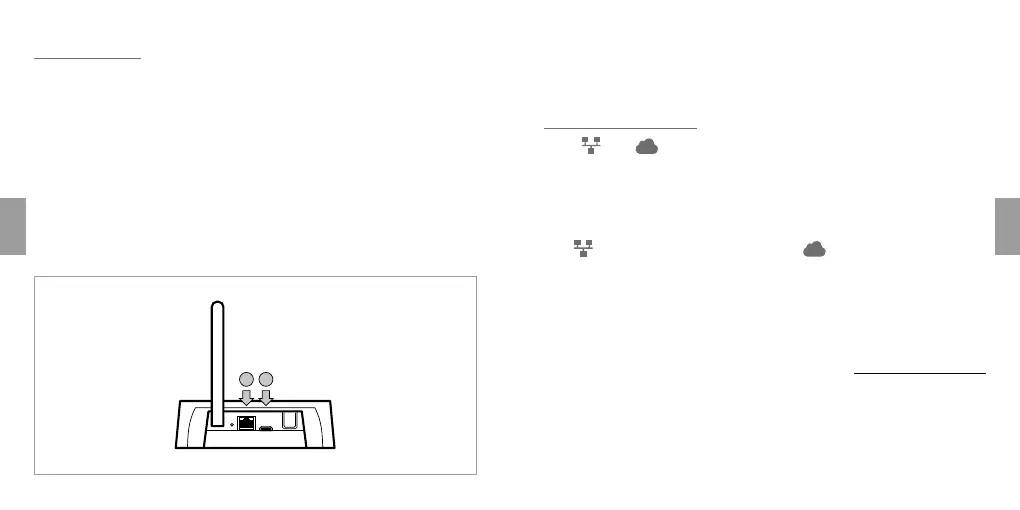
Connection of Rialto WhiteBox
1. Check that the home router is connected to the Internet.
2. Connect the WhiteBox to the home router with the ethernet cable (fig. 1 A).
3. Power up the WhiteBox using the USB cable and the relative adapter
provided (fig. 1 B)
4. Check that the two white Leds remain permanently alight within a few
minutes (see page 16 ref 5 and 6).
5. Download the “Rialto” app from AppStore or Google Play
6. Follow the guided configuration procedure prompted by the app
BA
fig. 1
Pairing a Rialto device
To add a Rialto device to the existing home network, refer to the relative
installation manuals.
Troubleshooting
Leds and blink continuously
/ Check that the ethernet cable is connected properly to the modem/
router
/ Check that the modem/router is correctly powered up
/ Check that DHCP mode is activated at the modem/router
Led
is permanently alight, whereas Led is neither alight nor blinking
/ Check that the connection between the modem/router and the
internet is working as it should
/ Check for the existence of firewalls or protection systems that could
limit or prevent normal connection of the Rialto WhiteBox to the
internet
For further information, visit the FAQ area of the website www.rialtocomfort.com



 To Next Page