EasyManua.ls Logo

RIB RAPID PARK - Page 51

RIB RAPID PARK
Print Icon
To Next Page IconTo Next Page
To Previous Page IconTo Previous Page
Loading...
E
S
51
51
PARA ENTRAR:


      
 

    
     

     
   
      
     
        
     

PARA SALIR:
   
      
       
    

     
      

  
    
   
           

   
           

ATENCIÓN:         

          


BOTÓN ABERTURA 2 (Mando - Open 2) solo para funcionamiento en
modo PARK




      

MANDO OK CLOSE (Mando - OK Close) solo para funcionamiento en
modo PARK

 


MANDO TCL - Traffic Light Control (Mando - TCL) solo para el
funcionamiento con modalidad PARK.


           
          


FUNCIONAMIENTO LUEGO DE UN BLACK OUT
Con DIP 10 - OFF => 
      

        
  
         
        
    
      


Con DIP 10 - ON =>         
       


FUNCIONAMIENTO DE LOS ACCESORIOS DE SEGURIDAD
FOTOCÉLULA (Com - Photo)

            

          


Nota: Se sugiere verificar el funcionamiento de las fotocélulas, por lo
menos, cada 6 meses.
ATTENCION: Si el Led del receptor queda
encendido, es posible que sea debito a
interferencias en la red de alimentación.
Aconsejamos conectar eléctricamente en tierra
las columnas o las columnas de soporte a
los contactos D- para proteger las fotocelulas
contas las interferencias.
Poner atención a no causar cortos circuitos
cuando las polaridades de alimentación estan invertidas!
EDGE (COSTA) (Com-Edge)
           
         


MONITOREO DE LAS COSTAS DE SEGURIDAD (D+ Test D-)


           
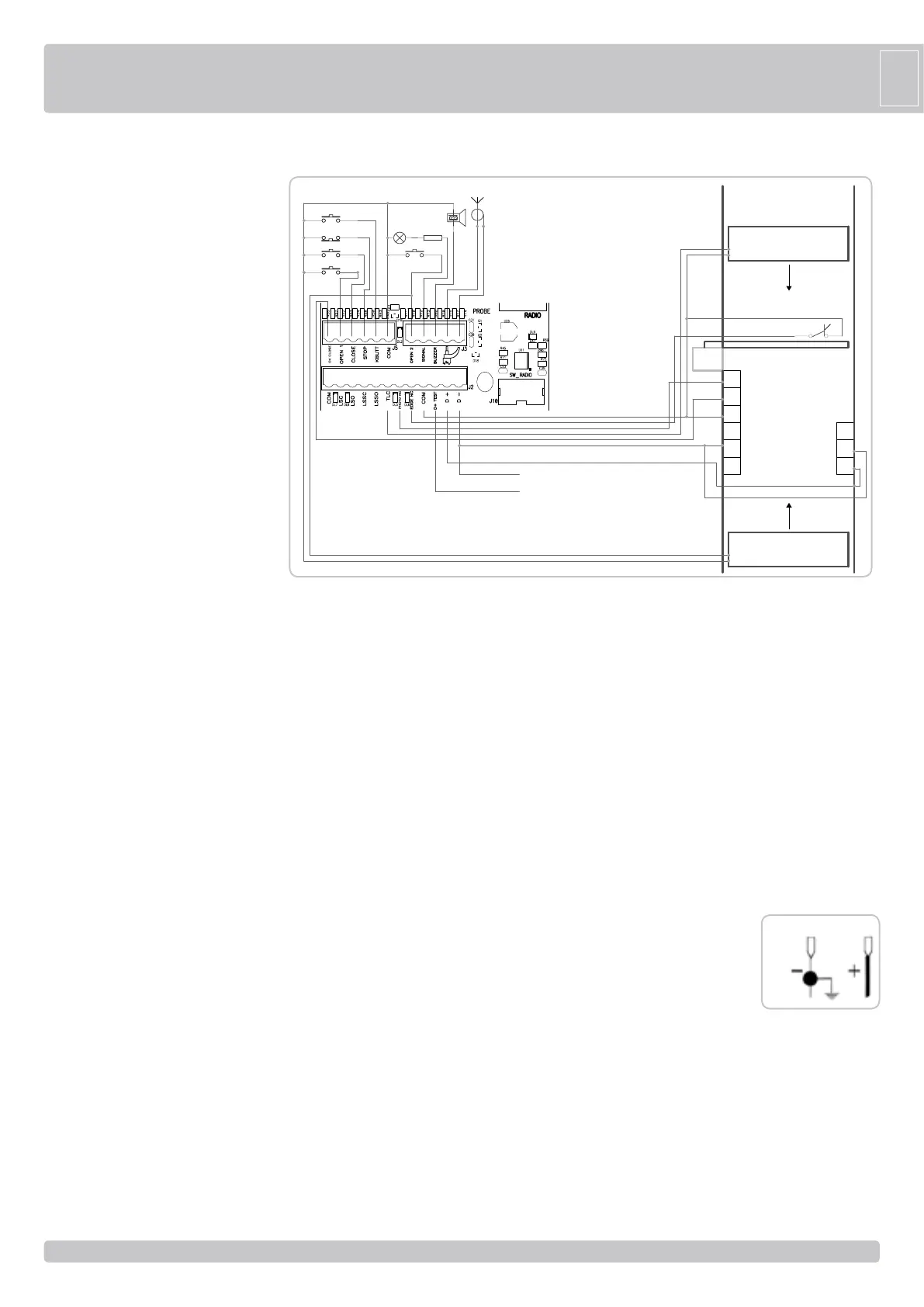
FUNCIONAMIENTO MODO PARK (DIP 6 ON)
NO
NC
D+
D-
+
D-
S
D+
+
S
COM
+
_
+
_
-
+
PASSO PASSO
STOP
CIERRA
ABRE 1
ANTENA
LED
BUZZER
MASA
ANTENA
SENSOR DE ESPIRA
MAGNÉTICA
SALIDA
SENSOR DE ESPIRA
MAGNÉTICA
ENTRADA
R=2K2
COSTAS
12 Vdc max 0,5A para ACCESSORIOS
12 Vdc max 0,5A para AUTOTEST PARA COSTA
12Vdc
Cont.
D-