49
G
B
PARAMETER
(ENTER
key)
FUNCTION
A
Key = 0 A Key = 1 A Key = 2 A Key = 3 A Key = 4
.a
Obstacle detection Very high High Low Very low
.b
Max opening speed Very slow Slow Fast Very fast
.c
Max closure speed Very slow Slow Fast Very fast
.d
Opening deceleration
speed
Very slow Slow Fast Very fast
.E
Closure deceleration
speed
Very slow Slow Fast Very fast
.F
Master/Slave Slave Master
.G
Low energy Disabled Very slow Slow Fast Very fast
.x
Delay of second leaf in
closure
No delay 1=1s 2=2s 3=3s 4=4s 5=5s 6=6s 7=7s 8=8s 9=9s
.i
Automatic closure time
from OPEN command
One command opens,
another one closes.
Automatic closure
disabled
1=10sec 2=20sec 3=30sec 4=40sec 5=50sec 6=60sec 7=70sec 8=80sec 9=90sec
.L
Dynamic automatic
closure
Disabled 3 consecutive closures not completed = 5 s increase automatic closure set
.M
Arm Articulated Sliding
.n
Emergency batteries
UP without batteries or
UP active until batteries
become weak
Door opens when there is
no power supply
Door closes when there
is no power supply
.o
Anti-wind function Disabled Low Medium High
.P
Photo test Disabled Enabled at each closure
.r
Electric lock Enabled
Quick selector
automatic/night modes
for 2 UP syncronized
.t
Opening braking 1=10% 2=20% 3=30% 4=40% 5=50% 6=60% 7=70% 8=80%
. u
Closure braking 1=10% 2=20% 3=30% 4=40% 5=50% 6=60% 7=70% 8=80%
.y
type of door Without friction With friction
.1/31
RS485 serial BUS
address
Disabled function Possibility of connecting a PC for the centralised management of the operators (max 31)
.J
Delay of second leaf in
opening
No delay 1=1,5s
.5
Push & Go
Disabled
electric lock enabled
Enabled
electric lock disabled
The new parameters will be active the next cycle, or by powering down and powering up the operator.
ATTENTION: the operator has a default setting and the parameters are indicated in bold letters.
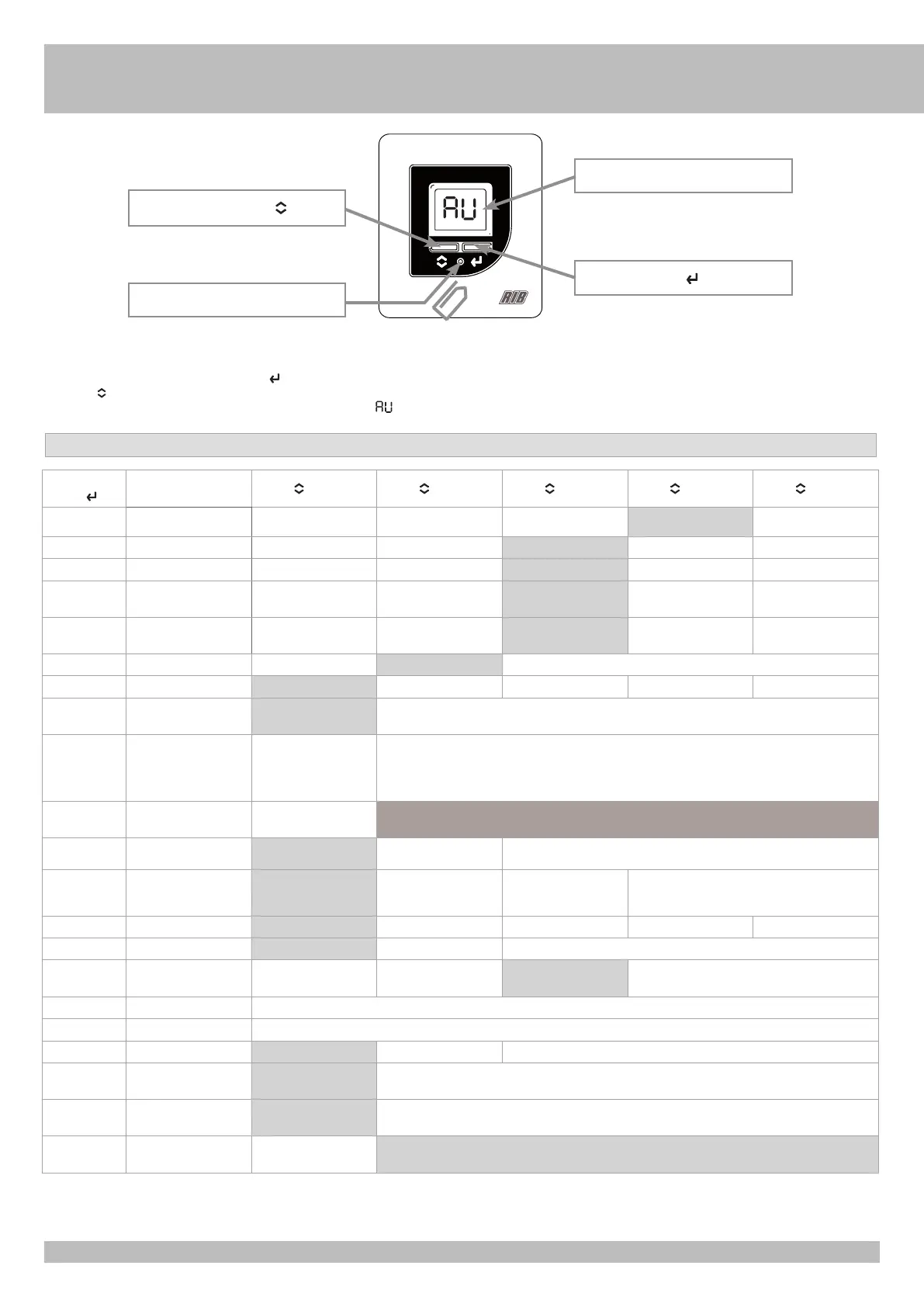
To access the parameters, press programming key B for at least 2 seconds (with the help of a paper clip, for example).
You will see parameter .A3.
To scroll through the parameters, press the ENTER key.
Press key A to change the value.
To exit programming, wait for 10 seconds. The screen will display the letter .
LCD Display
ENTER key
Programming key B
Selection key A


 To Next Page
 Loading...