48
G
B
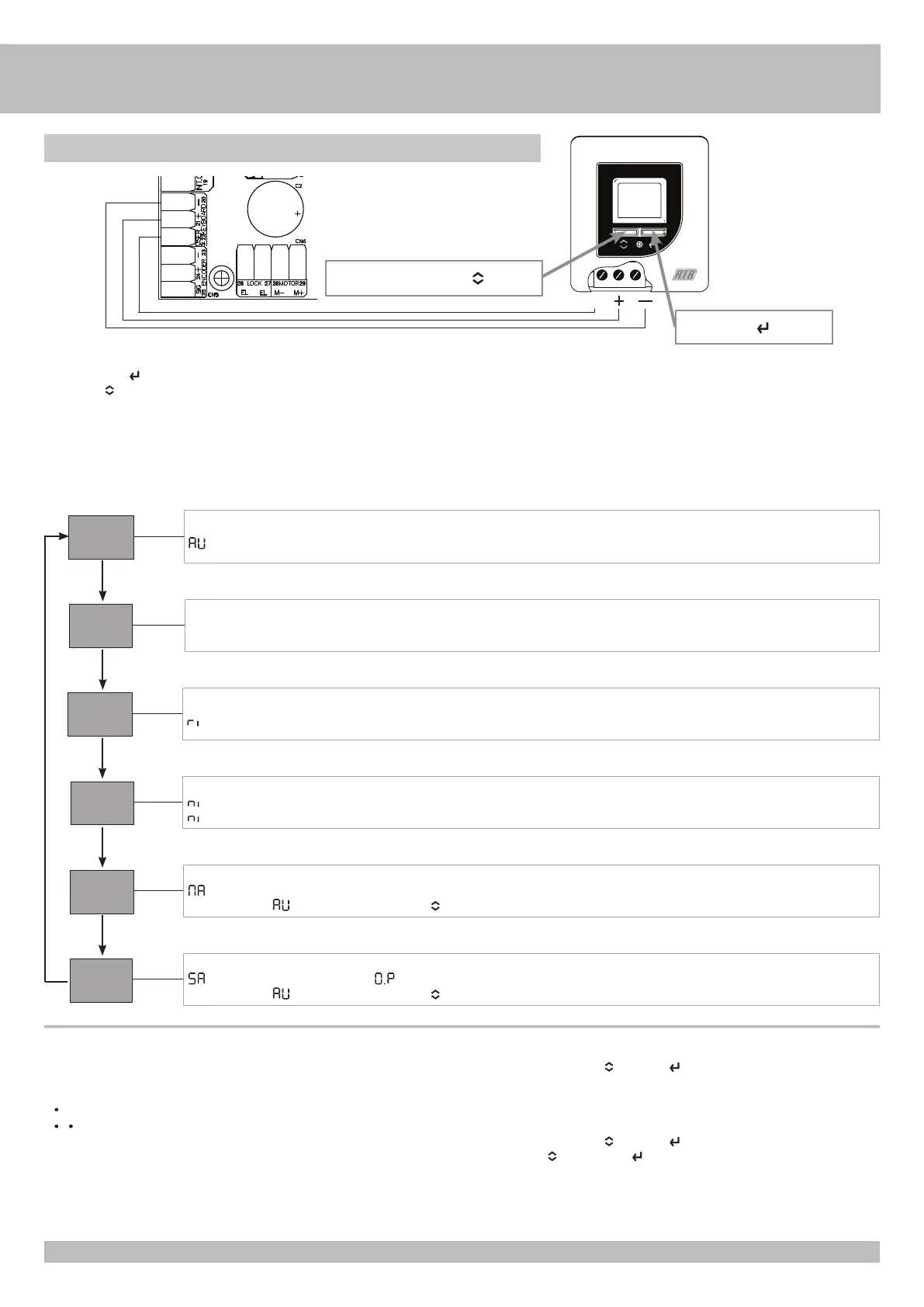
ENTER key
ACCESS TO THE OPERATOR MODES THROUGH THE LCD PROGRAMMER:
- Press the ENTER key for 2 seconds. The active mode starts to flash.
- Press key A
to scroll through the modes.
- When the desired function is visible, wait 10 seconds.
- After 10 seconds the sign/icon of the desired mode will go from flashing to a fixed light.
NOTE: Only if you select the MANUAL MA or ALWAYS OPEN 5A modes, the mode sign/icon will flash slowly instead of being on with fixed light.
NIGHT mode
flashing = disabled
fixed = int/ext radar control disabled - opening only with OPEN command
MANUAL mode
flashing = enabled
To return to
(automatic mode), press key A . Giving a command, the display will show r5 during realignment.
ALWAYS OPEN mode
Door opens. LCD display shows the symbol flashing and does not accept any closure order.
To return to (automatic mode), press key A .
AUTOMATIC mode
Door accepts opening commands. Door closes once the “automatic closure” time has passed by.
Not in use
INTERNAL RADAR mode
Internal radar enabled. External radar disabled.
ALARMS
- AL-BA alternate signs/icons indicate discharged battery.
- AL-F5 alternate signs/icons indicate photocell breakdown (with photo test enabled).
- r5 sign/icon indicates a learning/realignment operation.
- sign/icon indicates active external radar.
-
sign/icon indicates active external / internal radar.
KEYBOARD LOCKING
- Press and hold down keys A
and ENTER at the same time.
- The sign/icon on the display flashes.
- Hold down until flashing stops.
KEYBOARD UNLOCKING
- Press and hold down keys A and ENTER at the same time.
- Release key A and the ENTER key when the sign/icon on the display flashes
Selection key A
SIG
ni
MA
5A
AV
AP
RI


 To Next Page
 Loading...