Ricoh 500 Owner’s Manual Page 7 of 14
1 Set your light value by referring to the light-
value table or by taking a reading from an
electric exposure meter.
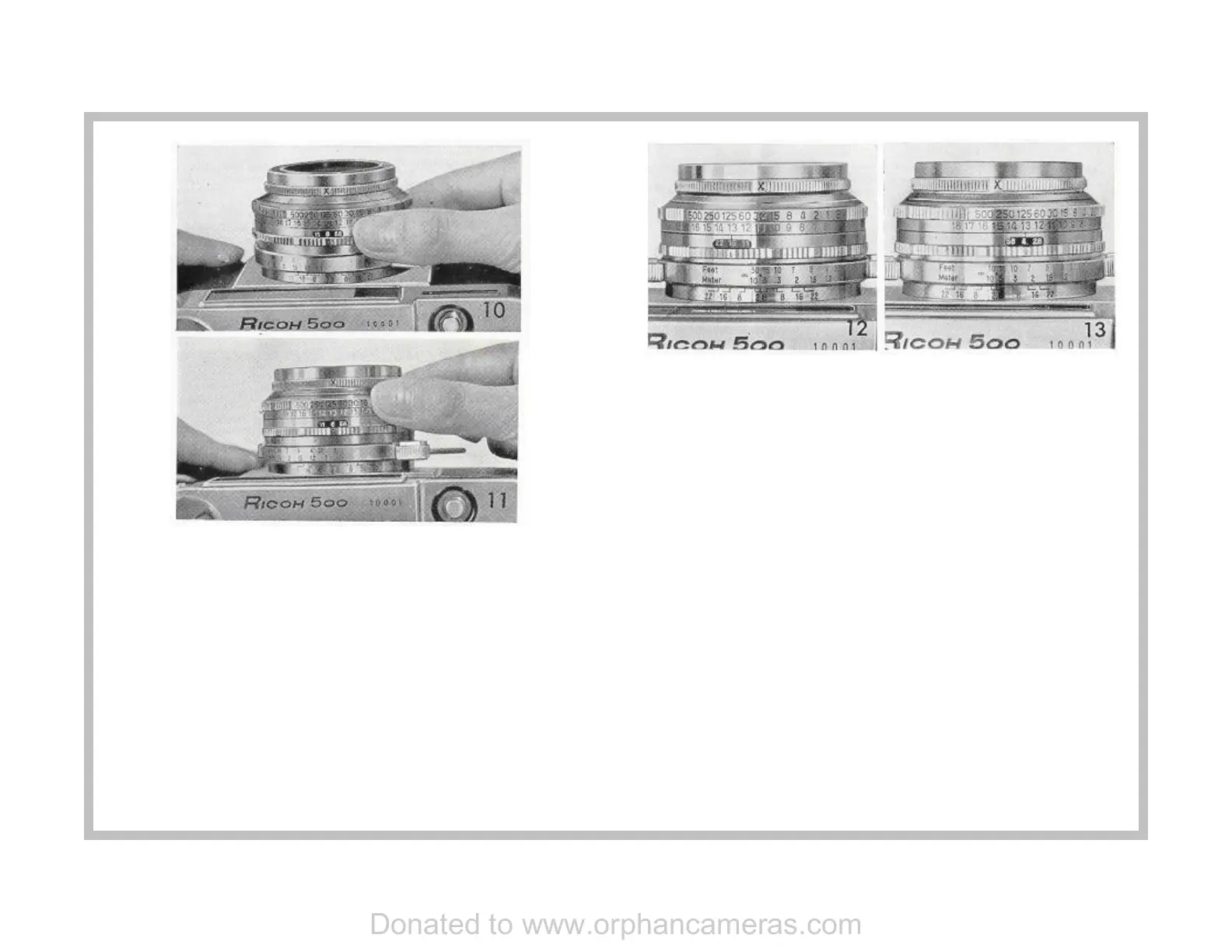
2 Turn the light value adjusting ring and bring
it into the required position. (See Figure 10.
which shows that the light value is "13").
Disregard all shutter speeds and the relative
openings in setting the light value. Just
shoot.
If either shutter speed or opening (which affects depth of field of
focus shown on a chart on another page) is not what you want, turn
the shutter speed setting ring until your desired speed or opening is
indicated. (See Figure 11.)
When you want to have everything in sharp focus, turn the shutter
speed setting ring to the left. If On the other hand you wish to have
things on the far and near side of your subject out of focus, turn the
ring to the right. (See Figure 12 and 13.)
The extent to which things are in sharp focus may be found by
reading the depth of field scale.
The f stop must be interpreted on the scale in such reading of depth
of field as being a rough guide.
When the required shutter speed is a fast one, turn the shutter speed
setting ring to the right until the required speed is brought in line with
the red mark arrow v.
When the required shutter speed is a slow one, turn the ring to the
left until the required speed is brought in line with the same red arrow
v.
Make sure that the shutter speeds are brought exactly in line with the
click stops, since no intermediate speeds are obtainable.
Donated to www.orphancameras.com


 To Next Page
 Loading...