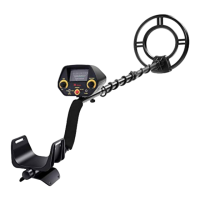
This document is the owner's manual for the Ricomax Metal Detector, Model GC-1065.
Function Description
The Ricomax Metal Detector, Model GC-1065, is designed for detecting various metal objects such as coins, relics, jewelry, gold, and silver. It offers two primary operation modes: ALL METAL and DISC.
- ALL METAL Mode: This mode allows the user to search for all types of metal with automatic ground balance and high sensitivity. It is recommended as the best operation mode for general metal detection.
- DISC Mode: This mode enables the detector to discriminate between different types of metal, allowing the user to filter out unwanted items. The DISC control can be rotated clockwise to eliminate various trash objects. Rotating it counter-clockwise to the end activates the ALL METAL mode. The DISC mode also features auto ground balance.
The detector includes a View Meter and Pointer, where the meter pointer swings to the right when metal is found. It also has a waterproof search coil, allowing for the detection of metal objects in shallow water. However, it's important to note that the control housing is not waterproof.
Important Technical Specifications
- Battery Requirement: The metal detector requires one 9V alkaline battery (not supplied).
- Earphone Jack: A 3.5mm earphone jack is provided for connecting stereo earphones (not supplied) for private listening. When earphones are connected, the internal speaker is disconnected.
- Search Coil: The search coil is waterproof, but the control housing is not.
- Adjustable Stem: The detector features an adjustable stem, allowing users to customize the length for comfortable use.
- LOW BAT Indicator: A "LOW BAT" indicator light signals when the battery needs to be replaced.
Usage Features
- Volume Control: A volume control allows adjustment of the speaker and headphone volume level. Rotating the control clockwise powers on the unit, and rotating it fully counter-clockwise powers it off.
- Sensitivity (SENS) Control: The SENS control allows adjustment of the detector's sensitivity. Rotating it clockwise increases sensitivity, while rotating it counter-clockwise decreases it.
- Assembly: The detector is designed for easy assembly without special tools. It involves connecting the top stem, lower stem with the search coil, and the control box. The search coil cable is then wound around the stem and plugged into the five-pin jack at the bottom of the control box.
- Search Coil Adjustment: The search coil's angle can be adjusted by loosening the knobs at its end, ensuring it is parallel with the ground (0.5-2 inches / 1-5cm above the ground).
- Battery Installation: To install the battery, the power must be off. The battery compartment cover is slid off, the 9V alkaline battery is connected, and then placed into the compartment before replacing the cover.
- Earphone Usage: Earphones can be connected to the 3.5mm EAR jack for private listening, which also helps conserve battery power and identify subtle sound changes. Users are advised to set the volume to the lowest setting before listening and avoid extremely high volume levels to protect hearing. Earphones should not be worn in high-traffic areas.
- Detecting Procedure:
- Start in ALL METAL mode with DISC set to the counter-clockwise end and SENS to a high position.
- Hold the search coil parallel to the ground, about 1-5cm above the surface, and sweep it from side to side in a 7cm arc motion.
- When a target is detected, the detector sounds a tone.
- To identify the metal type, stop the search coil over the detected spot and slowly rotate the DISC control clockwise from ALL METAL until the sound stops or becomes a short tone. The position of the DISC control indicates the type of metal being rejected.
- Factors Affecting Detection:
- Interference from other instruments, electrical cables, TV, or radio may require lowering sensitivity or changing the search area.
- In highly mineralized areas, false signals can be reduced by lowering sensitivity and increasing the height of the search coil from the ground.
- In trashy areas, setting DISC to the 11:00 position can help filter out invaluable metals like nails and small trashy iron.
- Metal digging tools should be kept away from the search area.
- There is a trade-off between sensitivity and discrimination; higher sensitivity generally means worse discrimination, and vice versa.
Maintenance Features
- Gentle Handling: The detector should be handled gently to prevent damage to circuit boards and cases, which could impair its function.
- Temperature Environment: Use the detector only in normal temperature environments, as extreme temperatures can shorten the life of electronic devices and damage the cases.
- Dust and Dirt Protection: Keep the detector away from dust and dirt to prevent premature wear of parts.
- Cleaning: Wipe the detector with a damp cloth occasionally to keep it clean. Avoid using harsh chemicals, cleaning solvents, or strong detergents.
- Battery Care:
- Always remove old or weak batteries promptly to prevent chemical leakage that can damage electronic parts.
- If the detector will not be used for a week or more, remove the battery.
- Dispose of old batteries properly.
- Using earphones can extend battery life compared to using the built-in speakers.
For any questions about the product, customer service can be contacted via email at supportus@tymextools.com.

 Need help?
 General

 To Next Page