| 5MANUAL
DC-DC BATTERY CHARGER
WITH SOLAR INPUT
20AMP & 40AMP
OPERATING THE CHARGER
If a solar panel input is connected to the battery charger, it will automatically accept
power from the panels once the engine has stopped running and the main battery has
dropped to 12.4V.
Minimum solar input voltage is 13.5V, maximum is 25V. No regulator is required between
the charger and the panels if the panel output voltage is within those parameters.
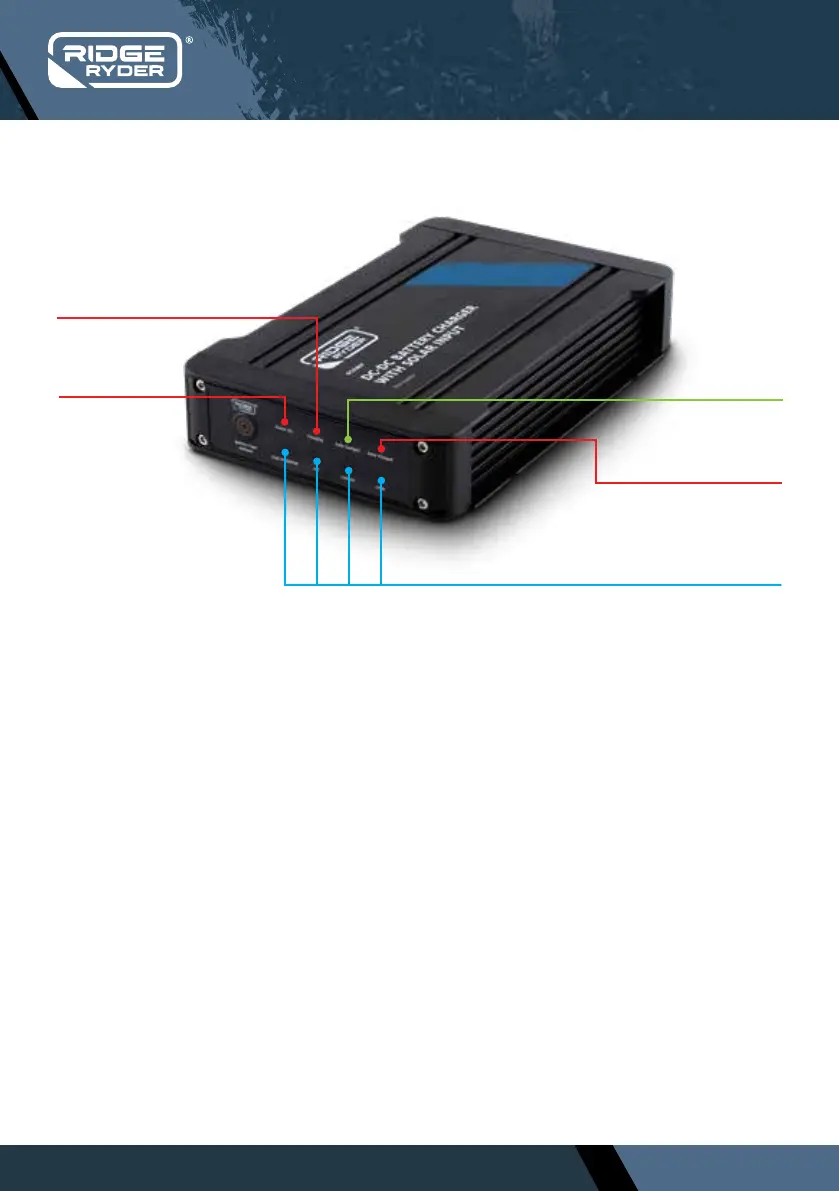
Red LED indicates
Solar input is active
The battery chemistry selected is
indicated by the blue LED
Red LED
indicates
POWER on
Red LED indicates
the unit is CHARGING
GREEN LED
indicates battery is
FULLY CHARGED
CHARGER DISPLAY
Once the charger is installed correctly, the battery chemistry needs to be selected, then it
will operate automatically, with no further input required.
●
Start the vehicle and let it idle
●
The charger will recognise that there is charge going into the main starting battery
●
Once the main starting battery reaches 13.0V (11.5V if ignition sensor is installed), the battery
charger will begin charging the auxiliary battery
●
Change the battery chemistry setting to suit your application. The default setting is Lead Acid.
Once selected, the charger will remember this as the new default setting, you do not need to
change the setting again
●
The charger will continue to operate until the vehicle is switched o (Ignition sensor
connected) and/or the main starting battery drops to 12.4V
. SOLAR INPUT
. DC BATTERY INPUT


 To Next Page