10
Troubleshooting
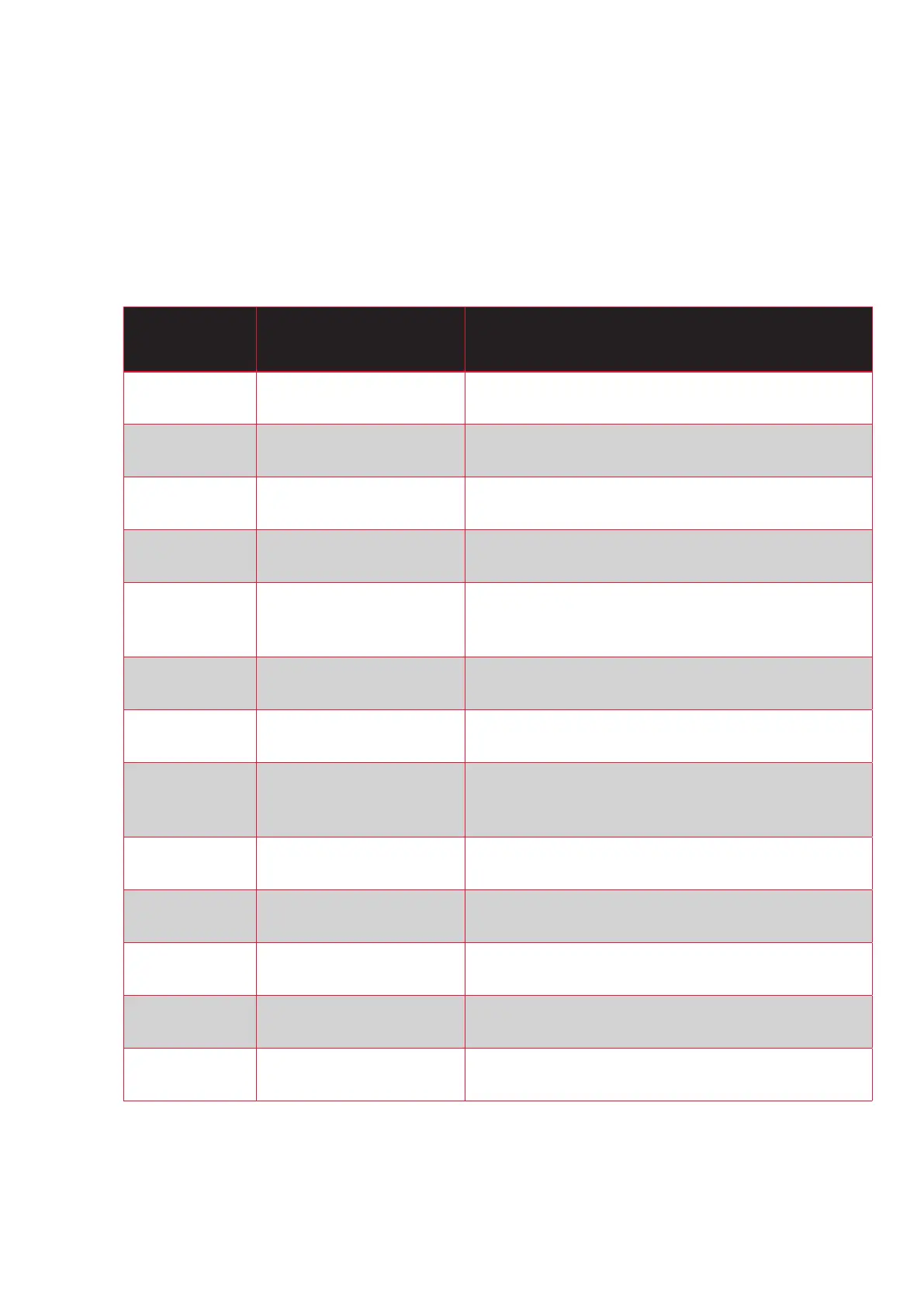
If the rst LED in the battery indicator starts to ash, this indicates that the system has
detected an error. The numbers of ashes determine the error code.
NUMBERS OF
FLASHES
DESCRIPTION SOLUTION
1 Motor error.
Check motor connection.
Contact retailer.
2 Controller fejl. Contact retailer.
3 Display error.
Check display connection.
Contact retailer.
4 Low battery voltage. Recharge the battery.
5 Brake sensor error.
Reset the handbrake to start position.
Check the light connection for moisture.
Contact retailer.
6 Speed sensor error.
Check the display connection for moisture.
Contact retailer.
7 Battery error. Contact retailer.
8 Overload.
Check connections.
Restart the bike.
Contact retailer.
9 Communication error.
Check the display connection for moisture.
Contact retailer.
10 Battery voltage to high Contact your dealer
11 Display error.
Check the display connection.
Contact retailer.
12 Temperature error
Reduce the workload or cool of the motor.
Contact your retailer.
13
Only with centermotor.
Torque sensor error.
Contact retailer.
*Check the wire connections:
• are connected
• are free from water
• the pins are not bend or damaged


 To Next Page