VAULT CSMART WIRELESS RM311 / RM313 / RM472 / RM473 / RM474 / RM486
VAULT CSMART WIRELESS
IMPORTANT:
Carefully read and understand these instructions
before using this RidgeMonkey product.
Keep these instructions for future reference.
TECHNICAL SPECIFICATIONS:
Vault C-Smart Wireless 26950mAh
Capacity: 26950mAh @ 3.7V / 9Ah @ 11.1V / 99.9Wh
Dimensions: 182mm x 103mm x 30mm
Weight (excluding accessories): 650g
Vault C-Smart Wireless 42150mAh
Capacity: 42150mAh @ 3.7V / 13Ah @ 11.1V / 144Wh
Dimensions: 190mm x 110mm x 42mm
Weight (excluding accessories): 850g
Vault C-Smart Wireless 77850mAh
Capacity: 77850mAh @ 3.7V / 24Ah @ 11.1V / 266Wh
Dimensions: 230mm x 130mm x 44mm
Weight (excluding accessories): 1495g
26950mAh model:
Input:
1x C-Smart USB-C Power Delivery, 45W max
Output:
1x Qi compatible wireless pad, 10W max
1x C-Smart USB-C Power Delivery, 45W max
1x 12V DC with cigarette lighter socket adaptor, 60W max
2x USB-A: DC 5V 2.4A (max), 3.2A total
42150mAh & 77850mAh models:
Input:
1x C-Smart USB-C Power Delivery, 60W max
Output:
1x Qi compatible wireless pad, 10W max
1x C-Smart USB-C Power Delivery, 60W max
1x 12V DC cigarette lighter socket, 156W max
2x USB-A: DC 5V 3A (max), 4.8A total
3 4
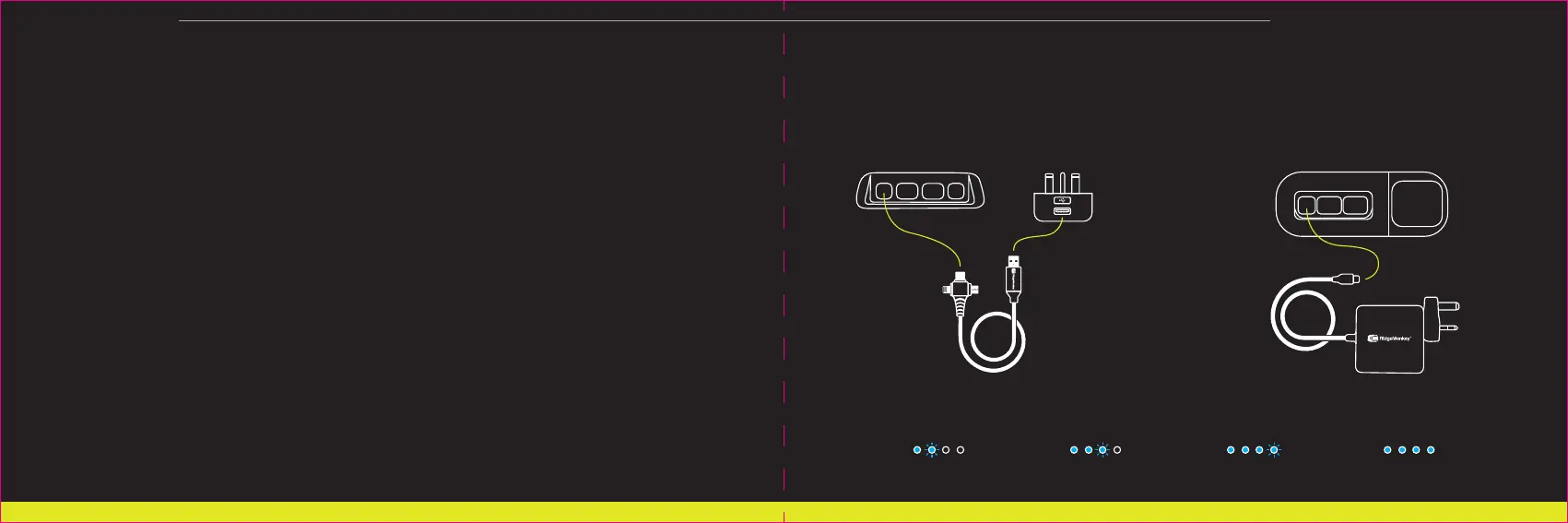
INSTRUCTIONS FOR USE:
26950mAh model:
Connect the USB-C port to the included 12W USB Mains
Adaptor using the included USB-A to Multi Out cable.
42150mAh & 77850mAh models:
Connect the USB-C port to the included 60W
USB-C Power Delivery Mains Adaptor.
CHARGING YOUR RIDGEMONKEY VAULT CSMART WIRELESS:
The Vault C-Smart Wireless will automatically begin to charge at the appropriate rate. The Vault C-Smart
Wireless will automatically cease to accept current from the adaptor when fully charged, however prompt
disconnection of all power sources is always recommended upon displaying a full charge.
25% charged 50% charged 75% charged 100% charged



 To Next Page