EasyManua.ls Logo

RIDGID D Series - User Manual

RIDGID D Series
4 pages
Print Icon
To Next Page IconTo Next Page
Loading...
2017-2018 FORD
®
RAPTOR
®
FOG MOUNT
INSTALLATION INSTRUCTIONS
*THIS MOUNT FITS THE FOLLOWING LIGHTS:
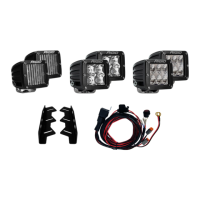
(6) D-Series
®
PRODUCT INCLUDES:
(2) Raptor Fog Mount
* LIGHTS SOLD SEPARATELY
IMPORTANT
THANK YOU FOR PURCHASING RIGID INDUSTRIES PRODUCTS FOR YOUR VEHICLE.
Please read through all of these Instructions and tips before proceeding with the installation.
We do our best to provide a simple installation process for all applications however
a professional installation is always recommended.
Always disconnect any power sources connected to your vehicle
before servicing fuses or electrical systems.
Question and Answer IconNeed help?

Do you have a question about the RIDGID D Series and is the answer not in the manual?

Summary

2017-2018 Ford Raptor Fog Mount Installation

Important Safety and Installation Notes

General advice including disconnecting power sources before servicing electrical systems.

Step 1: Prepare Bumper Brace

Remove or loosen specific bolts on the bumper brace to allow it to dangle for installation.

Step 2: Install Fog Light Bracket

Install the RIGID fog light bracket using provided hardware and an M6 bolt/washer.

Step 3: Mount Carriage Bolt

Install the provided M6 carriage bolt and M6 flange head nut, but do not fully tighten yet.

Step 4: Install Drop Mount Brackets

Install (6) extended drop mount brackets, ensuring carriage bolts are pre-installed.

Step 5: Install Lights and Final Tightening

Mount the lights to the bracket, adjust for fitment, then fully tighten all bolts.

Warranty Information

Summary

2017-2018 Ford Raptor Fog Mount Installation

Important Safety and Installation Notes

General advice including disconnecting power sources before servicing electrical systems.

Step 1: Prepare Bumper Brace

Remove or loosen specific bolts on the bumper brace to allow it to dangle for installation.

Step 2: Install Fog Light Bracket

Install the RIGID fog light bracket using provided hardware and an M6 bolt/washer.

Step 3: Mount Carriage Bolt

Install the provided M6 carriage bolt and M6 flange head nut, but do not fully tighten yet.

Step 4: Install Drop Mount Brackets

Install (6) extended drop mount brackets, ensuring carriage bolts are pre-installed.

Step 5: Install Lights and Final Tightening

Mount the lights to the bracket, adjust for fitment, then fully tighten all bolts.

Warranty Information

RIDGID D Series Specifications

General IconGeneral
BrandRIDGID
ModelD Series
CategoryAutomobile Accessories
LanguageEnglish