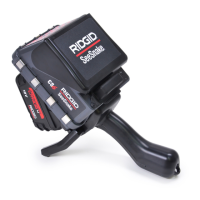
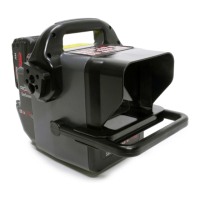
The RIDGID SeeSnake CS10 is a portable monitor and camera control unit designed for pipe inspection. It connects easily to any SeeSnake Reel and camera, allowing users to capture audio, video, and still images, and then automatically assemble them into an HTML report on a USB thumb drive. The CS10 features readily accessible controls for adjusting the camera and display, and for controlling the in-line Sonde built into many SeeSnake cameras.
Function Description
The primary function of the SeeSnake CS10 is to facilitate pipe inspections by providing a portable display and control interface for SeeSnake cameras. It enables the capture of various media types—photos, videos, and Autolog videos—which are then organized into reports. The built-in Sonde allows for underground camera location, and the unit can also connect to an external Line Transmitter for line tracing the path of a SeeSnake cable in a pipe. The CS10 is fully compatible with SeeSnake HQ software, which offers advanced report generation, customization, and distribution options.
Usage Features
The CS10 offers a user-friendly interface with dedicated keypads for various functions. The main keypad includes keys for photo capture, video recording, Autolog video recording, menu access, job management, and microphone muting. An additional mini keypad provides controls for power, LED brightness, Sonde activation, and zeroing the counter.
Powering the Unit: The CS10 can be powered by either Li-Ion rechargeable batteries or an external power cord. Battery indicator LEDs provide real-time status of the battery charge. For optimal safety, battery power is the preferred method, and the unit should not be operated from AC power in wet environments.
Connecting to SeeSnake Reel: The CS10 connects to a SeeSnake System Cable via a secure locking sleeve. Proper alignment of the guide pin and socket is crucial for connection.
Display and Interface: The on-screen interface consists of a "Live View" for the video feed and a "Status Overlay" at the bottom, displaying time, date, and, if equipped with a CountPlus system, the distance count. The front cover of the unit doubles as a sun hood to reduce glare during inspections.
- Photos: Pressing the Photo Key captures a still image. A "Photo Saving Icon" appears during saving, followed by a "Saved Icon" upon successful storage.
- Video: The Video Key initiates and stops continuous video recording. A "Video Icon" briefly appears at the start, and "Video Saving Icon" and "Saved Icon" indicate the saving process.
- Autolog Video: The Autolog Key starts and stops Autolog video recording, which captures highly compressed video at four frames per second. This format uses a smaller file size than standard video and pauses frame addition when the camera is stationary. An "Autolog Icon" appears at the start, and "Autolog Saving Icon" and "Saved Icon" indicate the saving process.
- Audio Annotation: The microphone is ON by default, allowing continuous audio recording during video and Autolog video. It can be muted using the Microphone Mute Key to exclude unwanted sounds.
Job Management and Reporting:
- The CS10 automatically saves all captured media to the latest "Job" on an inserted USB thumb drive. A new Job is created if none exists.
- Reports can be generated automatically upon USB ejection (if "Auto" report creation is selected in settings) or manually through the Job Manager Menu. These reports are saved as HTML files on the USB drive, viewable in any web browser.
- The Job Manager Key provides access to the "Media List" for reviewing captured photos, videos, and Autolog videos directly on the CS10. Videos can be fast-forwarded and rewound.
Camera Location and Line Tracing:
- Sonde Location: Many SeeSnake cameras have a built-in Sonde that transmits a 512 Hz signal. The Sonde Key on the CS10 toggles this signal ON or OFF, allowing a RIDGID locator (e.g., SR-20, SR-60, Scout™, NaviTrack® II) to detect the camera's underground location.
- Line Tracing: The CS10 can be used with an external line transmitter to trace the push cable's path underground. The transmitter connects to the Transmitter Clip-on Terminal on the CS10.
Settings Adjustments: The Menu Key provides access to various settings, including:
- Display Settings: Adjust monitor color, contrast, and brightness.
- Time and Date: Change the format and set the current time and date.
- Measurement Units: Select between feet or meters for the CountPlus cable measurement system, or set to "auto" for automatic detection based on camera type (NTSC for feet, PAL for meters).
- Video Format: Choose between MJPEG or MPEG4 video formats.
- Language Preference: Select the desired language for the interface.
- Report Creating Preferences: Choose between "Auto" or "Manual" report generation.
Maintenance Features
Pre-Operation Inspection: Before each use, a thorough inspection of the CS10 is recommended. This includes checking for proper power connections, ensuring cords and cables are undamaged, cleaning any dirt or contamination, and verifying that all parts are in good working order. Any identified problems should be corrected before use.
Software Updates: The CS10's software can be updated via USB. If SeeSnake HQ's Auto-Launcher is enabled, update notifications will appear automatically. Otherwise, updates can be manually checked through the SeeSnake HQ software. The update process involves downloading the software to a USB drive, inserting it into the CS10, and following on-screen prompts for installation and reboot.
Cleaning: To prevent electrical shock, all cords, cables, and batteries must be disconnected before cleaning. The CS10 should be cleaned with a damp cloth, avoiding liquid or abrasive cleaners. Only cleaners approved for LCD screens should be used on the display, and no liquid should enter the unit.
Transport and Storage: The CS10 should be stored indoors in a dry, temperature-controlled environment (14°F to 158°F [-10°C to 70°C]), away from heat sources. Batteries should be removed before shipping or extended storage. The unit should be kept in a locked area, out of reach of children and untrained users, and protected from heavy shocks or impacts during transport.
Service and Repair: Any service or repair of the SeeSnake CS10 must be performed by a RIDGID Independent Authorized Service Center to ensure safe operation. Contact information for local distributors and technical support is provided in the manual.
Disposal: The CS10 contains valuable recyclable materials. Components should be disposed of in compliance with local regulations, and users are advised to contact their local waste management authority for information. For EC countries, electrical equipment should not be disposed of with household waste but collected separately for environmentally correct disposal.
Battery Disposal: RIDGID participates in the Call2Recycle® program for rechargeable battery recycling. Used batteries can be returned to collection locations, or users can call a provided number or visit the Call2Recycle website for more information. For EC countries, defective or used battery packs/batteries must be recycled according to guideline 2006/66/EC.


 To Next Page
 General