EasyManua.ls Logo

RIDGID SeeSnake CS6 - User Manual

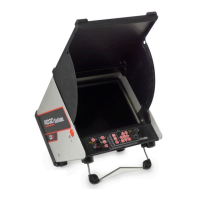
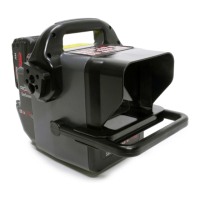
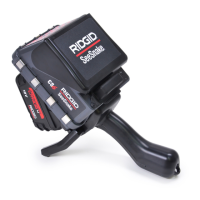
RIDGID SeeSnake CS6
16 pages
Print Icon
To Next Page IconTo Next Page
Loading...
Original Instructions – English – 1
WARNING!
Read this Operator’s Manual
carefully before using this
tool. Failure to understand
and follow the contents of
this manual may result in
electrical shock, fire and/or
serious personal injury.
Serial
No.
Operators Manual
Question and Answer IconNeed help?

Do you have a question about the RIDGID SeeSnake CS6 and is the answer not in the manual?

Summary

Introduction and Safety Fundamentals

Regulatory Statements

Compliance statements for EC and FCC regulations.

Safety Symbols Explanation

Explanation of safety alert symbols and signal words used in the manual.

General Safety Rules

Work Area Safety Guidelines

Guidelines for maintaining a safe and organized work environment.

Electrical Safety Precautions

Precautions to prevent electrical shock hazards during operation.

Personal Safety Recommendations

Recommendations for operator alertness, PPE, and proper attire.

Equipment Use, Care, and Specific Safety

Equipment Use and Care Instructions

Instructions for proper usage, maintenance, and care of the equipment.

Battery Use and Care Guidelines

Guidelines for safe and effective use and care of batteries.

SeeSnake CS6 Specific Safety

Critical safety precautions specific to the CS6 operation.

Description, Specifications, and Standard Equipment

CS6 Description Overview

Overview of the CS6 as a portable CCU for SeeSnake reels.

SeeSnake CS6 Technical Specifications

Technical specifications including dimensions, power, and display.

Included Standard Equipment

List of standard accessories and components included with the CS6.

Components Identification

Visual Component Identification

Diagrams identifying key components from side, front, and connection views.

CS6 Keypad and Connection Icons

Layout of the CS6 keypad and definitions of connection icons.

Keypad and Function Overview

CS6 Keys and Functions Detailed

Detailed list of CS6 keys and their specific functions.

Brightness, Image Flip, and Sonde Controls

How to adjust brightness, flip images, and control the Sonde.

Zero Key Usage for Measurement

Usage of the Zero Key for setting inspection points and measurements.

Pre-Operation Inspection and Setup

Pre-Operation Safety Warning

Critical safety warning before conducting pre-operation inspection.

Work Area Guidelines and Setup

Checks for work area conditions, lighting, and equipment setup.

NOTICE and Placement Guidance

Notice on wet conditions and guidance on CS6 placement for optimal use.

Component Features and Usage

Details on the function of the front cover, USB port cover, kick stand, and docking handle.

Connecting and Powering the CS6

System Cable Connection Notice

Important notice regarding proper handling of the system cable connector.

Power Source Safety Warning

Safety warning about using the AC adapter outdoors.

Operating Instructions and Recording

Operational Safety and Setup

General safety warnings and initial setup for performing an inspection.

Recording and USB Drive Usage

Instructions for video recording and proper usage of USB drives.

Inspection Recording and Measurement

Autolog Video and Audio Recording

Details on Autolog video recording and audio control features.

Taking Photos and Measuring Inspection

Procedure for capturing photos and using the Zero Key for measurements.

Sonde and Line Tracing Operations

Locating and Tracing with Sonde and Cable

Using the Sonde and line tracing for camera location and cable tracing.

Operation Diagrams

Diagrams illustrating Sonde locating and Push Cable line tracing.

System Settings and Configuration

Custom Settings Menu Overview

Accessing and navigating the custom settings menu for adjustments.

On-screen Text Icon Definitions

Definitions for icons used to display on-screen text and notes.

Report Management and Delivery

Job and Report Operations

Managing jobs, previewing reports, adding notes, and delivering final reports.

Report Preview Diagram

Visual example of a report preview screen within the interface.

SeeSnake HQ Software Usage

Software Interface and Media Editing

Overview of SeeSnake HQ, including editing media and previewing reports.

Maintenance and Cleaning Procedures

Software Updates

Procedure for updating the CS6 software via USB.

Cleaning the CS6 Unit

Safety warning and instructions for cleaning the CS6 unit.

Compatible Accessories and Safety

Accessory Usage Warning

Warning to only use specifically designed accessories with the CS6.

Equipment Handling and Maintenance

Transportation and Storage Guidelines

Recommendations for storing and transporting the equipment safely.

Service, Repair, and Disposal

Information on service, repair, product disposal, and battery recycling.

Troubleshooting Common Issues

Camera Feed and Battery Problems

Solutions for no camera feed and battery warning indicators.

Measurement and Counter Accuracy

Troubleshooting for count accuracy and counter battery issues.

Indicator Lights and Measurement Symbols

Resolving issues related to SOS blinking LED and '+' measurement symbols.
Summary

Introduction and Safety Fundamentals

Regulatory Statements

Compliance statements for EC and FCC regulations.

Safety Symbols Explanation

Explanation of safety alert symbols and signal words used in the manual.

General Safety Rules

Work Area Safety Guidelines

Guidelines for maintaining a safe and organized work environment.

Electrical Safety Precautions

Precautions to prevent electrical shock hazards during operation.

Personal Safety Recommendations

Recommendations for operator alertness, PPE, and proper attire.

Equipment Use, Care, and Specific Safety

Equipment Use and Care Instructions

Instructions for proper usage, maintenance, and care of the equipment.

Battery Use and Care Guidelines

Guidelines for safe and effective use and care of batteries.

SeeSnake CS6 Specific Safety

Critical safety precautions specific to the CS6 operation.

Description, Specifications, and Standard Equipment

CS6 Description Overview

Overview of the CS6 as a portable CCU for SeeSnake reels.

SeeSnake CS6 Technical Specifications

Technical specifications including dimensions, power, and display.

Included Standard Equipment

List of standard accessories and components included with the CS6.

Components Identification

Visual Component Identification

Diagrams identifying key components from side, front, and connection views.

CS6 Keypad and Connection Icons

Layout of the CS6 keypad and definitions of connection icons.

Keypad and Function Overview

CS6 Keys and Functions Detailed

Detailed list of CS6 keys and their specific functions.

Brightness, Image Flip, and Sonde Controls

How to adjust brightness, flip images, and control the Sonde.

Zero Key Usage for Measurement

Usage of the Zero Key for setting inspection points and measurements.

Pre-Operation Inspection and Setup

Pre-Operation Safety Warning

Critical safety warning before conducting pre-operation inspection.

Work Area Guidelines and Setup

Checks for work area conditions, lighting, and equipment setup.

NOTICE and Placement Guidance

Notice on wet conditions and guidance on CS6 placement for optimal use.

Component Features and Usage

Details on the function of the front cover, USB port cover, kick stand, and docking handle.

Connecting and Powering the CS6

System Cable Connection Notice

Important notice regarding proper handling of the system cable connector.

Power Source Safety Warning

Safety warning about using the AC adapter outdoors.

Operating Instructions and Recording

Operational Safety and Setup

General safety warnings and initial setup for performing an inspection.

Recording and USB Drive Usage

Instructions for video recording and proper usage of USB drives.

Inspection Recording and Measurement

Autolog Video and Audio Recording

Details on Autolog video recording and audio control features.

Taking Photos and Measuring Inspection

Procedure for capturing photos and using the Zero Key for measurements.

Sonde and Line Tracing Operations

Locating and Tracing with Sonde and Cable

Using the Sonde and line tracing for camera location and cable tracing.

Operation Diagrams

Diagrams illustrating Sonde locating and Push Cable line tracing.

System Settings and Configuration

Custom Settings Menu Overview

Accessing and navigating the custom settings menu for adjustments.

On-screen Text Icon Definitions

Definitions for icons used to display on-screen text and notes.

Report Management and Delivery

Job and Report Operations

Managing jobs, previewing reports, adding notes, and delivering final reports.

Report Preview Diagram

Visual example of a report preview screen within the interface.

SeeSnake HQ Software Usage

Software Interface and Media Editing

Overview of SeeSnake HQ, including editing media and previewing reports.

Maintenance and Cleaning Procedures

Software Updates

Procedure for updating the CS6 software via USB.

Cleaning the CS6 Unit

Safety warning and instructions for cleaning the CS6 unit.

Compatible Accessories and Safety

Accessory Usage Warning

Warning to only use specifically designed accessories with the CS6.

Equipment Handling and Maintenance

Transportation and Storage Guidelines

Recommendations for storing and transporting the equipment safely.

Service, Repair, and Disposal

Information on service, repair, product disposal, and battery recycling.

Troubleshooting Common Issues

Camera Feed and Battery Problems

Solutions for no camera feed and battery warning indicators.

Measurement and Counter Accuracy

Troubleshooting for count accuracy and counter battery issues.

Indicator Lights and Measurement Symbols

Resolving issues related to SOS blinking LED and '+' measurement symbols.

RIDGID SeeSnake CS6 Specifications

General IconGeneral
BrandRIDGID
ModelSeeSnake CS6
CategoryMonitor
LanguageEnglish

Related product manuals