27
OPERATION
4.3.6 Error Screen
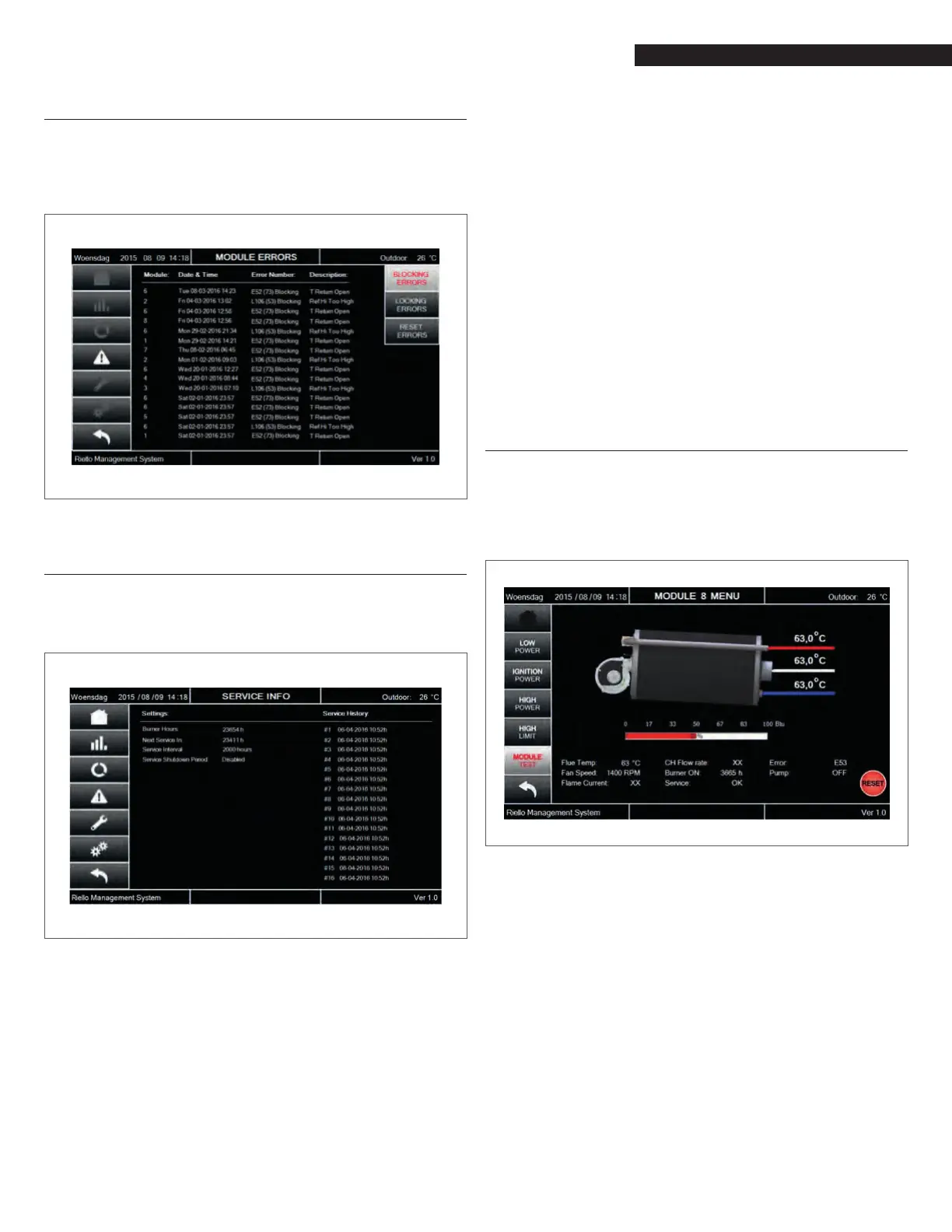
For each boiler, the Error screen shows the list of the last 40 errors
occurred on its own modules.
The errors are listed in chronological order, under two categories:
Blocking errors and Locking errors.
Fig. 51
Error screen
4.3.7 Service Screen
The Service screen shows the main parameters of the Service Re-
minder function.
Fig. 52
Service screen
The Service Reminder will remind the owner/user of the appli-
ance to service the appliance at a specied Service_Interval (fac-
tory setting).
When service is not done within the specied time, a service re-
minder will be shown on the screen, alternating with the normal
status display.
The Service_Interval can be set as the number of burn hours or
the number of operational (appliance is powered) hours.
This can be done by setting the Service_Hour_Counter (factory) pa-
rameter.
When the Service Reminder is active, the time before service is
actually done is logged by the 900PB (in hours). This time is called
the Service Overdue time. With this log the factory can read back
how long service was overdue on the system/appliance which can
be useful when handling warranty claims.
A maximum of 15 Service moments can be logged by the 900PB,
when the log is full it will overwrite the oldest log entry.
Each time the Service Reminder is being reset, a new service mo-
ment is counted and the Service Overdue counter will be stored in
the log/history.
There are two types of service reminders: (Normal) Service Re-
minder and Service Shutdown.
The (normal) Service Reminder will only show the service remind-
er message on the screen and will log how many hours the service
is overdue, and the appliance will remain fully operational.
The Service Shutdown has the same functionality as the Service
Reminder but will shut-down the appliance after the specied
Service_Shutdown_Period (factory setting) after the service re-
minder became active (message is displayed).
The owner/user has a warning before the appliance will actually
shutdown. Re-enabling the appliance is only possible by resetting
the Service Reminder (Shutdown) which is done by the installer.
4.3.8 Module Test Screen
This screen is designed to support the installer and service activ-
ities. When pushing the Module Test button on Module screen, a
new set of buttons appears on the left side of the screen.
Fig. 53
Module Test Screen
Setup, adjustments and checks of combustion parameters can be
done using the Low Power, Ignition Power and High Power but-
tons.
In addition, the High Limit button allows to carry out the high limit
temperature switch functionality test.



 To Next Page