Programmable Relay ● User Manual for ELC, EXM and PR Series 156 2020 v6.0 ● © Rievtech Co.,
Ltd. ● www.rievtech.com
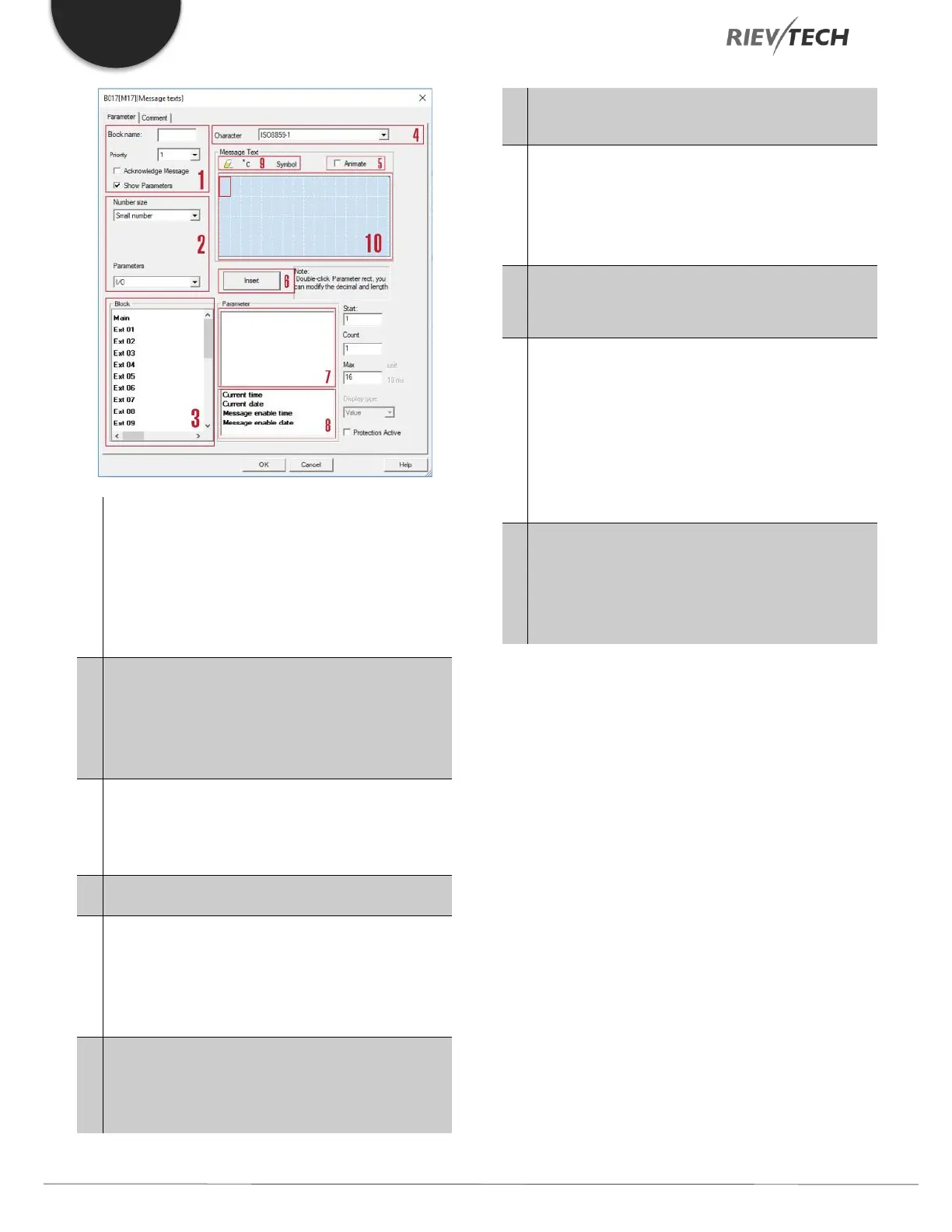
"General" area
Here you will find the following settings: ·
Priority of the message text
Check box for message text
acknowledgement
Kinds of parameters and the number size selection
area
IO status, analogue IO values analogue flags and
blocks can be inserted into LCD for displaying.
"Blocks" area
Shows a list of all the circuit program blocks and
their parameters.
Animate option
This option is used for display animation on the
ELC-43TS. See user manual of ELC-43TS for further
details.
"Insert" button
Button for inserting a parameter selected from the
“Block parameters” area.
"Block parameters" or "General parameters" area
into the message text.
"Block parameters" area
Shows the parameters of a block selected from the
"Blocks" area which you can output in the message
text.
"General parameters" area
Shows general parameters such as the current date.
"Delete" button
Button for deleting entries from the "Messages"
area
"Special characters" button
Button for inserting special characters in the
"Messages" area
"Messages" area
You arrange the message text in this area.
Information entered in this area corresponds with
that on the xLogic display.
To arrange the message text
From the "Blocks" area, select the block whose parameters
you want to output.
Drag and drop the parameters required from the "Block
parameters" to the "Messages" area. You may also use the
"Insert" button to do so.
In the "Messages" area, you can add parameter data as
required.
Particular characteristics to be noted when configuring
The message text can be configured in the block
properties dialogue. You can enter up to 4 lines for each
message text (the text display of the xLogic is 4 x 16
characters) and set the priority. You can move to the next


 To Next Page
 Loading...


