record file and you’ll see the recording time and the status
of the output.
NOTICE:
1. The ELC-MEMORY can only be inserted into
the RS232 port ( programming port) of ELC series CPU.
2. If this function block is working, the RS232
port (programming port) will be occupied, some data will
be being transferred, if you want to use the
programming port for some purposes (for example
download or upload program), you must make sure the
Trg pin of this block keeps at Low status or stop the CPU
using the panel keys on the LCD.
Memory Read
Description of function
Only when there is a low to high trigger at Trg pin, the
Memory Read block will be activated once and xLogic CPU
will read correlative data (bit or short) to set pre-
configured register from the file in the SD card of ELC-
MEMORY module, at the same time the output will switch
on if the read action had been done successfully.
Only when there is a low to high
trigger at Trg pin, the Memory Read
block will be activated and xLogic
CPU will read some data (bit or
short) to set pre-configured register
from the file in the SD card of ELC-
MEMORY module. Each trigger only
writes once.
Reset the Memory Read block and
set the output to 0 via the R (Reset)
input.
Reset has priority over Trg
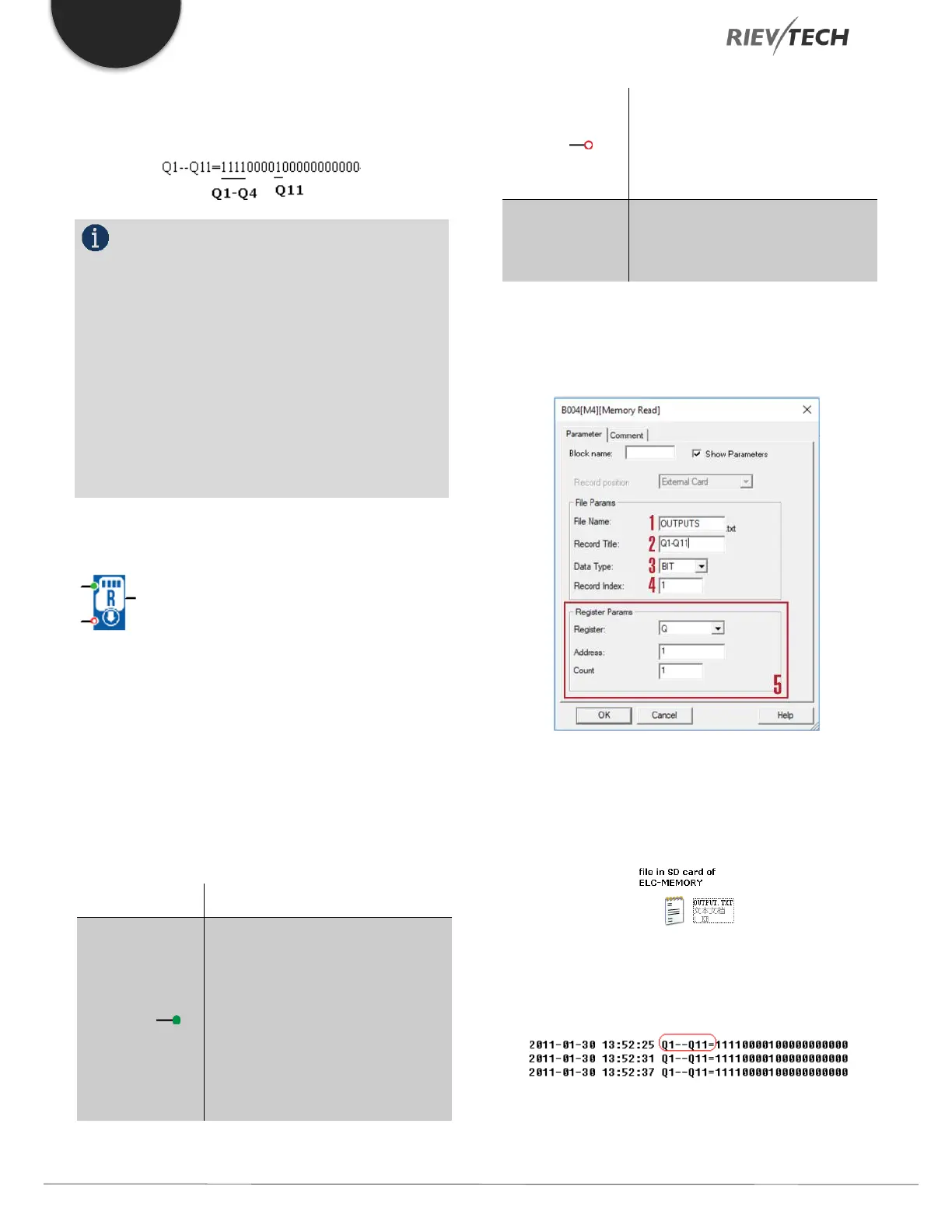
Description of Memory write block’s property dialogue
box:
1. Filename
The name of the file which you want to access is stored in
the mini-SD card of the ELC-MEMORY module.
Above is an example of the “OUTPUT.TXT”
2. Record Title
3. Data Type:


 To Next Page
 Loading...


