For the PR-26DC-DAI-RT-WIFI there is no need to select
BPS, as the software will automatically select it. But for the
EXM-12DC-DA-RT-WIFI you will need to choose the baud
rate (default is 9600). If the WIFI module is restored to
factory settings, you need to select Is 57600.
8.5.4. Confirm Wi-Fi Parameters
The operation is the same for either Wi-Fi CPU. The
following description uses the PR-26DC-DAI-RT-WIFI as its
example.
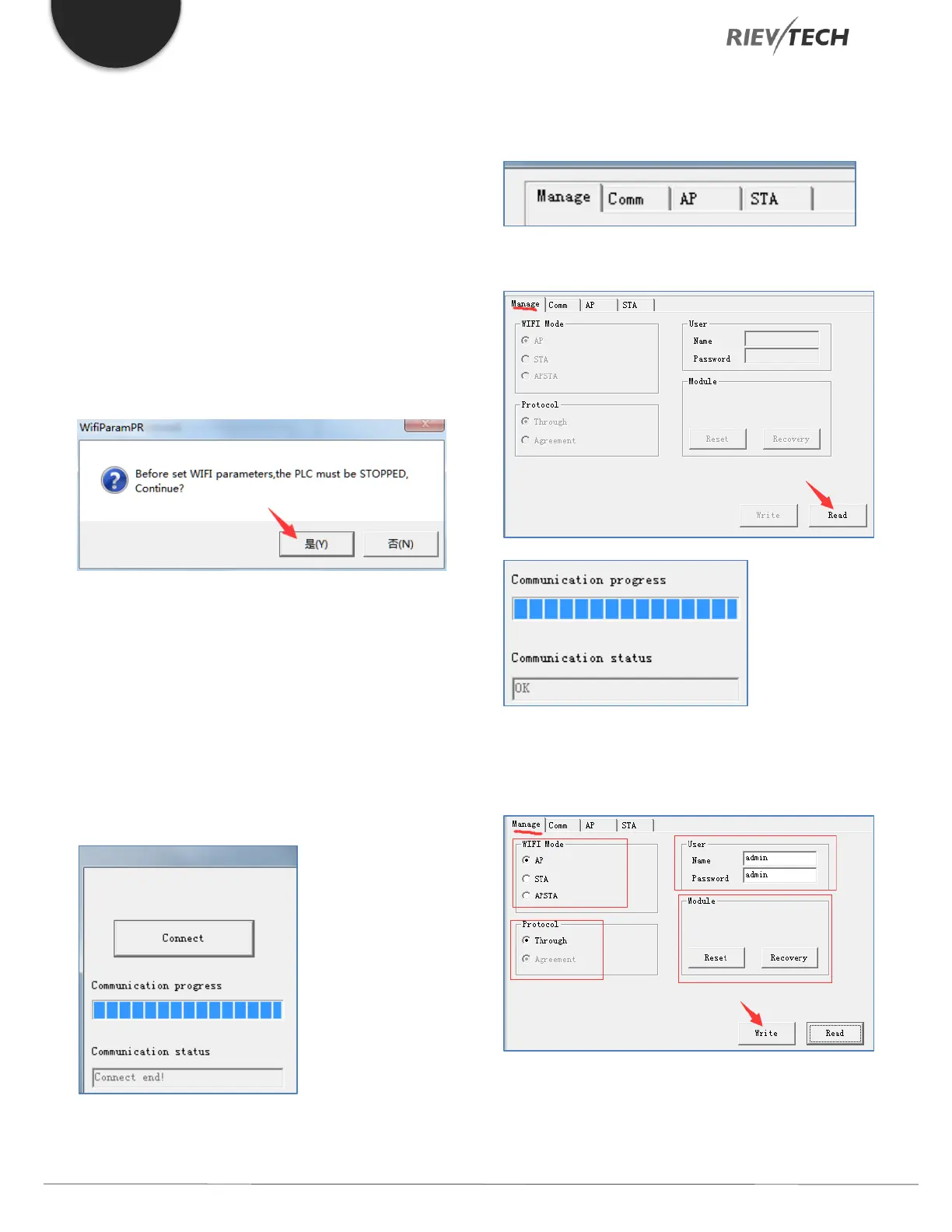
Click ‘Connect’ and click ‘OK’ when prompted
During the connection process, the progress bar will
indicate the state of connection. The process bar will
pause, but this is normal. If the pause is too long or it
appears you can’t connect, power off the PLC and restart
the connection process again.
Once a successful connection has been made, the
communication window will show the message ‘Connect
end!’.
Next configure the information required in the
‘Manage’, ‘Comm’, ‘AP’ and ‘STA’ tabs
Select the Manage page, and click ‘Read’ button
This above figure confirms a successful Read from the PLC.
Configure the options as shown in the figure below:
WIFI Mode:



 To Next Page