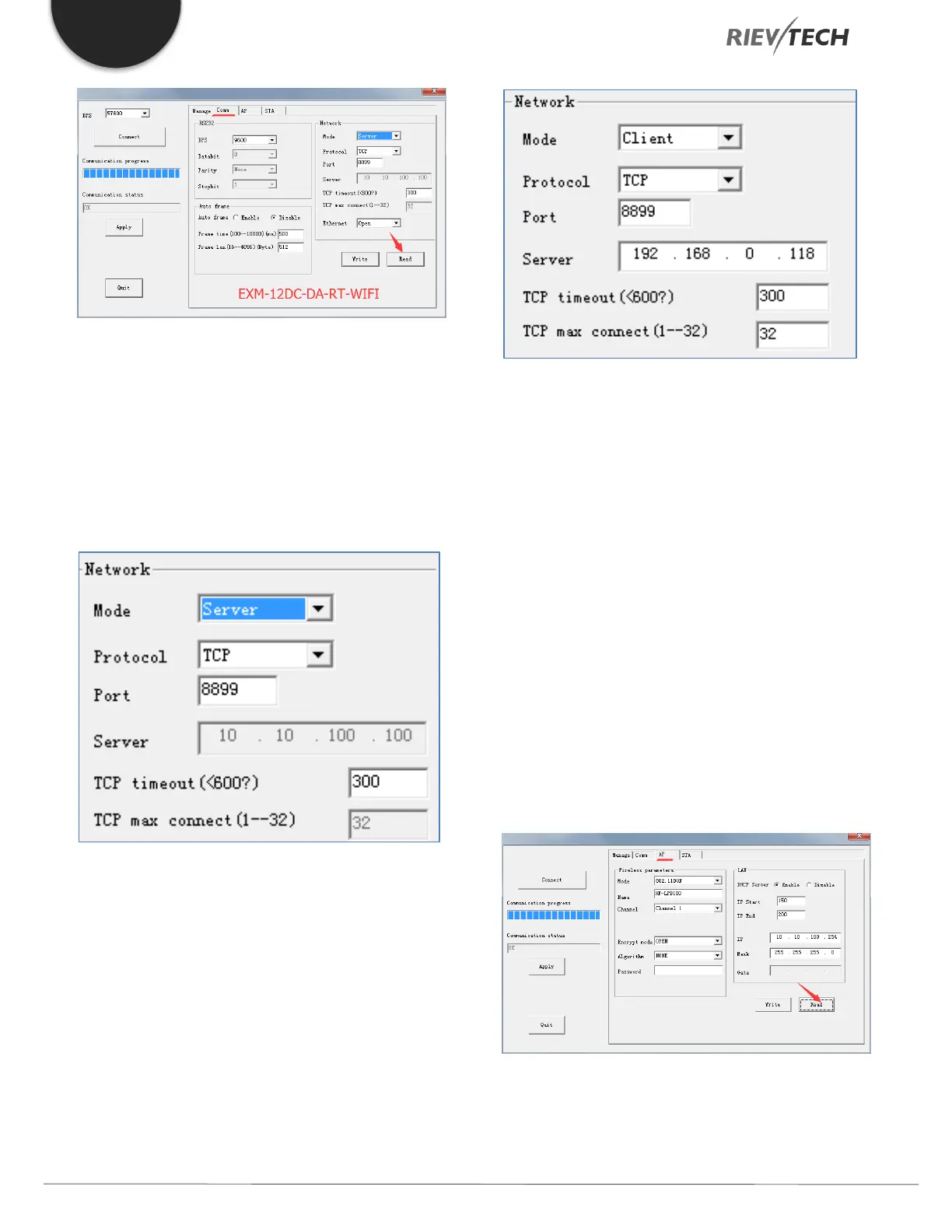
Usually the default settings will suffice, but if you wish to
change them remember to click the ‘Write’ button to save
your changes.
The PLC can either use the Server or Client mode for
communication.
Server Mode:
Using the above settings, the PLC will be used as the
server and its port will be 8899.
Client mode:
Using the above settings, the PLC will be used as the Client
and will communicate with a server whose IP address is
192.168.0.118, using port 8899.
Note:
Although the maximum number of TCP connection is 32,
when Modbus Read/Write is performed, the PLC can only
communicate with ONE network device at a time.
After setting the parameters of this page, click the ‘Write’
button to write the parameters to the WIFI module.
To take effect, you need to click the ‘Apply’ button on the
right. It is recommended to click the ‘Apply’ button after
setting the parameters of all the pages.
Select the ‘AP’ page and click the ‘Read’ button.
The AP page is used to set the access point WIFI network
parameters. Other devices use the WIFI name and
password set on this page to access the WIFI network.



 To Next Page