Once configured, click the ‘Write’ button.
To take effect, you need to click the ‘Apply’ button on the
right. It is recommended to click the ‘Apply’ button after
setting the parameters of all the pages.
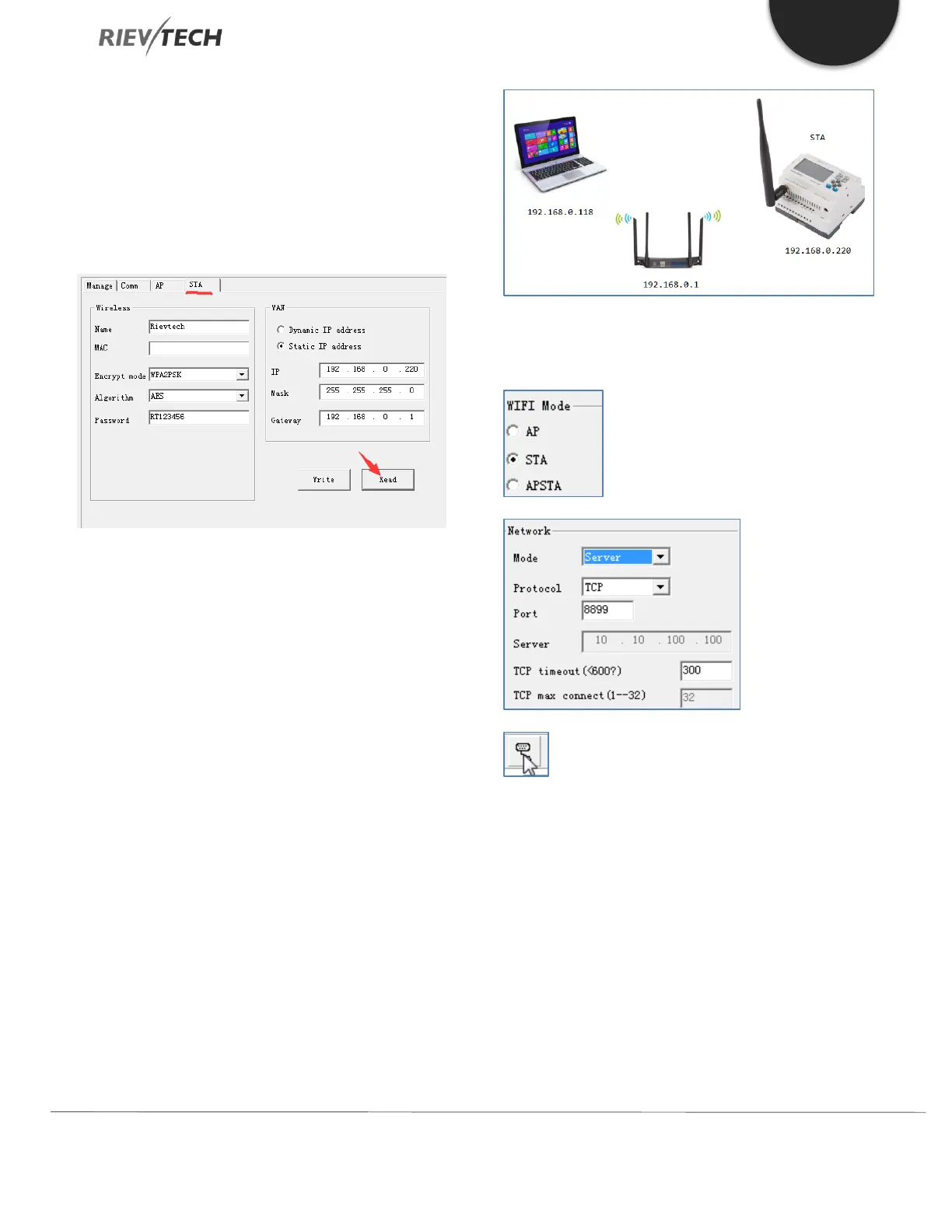
Select the ‘STA’ page and click the ‘Read’ button.
Use this page to configure the Wi-Fi parameters,
username, password, encryption, etc. of the Wi-Fi network
the PLC is to be connected to.
After completing all the necessary changes, click the ‘Write’
button to update the Wi-Fi module.
To take effect, you need to click the ‘Apply’ button on the
right. It is recommended to click the ‘Apply’ button after
setting the parameters of all the pages.
8.5.5. Setting the PLC as a Server Example
The Wi-Fi of the PLC works in STA mode.
The Wi-Fi of the PLC and the IP address of the PC are on
the same subnet.
The PLC is used as a Server. The Wi-Fi module works in
Server mode.
Click this button in xLogicsoft to Open the serial
port configuration window. The settings in the software
are configured as follows:



 To Next Page