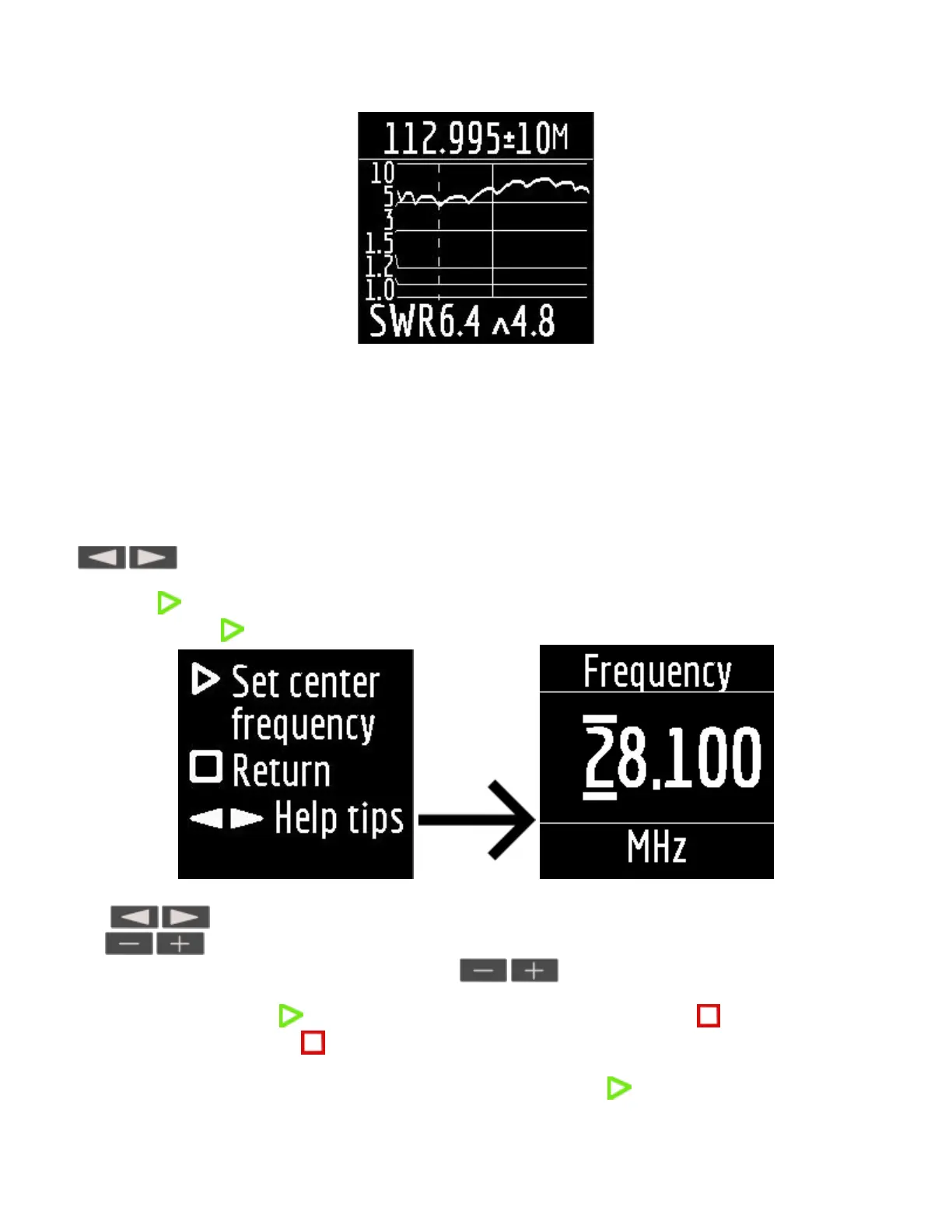
at the top of the screen: the value of the center frequency of the measurement and the width of the
measurement band.
in the middle of the screen: SWR chart
at the bottom of the screen: the SWR value under the marker (solid vertical line) and the minimum of the SWR
found (dashed vertical line).
There are two ways to set the center of the measurement frequency:
keys. Pressing the key once will change the frequency discretely to a certain value. Pressing
and holding the key will cause an accelerated continuous change in frequency.
long press After press, a window will be available with a choice of setting the center frequency, exit or
calling Help. Press briefly and enter the frequency setting menu.
The keys select the cursor position to change units, tens, hundreds, thousands of kilohertz, and
the keys change the value.
Setting the measurement bandwidth by pressing the keys.
The minimum bandwidth is 10 kHz.
A quick double press of the key will cause a measurement in a loop. To stop click key.
To exit the mode, briefly press key.
Settings menu.
In order to get to the settings menu, in the Main menu, press and hold the key.


 To Next Page