Need help?
Do you have a question about the Right Weigh 202-DDG-02 and is the answer not in the manual?
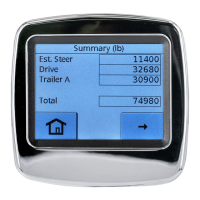
Explains how to estimate steer axle weight from drive axle data.
Lists operating temperature, power requirements, units, and housing.
Details options for mounting the gauge in the vehicle's dash.
Instructions for physically inserting the gauge into its mounting location.
Guide to attaching an optional styling cover to the gauge bezel.
Explains how to connect the gauge wiring harness to the vehicle's power.
Step to release air from the suspension system as part of setup.
Instructions for installing a street tee fitting into the air bag line.
Guidance on connecting a new air line fitting to the tee.
Steps to route the air line from the fitting to the gauge.
Instructions to repeat air line installation for additional axle groups.
Procedure to inflate suspension and check for air leaks.
Guidance on reassembling the vehicle's dash panel after installation.
How to set the gauge to display weight in English (LBS) or Metric (KG).
Instructions for adjusting display settings like backlight brightness.
Steps to calibrate the system with the vehicle empty.
Steps to calibrate the system with the vehicle fully loaded.
Addresses issues causing inconsistent or incorrect weight measurements.
Explains why calibration data might be unchangeable, often due to PIN.
Troubleshooting steps for when the scale unit fails to power up.
Solutions for calibration failures due to air pressure issues.
 General
| Type | Digital |
|---|---|
| Power Supply | Battery |
| Display | LCD |
| Accuracy | ±0.1% |
| Display Type | LCD |
| Capacity | 20000 lb |

 To Next Page