10 11
RIGHTEST Blood Glucose Monitoring System RIGHTEST Blood Glucose Monitoring System
1.4 RIGHTEST Test Strips
The RIGHTEST Blood Glucose meter GM700 Pro 2 can only be used with RIGHTEST Blood
Glucose Test Strip GS770 and the strip should be used with RIGHTEST Control Solution GC700.
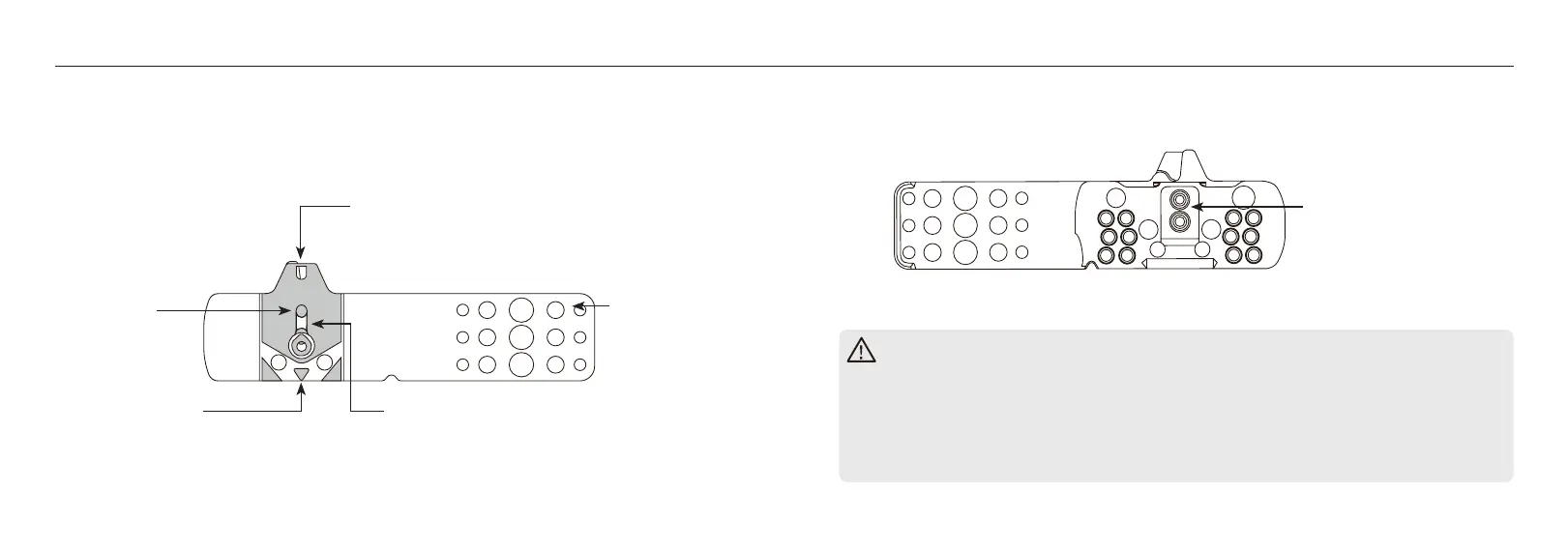
Sample Port
Apply a drop of blood or control solution.
Handle Bar
Hold the handle
when moving
the strip around.
Electrode Contact
Sensor signal output
terminal.
Noble Metal
Electrodes
Electrochemical
sensor.
Indication Symbol
Insert the test strip with the indication
symbol fpointing towards the meter.
Viewing Window
The viewing window appears yellow before
blood is applied. It turns red after being lled
with blood.
Important information
- Please refer to the Blood Glucose Test Strip GS770 insert for details.
- If the blood glucose meter or test strip are exposed to a sudden increase or drop in
temperature or been placed outside the recommended operating temperature range
(43 - 111°F or 6 - 44°C), please wait 60 minutes before using the meter and 30
minutes before using the test strip.


 To Next Page