EasyManua.ls Logo

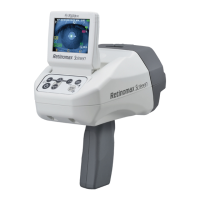
Righton Retinomax 3 - User Manual

Default Icon
93 pages
Print Icon
To Next Page IconTo Next Page
Loading...
Hand Held Auto Ref
Instructions
May 2018
D033-6E

Table of Contents

Questions and Answers

Summary

Handling Precautions

General Safety Precautions

Covers intended use, disassembly, operation, and installation/transport safety.

3. Setup

Strap Attachment and Battery Pack Installation

Instructions for attaching a strap and installing/removing the battery pack for the main unit.

3-3 Setting Up the Instrument

3-4 Charging the Battery Pack

3-4-1 Automatic Charging of the Main Unit

3-4-2 Automatic Charging of the Printer

3-6 Confirmation of Configuration

4. Measurement Procedures

4-4 Automatic Measurement Mode

4-7 Helpful Hints for Successful Measurement

4-7-1 Others: Considerations for Measurement

5-2 Alignment Direction Indication Function

5-3 Horizontal Indication Function

5-4 Auto Quick Function

5-5 Memory Function

6. Printing Out Stored Data

7. Setting Up the Instrument

7-1 SETUP Screen Navigation

Guide to navigating the SETUP screen and accessing sub-menus for configuration.

7-2 SET-MENU Screen - Measurement Setup

Configures settings for measurement modes, CYL, VD, BUZZER, INDICATOR, etc.

7-3 HOLD MODE Screen - Mode Store;Setup

Allows disabling initial settings and storing preferred modes like QUICK, RL SENSE, AX ROTATION.

7-4 OUTPUT Screen - Output Setup

Configures settings for output equipment, including PRT UNIT NO., RV OUT, and PRT RS OUT.

7-5 PRINT Screen - Print Setup

Configures print output settings like REF PRINT, PUPIL PRINT, MSG PRINT, and EYE PRINT.

7-6 RS232 C OUTPUT Screen - External Output Setup

Configures external output settings for RS232C communication, including baud rate and data bits.

7-7 CLOCK Screen - Time Setup

Sets the internal clock time and specifies the date/time print format.

7-8 NO.Screen - Patient Number Setup

Allows setting the patient number within a valid range of 001 to 999.

7-9 MESSAGE Screen - Message Input

Details how to enter and set a custom message for printouts.

8. Connecting to the Remote Vision and a Computer

9. Maintenance

10. Troubleshooting

10-1 Main Unit Troubleshooting

Addresses common issues with the main unit's power, screen, and battery pack.

10-2 Station Troubleshooting

10-3 Printer Troubleshooting

11. Specifications

Safety Information: Optical Radiation

EMC Information

Righton Retinomax 3 Specifications

General IconGeneral
BrandRighton
ModelRetinomax 3
CategoryMeasuring Instruments
LanguageEnglish

Related product manuals