EasyManua.ls Logo

Rii MX3 - User Manual

Rii MX3
16 pages
Print Icon
To Next Page IconTo Next Page
Loading...
2.4G Air Mouse & Keyboard
User Manual
> Product Diagram
Standard Version / Mic Version
GDCDCEDCED
®0S©
Home
Menu
W (=0
Page Up
Volume Down
00
CD CD CD®
CD®®®
®®®®
CD CD®®
OOOO
Page Down
IR Learning
Set Key
IR Learning Keys
(Mic. optional)
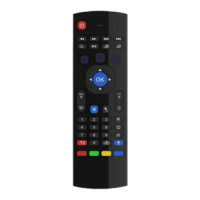
2.4G Air Mouse is a multi-axis device which integrates
the main functions of a mouse, a remote control and
a keyboard. It supports Android TV Box, Projector,
Android Smart TV, IPTV, Networked set-top Box, Mini
PC, etc. It's easy to use, just plug and play.
Question and Answer IconNeed help?

Do you have a question about the Rii MX3 and is the answer not in the manual?

Summary

Product Diagram

Important Notice

Specifications

Function Keys

How to Use

Backlight (Optional)

Explains how to turn the optional backlight on or off.

Microphone (Optional)

Details the usage of the optional microphone feature and its requirements.

Attention

Provides crucial points to consider before and during device use.

Wireless Keyboard

FAQs

IR Learning Instructions

Rii MX3 Specifications

General IconGeneral
TypeWireless Remote Control
Connectivity2.4GHz RF
Operating Range10 meters
Keyboard LayoutQWERTY
BacklitYes
GyroscopeYes
TouchpadYes
Media ControlsYes
Air Mouse FunctionYes
BatteryRechargeable Lithium-ion
CompatibilityWindows, Android, Linux, Mac OS

Related product manuals