> Wireless Keyboard
n
—
©00000O00©
©0000OO00©
000C0DO000
II
Back Cover
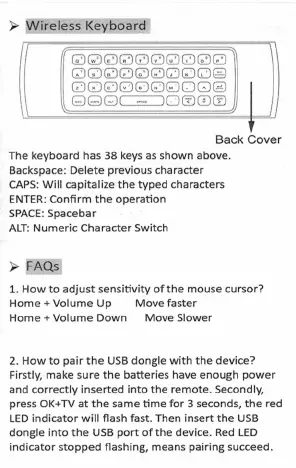
The keyboard has 38 keys as shown above.
Backspace: Delete previous character
CAPS: Will capitalize the typed characters
ENTER: Confirm the operation
SPACE: Spacebar
ALT: Numeric Character Switch
> FAQs
1. How to adjust sensitivity of the mouse cursor?
Home + Volume Up Move faster
Home + Volume Down Move Slower
2. How to pair the USB dongle with the device?
Firstly, make sure the batteries have enough power
and correctly inserted into the remote. Secondly,
press OK+TV at the same time for 3 seconds, the red
LED indicator will flash fast. Then insert the USB
dongle into the USB port of the device. Red LED
indicator stopped flashing, means pairing succeed.


 To Next Page