Measure smoker temperature
1. You can use one probe or two Probe to measure and monitor the temperature inside the smoker.
Clip the probe you selected to grill rack of smoker chamber.
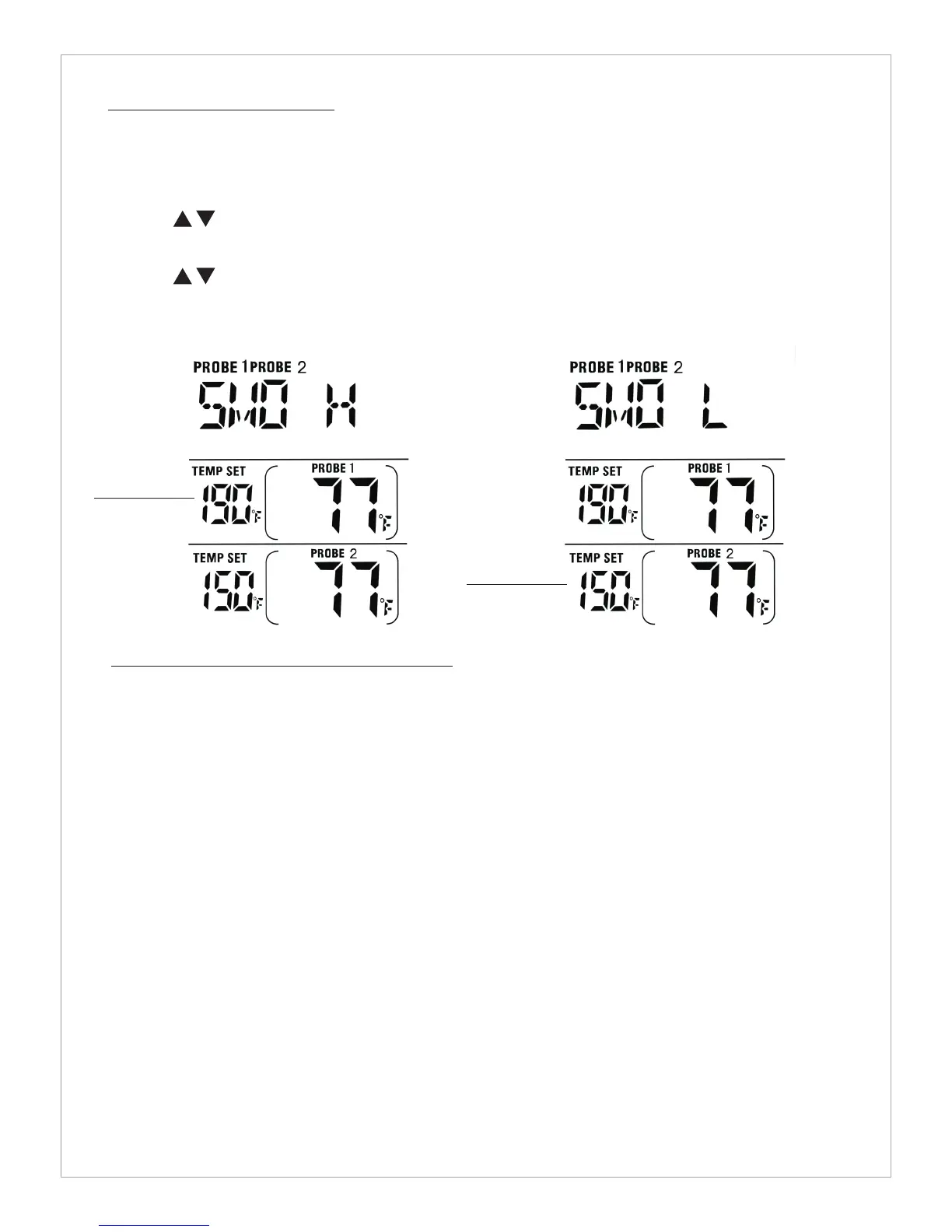
2. Press MODE to select Smoker Mode, Probe 1 and Probe 2 as you selected.
3. Press to set a high temperature limit. It ok, Press ST/SP to jump to the lower temperature
limit setting.
4. Press to set a lower temperature limit.
5. Press ST/SP to Start the smoker temperature measurement, the PROBE1 PROBE2 icon flashes.
6. Starting the smoker measurement automatically disables the Thermometer Mode and Timer Mode.
High limit
Temp Seting
Lower limit
Temp Seting
Procedure for typical use on an outdoor grill
The following typical example will go through the steps to have the Professional Remote Cooking
Theremometer alert you when you cook tow pieces of beef steak at the same time with one piece
of beef steak to be cooked to medium(USDA doneness level)and the other piece of beef steak to
be cooked to medium well(USDA doneness level)
1. Turn on the grill.
2. Place two pieces of beef steak on grill rack.
3. Insert probe sensor 1 into the center of thickest portion of first piece of steak. Avoid touching
bone or heavy fat areas. Insert probe sensor 2 into the second piece of steak. Assume you would
like to cook first pieces of steak to medium and the second piece to medium well.
4. Position the probe sensor wire so they will not come into contact with flames and exit the grill
surface area without being pinched/crushed by the grill cover.
5. Stand the transmitter away from heat source of grill, DO NOT put transmitter on the closed cover
or under the cover. The transmitter is not waterproof. DO NOT use in the rain.
6. press Mode to select Thermometer Probe 1. Press MEAT so BEEF is displayed.
7. Press TASTE so MEDIUM is displayed and 150°F will be shown as the TEMP SET.
8. Press MODE to change Thermomter Probe 2.Press MEAT so BEEF is displayed.


 To Next Page
 Loading...