ELECTRIC SCOOTER / ENG
8
INSTRUCTIONS FOR MINI ROBOT APPLICATION
Download MINI ROBOT application from the APP-Store or Google Play
1. Turn on the scooter, and turn on Bluetooth and APP on your phone to connect with the scooter. (Select
the correct Bluetooth No.).
2. IMPORTANT: check on the application if you have the desired speed selected as it can happen
that the speed on the application is limited to lower than your preference. Check the set maximum speed
and adjust it to your needs and desired speed (Eco, Drive and Sport mode)
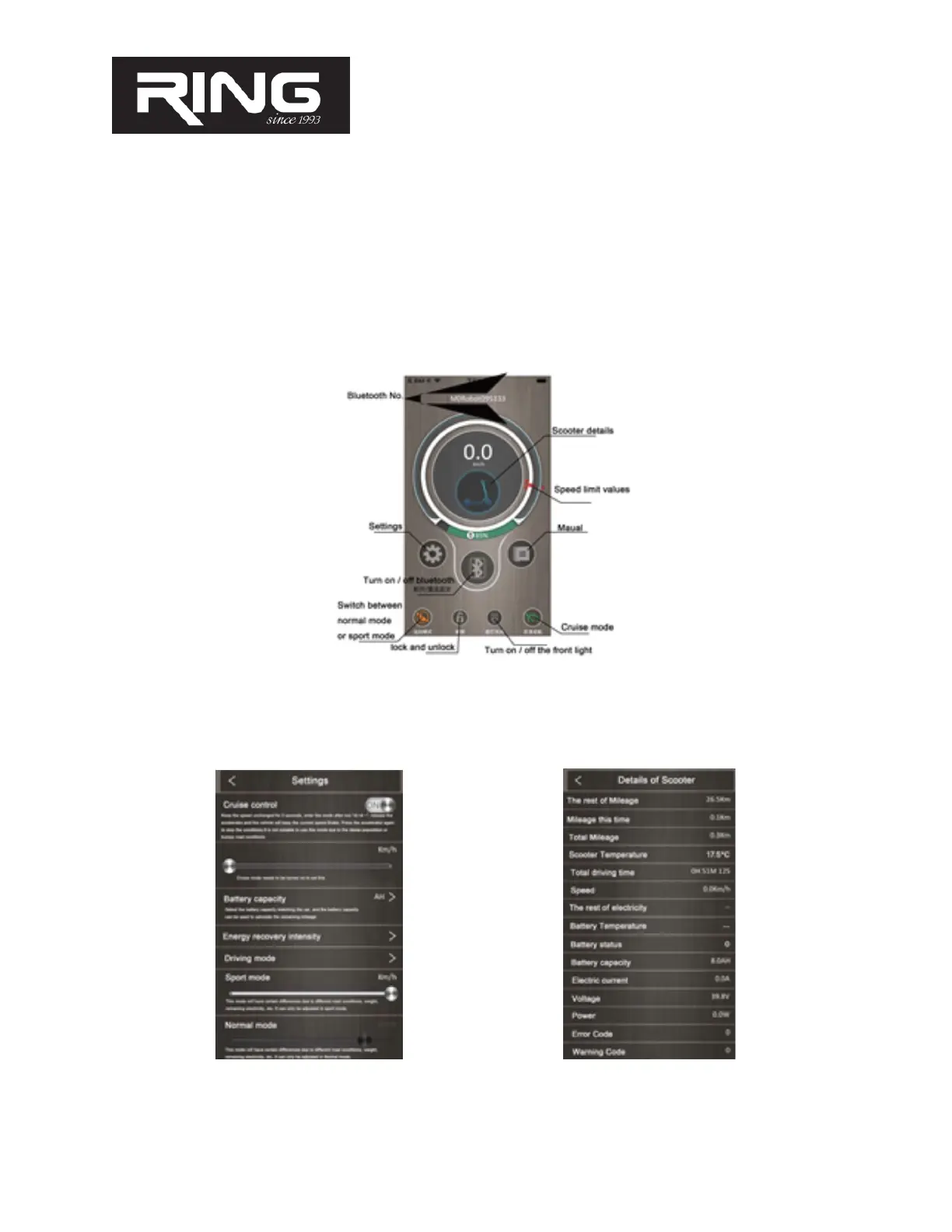
3. This is how the application screen looks like with its features:
4. Turn on the desired features, but also set up all parameters and features on your phone: select adequate
battery RX1 (4.4Ah); RX2 (6.6Ah)
5. In the APP, read the remaining km of riding, max speed for modes, turn on the light. With the APP
turned on you consume battery 20% more!!!


 To Next Page