Need help?
Do you have a question about the Rinstrum R320 and is the answer not in the manual?
Lists product certifications: NSC, NMI, C-tick, CE.
Highlights R310/R320 features: Zero/Tare, clock, special function key.
References other Rinstrum R300 Series manuals for more details.
Specifies operating temp (-10-50°C), humidity (<90%), and voltage.
Details safety for electrical connections and maintenance to prevent shock.
Instructions for cleaning using a soft cloth and mild soapy water.
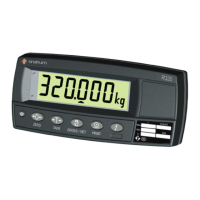
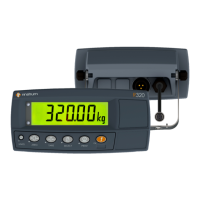
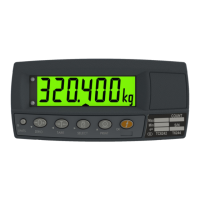
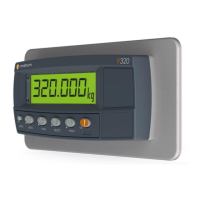
Explains R310/R320 displays: Weight, Units, Annunciators, Keys.
Details functions of keys: Power, Zero, Tare, Gross/Net, Print, Test, Function.
Explains stable readings for operations and error conditions.
Defines symbols: NET, MOTION, HOLD, LOW BATTERY.
Steps for performing a standard weighing operation.
Zeroing container weight to measure net weight accurately.
Procedure to initiate a display test for the indicator.
Steps for using the indicator's counting feature with sample pieces.
How to switch display between kilograms (kg) and pounds (lb).
How to freeze the current weight reading on the display.
How to display and manage the largest absolute weight reading.
Procedure for live weighing, calculating a long-term average.
How to view, print, and reset accumulated totals.
Lists common weighing errors (under/overload, unstable) and resolutions.
Details errors for setup, calibration, resolution, and span.
Explains diagnostic error codes (E0001-E8000) and troubleshooting.
The Rinstrum R300 Series is a line of precision digital indicators designed for fast and accurate weight readings, utilizing the latest Sigma-Delta A/D technology. This series includes the R310, R320, and R321 models, with the R321 being a R320 enclosed in a stainless steel housing. The R300 Series is approved by NSC and NMI for 4000 divisions at 0.8µV/division, and is C-tick and CE approved, ensuring compliance with various standards.
The primary function of the R300 Series indicators is to provide precise weight measurements. All models offer basic weighing capabilities, including normal weighing, zero adjustment, and tare functionality.
Normal Weighing: To perform a normal weigh, the instrument is turned on, and the "Zero" annunciator should be lit. The item is then placed on the weigh platform, and the weight is displayed.
Zero Adjustment: The <ZERO> key is used to perform a zero adjustment on the scale display when an empty scale has drifted from a true zero reading. On the R320, the zero adjustment is stored when power is removed and is re-used upon the next power-up. In Industrial mode, a long press of the <ZERO> key will remove any stored zero adjustment.
Tare Functionality: The <TARE> key allows the user to temporarily set the scale to zero, for instance, to cancel the weight of a container before a filling operation. When tare is applied, the display shows the net weight, and the "Net" annunciator illuminates. The weight tared is deducted from the allowable range of the scale, reducing the maximum weight that can be displayed. The <TARE> key operates in all modes (Industrial, OMIL, and NTEP). On the R320, the tare adjustment is also stored when power is removed and re-used when powered up again.
Gross/Net Toggle: The <GROSS/NET> key toggles the weight display between the gross weight and the net weight, provided a tare has been previously acquired.
Print Function (R320 Only): The <PRINT> key on the R320 triggers an output of the current weight reading to a connected printer or computer, if the manual print function is selected. The "PRINT" prompt is displayed while waiting for data acceptance. If the printer is offline, the prompt remains for a maximum of 10 seconds before cancellation. Each printed weight is automatically added to an internal total. A long press of the <PRINT> key prints the total, which is then automatically cleared.
Special Functions (R320 Only): The R320 model offers enhanced functionality through a programmable <FUNCTION> key, which can be configured for various applications. A label identifies the assigned special function.
<TEST> key (or the <FUNCTION> key if assigned) initiates a display test, clearing all segments, then lighting them, and then clearing them again before returning to normal operation.<TARE> is pressed if needed. Sample pieces are then placed on the platform. Pressing and holding the <COUNT> key for two seconds displays the default number of pieces. The <GROSS/NET> and <PRINT> keys can be used to alter the number of pieces. Pressing <COUNT> again stores the current sample against the entered pieces, with 'p' indicating counts display. The <COUNT> key toggles between weight and counts display. If printing is enabled, the sample quantity and weight are printed.<UNITS> key switches the display between kilograms and pounds. Printing and serial communications will use the displayed unit.<HOLD> key holds the displayed weight at its current value, and the "Hold" annunciator illuminates. Pressing it again releases the weight reading. All printouts will use the held weight if displayed.<PEAK> key displays the largest absolute weight (positive or negative). The R320 continuously compares the current weight with the stored peak, updating it if a larger weight is detected. The "Hold" annunciator is lit. The <PEAK> key toggles between current and peak weight. When displaying peak weight, pressing and holding the <PEAK> key for two seconds clears the peak value and resets it to zero. All printouts will use the held weight if displayed.<LIVE WT> key switches between normal and live weight mode, displaying "NORMAL" or "LIVE.WT." In live weight mode, when the net weight is within the zero 'dead' band, the current weight is shown. The <TARE> or <ZERO> key clears residual weight. When an animal is moved onto the platform, the instrument calculates a long-term average, compensating for movement, with the "Hold" annunciator flashing. The "Hold" annunciator becomes steady when the final sample weight is displayed. The <LIVE.WT> key forces a recalculation. When the animal is removed, the R320 automatically clears the previous reading for the next animal.<PRINT> key adds the current weight to the total. The <TOTAL> key displays "COUNT" followed by the number of items, then "TOTAL" followed by the current total weight. If the total weight exceeds six digits, it is shown in two sections (upper six digits then lower six digits). Pressing and holding the <PRINT> key prints the total accumulated weight and then clears it.<POWER> key turns the instrument on and off. To turn on, press and hold until the display starts. To turn off, press and hold for three seconds; "OFF" and a three-second countdown will display. If the power key is locked, the instrument cannot be turned off from the keypad.<POWER> key turns the backlight on again.<POWER> key has a memory function, remembering the power setting even if external power is interrupted. This ensures the instrument will operate when external power is available without manual intervention.<ZERO>, <TARE>, or <PRINT> is pressed, the unit waits for a stable, valid reading. If readings remain unstable or invalid for over 10 seconds due to a diagnostic error, the operation is cancelled, and "STABLE ERROR" is displayed. General
| Category | Accessories |
|---|---|
| Excitation Voltage | 5 VDC |
| Type | Indicator |
| Display | 20 mm high |
| Power | 12-24 V DC |
| Operating Temperature | -10°C to +50°C |
| Load Cell Connection | 4-wire |
| Communication Ports | RS-232, RS-485 |

 To Next Page